LinkedIn Ads Management in 2026: What the AI Campaigns Took Over
LinkedIn crossed $5 billion in quarterly revenue on Marketing Solutions growth, and the job of managing its ads changed underneath that number. Accelerate campaigns now build an ICP, audience filters, and creative from a landing page, reporting 42% better cost per action than Classic. This guide covers 2026 cost benchmarks by vertical and offer type, exactly where Accelerate wins and where Classic still has to run, how Predictive Audiences and Career Journey signals shifted targeting into a data quality problem, why multi-account management breaks at five ad accounts, and a 90 day playbook for rebuilding the program around cost per qualified opportunity.

LinkedIn ads management used to be a targeting exercise. You picked job titles, seniority bands, and company lists, you wrote a headline, and the rest was budget arithmetic. That job barely exists anymore. LinkedIn has spent the last eighteen months moving targeting, bidding, and placement decisions inside its own models, and the work that remains for the person running the account has shifted almost entirely toward creative, offer design, measurement, and the unglamorous operational layer that keeps ten or fifty accounts from turning into a spreadsheet problem.
That shift matters more on LinkedIn than on most platforms, because LinkedIn is expensive. A wasted click on Meta costs pennies. A wasted click on LinkedIn costs somewhere between five and twelve dollars, and a badly structured account burns a quarter's budget before anyone notices. This guide covers what LinkedIn ads management looks like in 2026: the real cost benchmarks, where the new AI campaign types genuinely outperform manual setup and where they quietly do not, and how to build a management process that survives past the fifth ad account.
Table of Contents
- What LinkedIn Ads Management Actually Means Now
- The Numbers: Scale, Costs, and What Good Looks Like
- Accelerate vs Classic: Where Each One Wins
- Predictive Audiences and the End of Manual Filters
- Creative Became the Main Lever You Still Control
- Why LinkedIn Ads Management Breaks at Five Accounts
- Measuring LinkedIn When the Click Is Not the Story
- A 90 Day LinkedIn Ads Management Playbook
- Frequently Asked Questions
- The Bottom Line
What LinkedIn Ads Management Actually Means Now
Three years ago the job description for someone managing LinkedIn ads was mostly about the audience builder. You knew which job function and seniority combinations produced qualified leads, you maintained exclusion lists, and you adjusted bids by hand. Skill lived in the targeting panel.
LinkedIn has systematically absorbed that work. Accelerate campaigns take a landing page URL and generate an ideal customer profile, audience filters, and starting creative on their own. Predictive Audiences build segments from conversion patterns rather than from filters you set. Bidding runs on models you cannot inspect. The targeting panel still exists in Classic campaigns, but the platform's own guidance now pushes advertisers toward broader inputs and lets the system narrow.
What is left is arguably harder and definitely more valuable. Someone has to decide what the offer is, whether the creative earns attention in a feed where every competitor is running the same gated report, whether the leads coming through are worth anything to sales, and whether the reported cost per lead has any relationship to pipeline. That is a strategy and operations job wearing a media buying job's title. The same reshuffling happened on Google with Performance Max and on Meta with Advantage Plus, and it is now arriving on the newest platforms too, including ChatGPT ads.
The Numbers: Scale, Costs, and What Good Looks Like
LinkedIn is no longer a niche line item. The platform crossed $5 billion in quarterly revenue for the first time, growing 11% to 12% year over year and putting it on an annual run rate above $20 billion. Microsoft attributed that growth primarily to Marketing Solutions, which is the advertising business. Video ad consumption grew roughly 30% as LinkedIn leaned into short-form. Registered membership passed 1.3 billion, though monthly active users sit closer to 310 million, which is the number that actually determines auction density.
Cost benchmarks matter here more than on other platforms because the floor is so high. There is no version of LinkedIn where you learn cheaply. Current 2026 benchmarks look like this:
| Metric | 2026 benchmark | Notes |
|---|---|---|
| Average CPC | $5.50 to $8.50 | Wider range of $5 to $12 across verticals |
| Sponsored Content CPC | $5.74 | Up roughly 9% year over year |
| Average CPM | $30 to $50 | Reflects limited inventory, not poor performance |
| Average CPL | $75 | Median across B2B verticals |
| Lead Gen Form CPL | $50 to $130 | Median lands around $75 to $110 |
| External landing page CPL | $150 to $250 or higher | Two to three times the in-platform cost |
| Lead Gen Form conversion rate | 6.1% | Highest converting format on the platform |
Vertical spread is significant. Legal services average $7.95 CPC and financial services $6.84, while education sits at $4.18 and nonprofit at $3.12. If you are benchmarking against a blended average without adjusting for your category, you will reach the wrong conclusion about whether an account is healthy.
Offer type moves CPL more than almost any targeting decision. Gated content averages around $45, webinar registrations around $55, demo requests around $115, and contact sales requests around $150. That gradient is not a failure of optimization. It is the market pricing intent, and it means a CPL comparison across two campaigns running different offers tells you nothing useful. Understanding how these numbers roll into customer acquisition cost matters more than driving any single one of them down.
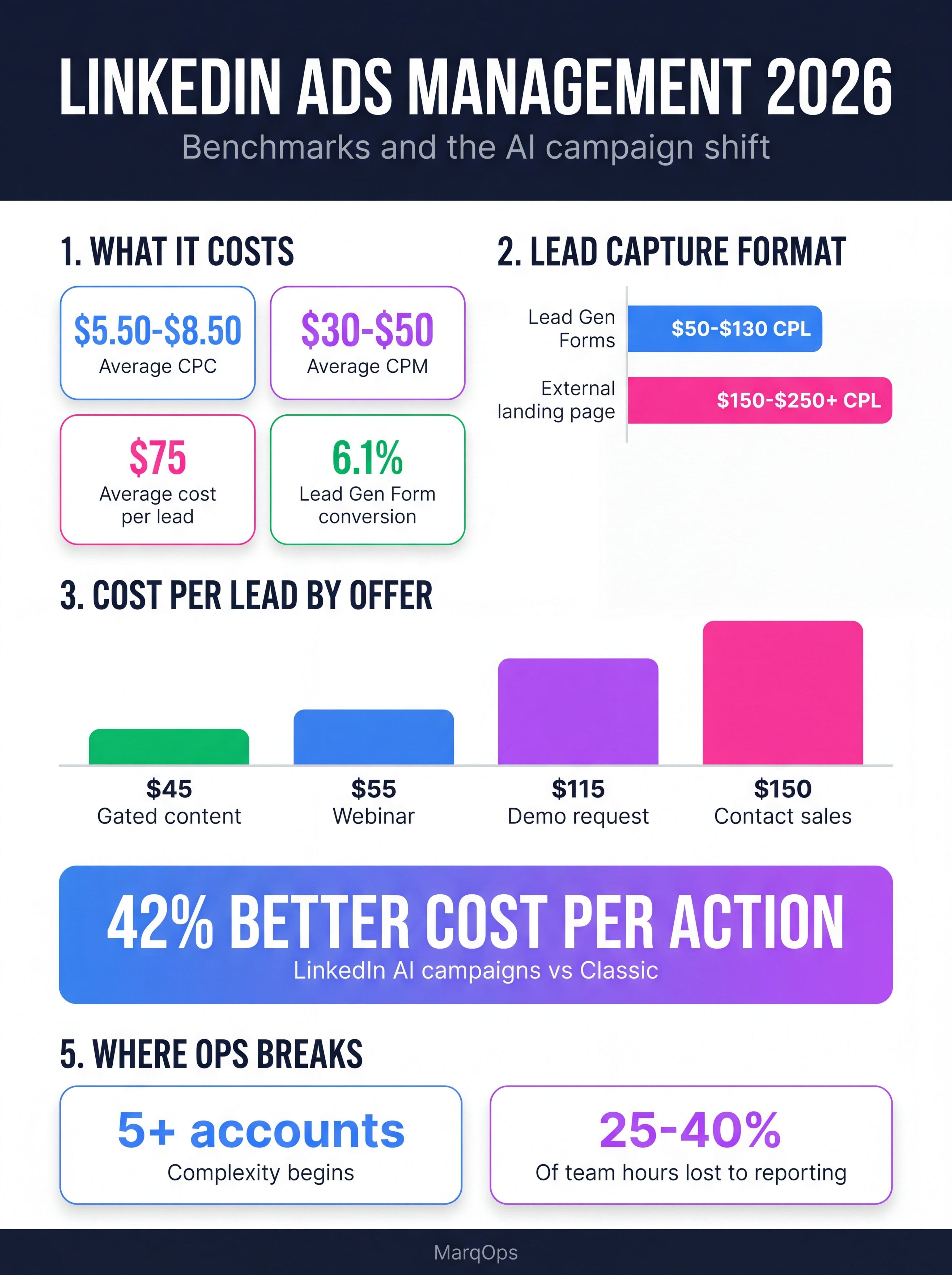
LinkedIn ads management benchmarks and the AI campaign shift, 2026
Accelerate vs Classic: Where Each One Wins
Accelerate is LinkedIn's AI-driven campaign type. You give it a campaign objective, creative assets, and optionally some audience signals such as a website URL or a customer list. It then handles targeting, bidding, and placement. Drop in a landing page and it will draft an ideal customer profile, propose audience filters, and generate starting creative in a few minutes.
The performance claims are strong. LinkedIn reports a 42% improvement in cost per action against Classic campaigns. Some enterprise advertisers have seen up to a 25% lift in return on ad spend. Calendly, in a case study LinkedIn promotes heavily, saw Lead Gen Form completion rates more than triple and cost per lead drop 66% compared to their best performing Classic campaign. Well-run accounts are reporting ROAS in the 2.5x to 3.0x range.
Those numbers are real but they describe a specific situation: cold prospecting at the top of the funnel, with enough conversion volume for the model to learn from. Accelerate is very good at finding people who look like your converters when it has converters to look at. It is considerably less useful in three cases.
The first is sequenced retargeting. If your program depends on showing message A, then message B only to people who engaged with A, Accelerate's automated placement decisions will not respect that logic. Classic remains the only way to build genuine sequences.
The second is tight exclusion requirements. Regulated industries, competitor suppression, and existing-customer exclusions all need control that automated targeting will erode. Accelerate accepts exclusions but applies them less rigidly than a hand-built Classic audience.
The third is low volume. A campaign generating fewer than roughly fifteen to twenty conversions a month gives the model almost nothing to work with, and you will see erratic delivery and cost swings rather than optimization. This is the same learning-phase constraint that governs smart bidding everywhere else.
| Use case | Better fit | Why |
|---|---|---|
| Cold prospecting, new ICP | Accelerate | Model finds lookalike patterns faster than manual filters |
| Fast launch, limited setup time | Accelerate | Full campaign from a landing page in minutes |
| Sequenced multi-touch retargeting | Classic | Accelerate cannot enforce message order |
| Strict exclusions or compliance | Classic | Automated targeting loosens exclusion enforcement |
| Under 15 conversions per month | Classic | Insufficient signal for the model to optimize |
| Account-based programs with named lists | Classic | Named account precision beats probabilistic matching |
The sensible structure for most accounts is both. Run Accelerate for prospecting and let it do the discovery work, then hand engaged audiences to Classic campaigns that control the follow-up. That mirrors what AI ABM platforms do for named account programs, where discovery and nurture run on different logic.
Predictive Audiences and the End of Manual Filters
Predictive Audiences use machine learning to build segments by analyzing your campaign history, identifying what converters have in common, and predicting which members are most likely to take the same action. You can seed them with first-party or third-party data and let LinkedIn's models expand from there.
Career Journey targeting is the more interesting addition. It lets you target on career-change signals rather than static attributes: recently promoted, newly hired, recently changed companies. For a large category of B2B purchases these signals predict buying far better than job title does, because a new VP of Marketing in month two is evaluating a tool stack while the same title at month thirty is not. That is a real buying signal rather than a demographic proxy.
LinkedIn also introduced predictive lead scoring, with early adopters reporting 52% higher conversion rates. The mechanism is straightforward: the platform scores incoming leads against patterns from your closed-won data and prioritizes delivery toward higher-scoring profiles.
All three depend on the same input, which is the quality of the conversion data you feed back. If your CRM only tells LinkedIn that a form was filled, the model optimizes for form fills. If it tells LinkedIn which forms became opportunities and which became revenue, the model optimizes for revenue. This is the single highest-leverage change most accounts can make, and it is a data plumbing project rather than an advertising one. The same principle drives AI lead scoring quality generally, and it is why sales and marketing alignment has become a paid media prerequisite rather than a nice-to-have.
Creative Became the Main Lever You Still Control
When targeting and bidding move into models, creative volume becomes the primary variable a team can actually manipulate. LinkedIn's own creative tooling now generates headlines, intro text, and image concepts from existing ad content and the Shutterstock library, with reported setup time reductions above 30%.
Useful, but generation speed is rarely the bottleneck. The bottleneck is that most B2B teams run three creatives per campaign for a quarter, which gives the platform almost nothing to test. Accounts that see the reported Accelerate gains are typically feeding it eight to fifteen distinct creative concepts, not variations of the same layout with different colors.
Format matters too. Video consumption on LinkedIn grew roughly 30% year over year, and document ads, carousel ads, and thought leader ads all show low competitive density relative to standard single-image sponsored content. Thought leader ads in particular, which promote a person's post rather than a company page's, consistently outperform brand-account creative because they read as native to the feed.
The constraint most teams hit is production throughput. Running fifteen concepts across four segments in three formats is sixty assets per quarter, per brand, all of which need to be on-brand and legally reviewed. That volume is where a lot of programs quietly stall, and it is the reason creative automation and dynamic creative optimization stopped being optional for teams running paid social at scale. Platforms like MarqOps address this by generating brand-consistent creative from a Brand Intelligence layer that already knows the voice, palette, and claims language, so the review cycle is a check rather than a rewrite.
Why LinkedIn Ads Management Breaks at Five Accounts
Single-account LinkedIn management is tractable. Multi-account management is where most agencies and enterprise teams lose the plot, and the breakpoint is predictable. Complexity starts to bite around five ad accounts and becomes severe past twenty. At that scale, teams commonly report that 25% to 40% of available hours go to operational overhead rather than strategic work.
The specific failures are consistent across organizations. Campaign Manager has no native way to visualize trends over time. Comparing performance across campaigns or across periods requires downloading separate reports and rebuilding the comparison manually. Permissions and billing live in different places from campaign structure. Naming conventions drift, and once they drift, cross-account rollups become guesswork.
Five things need to be designed deliberately rather than allowed to emerge: Business Manager structure, billing arrangement, permission model, naming convention, and reporting architecture. Of those, naming is the one teams skip and the one that costs the most later, because every downstream rollup depends on it.
The reporting piece is where consolidation pays for itself fastest. LinkedIn sits alongside Google, Meta, organic search, and email in almost every B2B program, and none of those platforms will tell you how they interact. This is the argument for a unified marketing dashboard rather than a folder of platform exports, and it is the specific problem marketing reporting software exists to solve. MarqOps takes the consolidation further by replacing seven or more disconnected tools with a single system covering ads, SEO, creative, and analytics, which removes the export-and-reconcile step entirely.
Measuring LinkedIn When the Click Is Not the Story
LinkedIn's measurement problem is that its best work is often invisible in last-click reporting. A buyer sees four ads over six weeks, never clicks any of them, then searches your brand name and converts through organic. Last-click gives credit to organic search. LinkedIn shows a poor cost per conversion, budget gets cut, and branded search volume declines a quarter later for reasons nobody connects back.
Three measurement approaches are worth the effort here. Multi-touch attribution gives you a directional read on how LinkedIn contributes to journeys it does not close, provided you accept its known weaknesses around cookieless traffic and long cycles. Incrementality testing through geo holdouts or audience splits is slower but answers the only question that really matters, which is what happens to pipeline when you turn LinkedIn off. And marketing mix modeling has become viable for mid-market budgets rather than enterprise-only, which makes it a reasonable third leg.
The practical minimum is simpler than any of those. Track cost per qualified opportunity rather than cost per lead, watch branded search volume as a leading indicator of upper-funnel LinkedIn spend working, and hold pipeline created as the metric you report upward. Getting the marketing KPIs right at that level prevents most of the bad budget decisions that come from optimizing a cheap lead that never becomes anything. For programs where LinkedIn is the primary demand channel, tying it directly to pipeline marketing reporting is worth the setup cost.
A 90 Day LinkedIn Ads Management Playbook
Days 1 to 30: fix the foundation. Audit conversion tracking first and confirm what event actually fires and what data flows back to LinkedIn. Connect CRM outcome data so the platform can optimize toward opportunities rather than form fills. Rebuild naming conventions across all accounts before adding anything new. Establish your baseline against vertical benchmarks rather than blended averages, and document current CPC, CPL, and cost per opportunity by campaign.
Days 31 to 60: rebuild the campaign structure. Launch Accelerate for cold prospecting with at least eight distinct creative concepts, not eight variations of one. Keep Classic for retargeting sequences, named account lists, and anything with strict exclusions. Move all lead capture to Lead Gen Forms unless you have a specific reason not to, given the roughly threefold CPL difference against external landing pages. Test Career Journey signals as a separate campaign rather than layering them onto existing audiences, so you can read the result cleanly.
Days 61 to 90: measure and consolidate. Stand up cross-channel reporting that puts LinkedIn next to your other paid and organic channels in the same view. Run a first incrementality test on your largest LinkedIn line item. Shift your reporting metric from cost per lead to cost per qualified opportunity and rerun budget allocation on that basis. Then set creative refresh on a fixed cadence, because creative fatigue on LinkedIn arrives faster than most teams plan for at these frequency levels.
Frequently Asked Questions
How much does LinkedIn ads management cost?
Agency management fees typically run 10% to 20% of ad spend, or $1,500 to $5,000 per month on retainer for mid-market accounts. That sits on top of media cost, where average CPC is $5.50 to $8.50 and average CPL is around $75. Most agencies set a minimum monthly spend of $5,000 because LinkedIn needs volume before optimization has anything to work with.
Should I use Accelerate or Classic campaigns?
Use Accelerate for cold prospecting where you want the model to find new converters, and where the campaign generates at least fifteen to twenty conversions a month. Use Classic for sequenced retargeting, named account lists, and any program with strict exclusion requirements. Most mature accounts run both, with Accelerate handling discovery and Classic handling follow-up.
Why is my LinkedIn cost per lead so much higher than other channels?
LinkedIn's inventory is limited relative to demand, with roughly 310 million monthly active users against Meta's 3.2 billion, and the audience carries verified professional attributes that no other platform offers at scale. That scarcity produces CPMs of $30 to $50. The relevant comparison is not cost per lead against Meta, it is cost per qualified opportunity, where LinkedIn frequently wins despite a CPL three to five times higher.
Are Lead Gen Forms better than sending traffic to a landing page?
On cost, almost always. Lead Gen Forms convert at roughly 6.1% and deliver $50 to $130 CPL, while external landing pages typically run $150 to $250 or higher. The tradeoff is lead quality, since the reduced friction lets less committed prospects convert. If your sales team is complaining about lead quality from forms, the fix is usually a higher-intent offer rather than a return to landing pages.
How many creatives should I run per LinkedIn campaign?
Eight to fifteen distinct concepts per prospecting campaign, refreshed on a fixed cadence. The common failure is running three creatives for a full quarter, which starves the optimization model and guarantees fatigue at LinkedIn's frequency levels. Distinct means different angle, format, and message, not the same layout in a different color.
At what point do I need a tool beyond Campaign Manager?
Around five ad accounts, and definitely past twenty. Campaign Manager cannot trend performance over time or compare across campaigns without manual exports, and at that scale teams typically lose 25% to 40% of their hours to reporting overhead. The threshold is less about account count than about how often someone rebuilds the same comparison by hand.
The Bottom Line
LinkedIn ads management in 2026 rewards a different skill set than it did three years ago. The platform has taken targeting and bidding, and it does both better than manual configuration in most prospecting scenarios. What it has not taken, and cannot, is the judgment about what to offer, what to say, which leads are actually worth having, and how the channel fits alongside everything else you run.
Teams that keep grinding on audience filters are optimizing a lever that no longer moves much. Teams that redirect that effort toward creative volume, conversion data quality, and honest cross-channel measurement are the ones reporting the results LinkedIn puts in its case studies. The expensive part of LinkedIn was never the CPC. It was running an expensive channel without knowing whether it worked.
Keep following the signal