Smart Bidding in 2026: The Complete Google Ads Guide to tCPA, tROAS, and AI Auction-Time Bids
Smart Bidding is no longer optional in Google Ads. A complete 2026 guide to Maximize Conversions, Target CPA, Maximize Conversion Value, and Target ROAS: the data thresholds each one needs, how the learning period really works, what AI Max and Smart Bidding Exploration changed, which bid adjustments still function, and the seven mistakes that quietly destroy performance.

TL;DR
- Smart Bidding is Google’s set of auction-time, AI-driven bid strategies: Maximize Conversions, Target CPA, Maximize Conversion Value, and Target ROAS. It sets a bid for every single auction based on hundreds of signals no human can process manually.
- In 2026 it stopped being optional. Dynamic Search Ads are auto-upgrading into AI Max starting September 2026, and most classic bid adjustments have been absorbed into the algorithm.
- Rough data thresholds: around 30 conversions in 30 days before Target CPA makes sense, around 50 conversions with clean value data before Target ROAS does.
- The learning period runs 2 to 6 weeks depending on volume. Any single change to a target or budget above 20 percent risks resetting it.
- Smart Bidding does not fail because the algorithm is bad. It fails because the conversion data feeding it is incomplete, mistargeted, or delayed.
- Google reports AI Max campaigns using Smart Bidding Exploration saw a 19 percent lift in conversions and an 18 percent increase in converting query categories.
There is a specific kind of frustration that comes from watching a Google Ads campaign you no longer control. You set a Target CPA, the algorithm went quiet for three weeks, spend crept up, and now you are staring at a performance graph trying to work out whether to intervene or hold your nerve. Meanwhile someone on your team is asking why you cannot just go back to manual bids.
You cannot. That is the honest answer. Smart Bidding is no longer a strategy you opt into. It is the substrate Google Ads now runs on, and 2026 has been the year that became unambiguous. The teams doing well right now are not the ones fighting the algorithm. They are the ones who understand exactly what it needs, feed it properly, and know which levers still actually move.
This guide covers what Smart Bidding is, how each strategy works, what changed in 2026, the data thresholds that determine success, and the specific mistakes that quietly destroy performance in accounts that look fine on the surface.
Table of Contents
- What Is Smart Bidding?
- Smart Bidding vs Automated Bidding: The Difference That Trips People Up
- The Four Smart Bidding Strategies (And When to Use Each)
- What Changed in 2026: AI Max, Exploration, and Journey-Aware Bidding
- The Data Thresholds Nobody Tells You About
- The Learning Period: How Long It Takes and What Resets It
- Signal Quality: Why Most Smart Bidding Failures Are Data Failures
- Which Levers Still Work in 2026
- Seven Mistakes That Destroy Smart Bidding Performance
- A Practical 90-Day Smart Bidding Implementation Plan
- Where MarqOps Fits
- Frequently Asked Questions
What Is Smart Bidding?
Smart Bidding is Google’s family of machine-learning bid strategies that set a bid for every individual auction, in real time, optimized toward conversions or conversion value rather than clicks.
The phrase that matters there is every individual auction. When someone searches for your keyword, Google evaluates that specific query in that specific moment, using signals like device, browser, location, time of day, day of week, remarketing list membership, language, operating system, search partner site, and the exact query itself, plus interactions between all of them. It then decides what that click is worth to you and bids accordingly.
A human cannot do this. You can set a mobile bid adjustment of plus 20 percent. You cannot set a different bid for a mobile user in Chicago on a Tuesday evening who visited your pricing page eleven days ago and is now searching a comparison query. Smart Bidding can, and does, thousands of times a day.
The mental shift: with manual bidding you were setting prices. With Smart Bidding you are setting objectives and supplying evidence. Your job moved from pricing to data quality and target-setting. Most underperforming accounts are still trying to do the old job.
Smart Bidding vs Automated Bidding: The Difference That Trips People Up
These get used interchangeably and they are not the same thing. It is one of the most common questions in the SERP for good reason.
Automated bidding is the broad umbrella. It includes any strategy where Google sets bids for you, including Maximize Clicks and Target Impression Share. Those optimize for traffic or visibility, not outcomes.
Smart Bidding is the subset of automated bidding that uses auction-time bidding and optimizes specifically for conversions or conversion value. Only four strategies qualify:
- Maximize Conversions
- Target CPA
- Maximize Conversion Value
- Target ROAS
Maximize Clicks is automated but not Smart Bidding, because it optimizes for clicks and does not use auction-time signals in the same way. If someone tells you they “switched to Smart Bidding” and they are running Maximize Clicks, they have not.
This distinction has practical consequences. Smart Bidding strategies ignore most manual bid adjustments. Non-Smart automated strategies do not. Getting the two confused is how teams end up spending afternoons tuning adjustments that have zero effect on their bids.
The Four Smart Bidding Strategies (And When to Use Each)
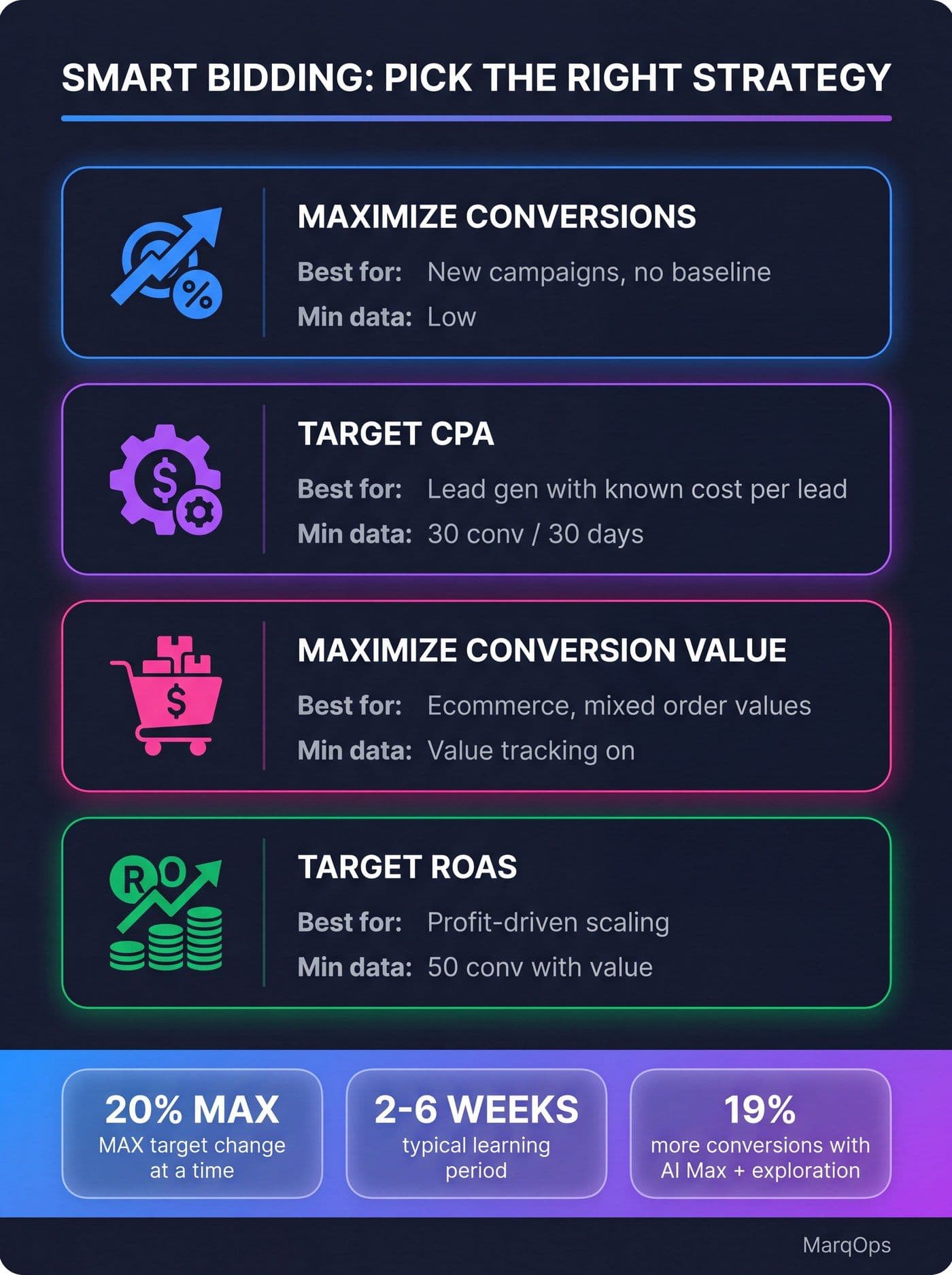
The four Smart Bidding strategies, their ideal use cases, and the conversion data each one needs before it can work.
1. Maximize Conversions
What it does: Spends your full daily budget to generate as many conversions as possible. No target, no constraint beyond budget.
Use it when: You are launching a new campaign, you have no reliable CPA baseline, or you are recovering from a tracking rebuild and need to re-establish what your unconstrained cost per conversion actually looks like.
The strategic value people miss: Maximize Conversions is not a permanent home. It is a discovery phase. It tells you what your CPA is when the algorithm is not being throttled by a target, which is the number you need before you can set an intelligent Target CPA. Skipping this step and guessing a tCPA out of thin air is how campaigns end up starved of volume for months.
The catch: It will spend your entire budget. Every day. If your budget is generous and your targeting is loose, it will find conversions, but they may not be conversions you want.
2. Target CPA (tCPA)
What it does: Gets as many conversions as possible at or below your specified average cost per acquisition.
Use it when: You run lead generation, you have cleared roughly 30 conversions in the last 30 days, and you know what a lead is genuinely worth to you.
How to set the target: Pull your median CPA from the last 30 to 60 days. Set your initial tCPA at that median, or 10 to 15 percent above it. The instinct is to set an aggressive target and let the algorithm chase it. That instinct is wrong. An aggressive target restricts the auctions Google will enter, which starves the model of data, which lengthens learning, which produces worse results. Give it headroom first, tighten later.
Then tighten slowly: No single change above 20 percent. Wait a full conversion cycle between changes. If your sales cycle is 21 days, changing targets weekly means you are optimizing against incomplete data.
3. Maximize Conversion Value
What it does: Spends your budget to generate the highest total conversion value, not the highest conversion count.
Use it when: Your conversions are not equal. Ecommerce with a wide range of order values. B2B where a demo request from an enterprise account is worth twenty times a request from a solo user. Anything where counting conversions hides the real story.
Prerequisite: You must be passing accurate conversion values. Not estimated values. Not a flat placeholder. Real values, ideally including margin rather than revenue if you can manage it. Feeding the algorithm revenue when your margins vary wildly by product means you are optimizing for the wrong thing with impressive precision.
4. Target ROAS (tROAS)
What it does: Optimizes for conversion value at or above a specified return on ad spend.
Use it when: You have run Maximize Conversion Value, you have collected around 50 conversions with reliable value data, and you are scaling toward profit rather than volume.
How to set the target: Start at your actual trailing 30-day ROAS. Not your aspirational one. Then tighten in 10 to 15 percent increments over weeks. Setting a 600 percent tROAS when your account has historically delivered 320 percent does not produce a 600 percent ROAS. It produces near-zero impressions, because Google correctly concludes there are almost no auctions it can win at that efficiency.
20%
The maximum you should change a tCPA, tROAS, or daily budget in one move. Larger jumps risk resetting the learning phase and wiping accumulated signal.
If your paid search program spans more than a couple of campaigns, the operational load of managing these strategies across accounts is exactly the kind of work that gets automated away. Our guide to AI PPC management covers how teams are restructuring around it, and AI for Google Ads maps the broader set of AI features now baked into the platform.
What Changed in 2026: AI Max, Exploration, and Journey-Aware Bidding
2026 has been the most consequential year for Google Ads bidding since Smart Bidding launched. Three shifts matter.
Smart Bidding Exploration went wide
Smart Bidding Exploration lets the algorithm deliberately bid into query territory it has not converted in before, accepting slightly lower efficiency on those auctions in exchange for discovering new demand. It launched on Search and in 2026 expanded into Performance Max and Shopping campaigns.
Google’s reported numbers: campaigns using AI Max with Smart Bidding Exploration saw an 18 percent increase in unique search query categories that produced conversions and a 19 percent increase in overall conversions. AI Max for Search campaigns using the full feature suite average 7 percent more conversions or conversion value at a similar CPA or ROAS.
The trade-off is real. Exploration means some spend goes into learning rather than harvesting. If you judge it on a two-week window you will conclude it is wasting money. Judge it on a quarter.
Dynamic Search Ads are being deprecated into AI Max
Starting September 2026, legacy Dynamic Search Ads campaigns auto-upgrade into AI Max. This is not a suggestion. If you are still running DSA campaigns, that migration is happening to you whether you plan for it or not, and campaigns that get migrated without a conversion-tracking audit first will have a rough learning period. Our AI Max Google Ads guide walks through what the upgrade actually changes.
Target-based bid strategies changed how they treat budget-limited campaigns
As of August 17, 2026, budget-limited campaigns running tCPA or tROAS will perform closer to the target you literally entered, rather than the more efficient number the algorithm had quietly been achieving on its own. If you had a campaign hitting a $40 CPA against a $60 target because it was budget-constrained, expect it to drift toward $60 and buy more volume with the same money.
This is not inherently bad. It is a change you need to know about, because a lot of accounts have targets that were set loosely years ago and never revisited. Go audit yours.
Journey-aware bidding entered beta
A Search beta for Target CPA campaigns that factors where a user sits in their overall journey rather than treating each query as an isolated event. It is early, but the direction of travel is clear: bidding is becoming journey-level rather than click-level, which puts even more weight on the quality of your first-party data.
The Data Thresholds Nobody Tells You About
Smart Bidding is a pattern-recognition system. Below a certain volume of conversions there are no patterns to recognize, and the algorithm shifts into a mode where it is essentially guessing expensively.
| Strategy | Recommended minimum | What happens below it |
|---|---|---|
| Maximize Conversions | No hard floor | Works, but volatile. Use it to build the data other strategies need. |
| Target CPA | ~30 conversions / 30 days | Erratic CPAs, long learning, target frequently missed in both directions. |
| Maximize Conversion Value | Accurate value tracking live | Optimizes toward whatever fake values you passed it. Garbage in, confident garbage out. |
| Target ROAS | ~50 conversions with value data | Impression collapse or wild ROAS swings week to week. |
If you are below these thresholds, you have three real options and none of them is “set a tROAS anyway and hope”:
- Consolidate campaigns. Three campaigns with 12 conversions each are worse than one campaign with 36. Over-segmentation is the single most common cause of data starvation in mid-size accounts.
- Move a conversion action up the funnel. If purchases are too rare, optimize toward a high-intent micro-conversion that correlates with purchase, and validate the correlation with incrementality testing rather than assuming.
- Use portfolio bid strategies. Group campaigns under a shared learning model so their data pools together. Google reports meaningful ROAS improvements for portfolio adoption versus campaign-level strategies, and the mechanism is simply more data per model.
The Learning Period: How Long It Takes and What Resets It
The learning period typically runs 2 to 6 weeks, scaled to your conversion volume:
- High volume (50+ conversions/week): 5 to 7 days
- Mid volume (15 to 50 conversions/week): 7 to 14 days
- Low volume (under 15 conversions/week): 3 weeks or more
During learning, performance is volatile by design. The algorithm is running experiments. Judging a campaign in week one and yanking the target is how teams trap themselves in a permanent learning phase, which is the worst possible state: all the volatility, none of the payoff.
What resets or extends learning:
- Target or budget changes above roughly 20 percent
- Switching bid strategy entirely
- Adding or removing campaigns from a portfolio bid strategy (this resets the whole shared model, not just the campaign you touched)
- Major changes to conversion actions or conversion tracking
- Large-scale changes to campaign structure, targeting, or ad rotation
The portfolio reset trap is worth repeating. If you shuffle campaigns in and out of a portfolio strategy monthly, every campaign in that portfolio pays a one-to-three-week volatility tax each time. Some accounts have been in continuous learning for a year without anyone realizing why.
Signal Quality: Why Most Smart Bidding Failures Are Data Failures
Here is the thing almost nobody wants to hear. When Smart Bidding underperforms, the algorithm is rarely the problem. The conversion data is.
If browser-side tracking is missing 20 to 30 percent of your orders because of ad blockers, ITP, consent mode gaps, or cookie loss, then Smart Bidding is optimizing against a distorted picture of reality. It will systematically under-bid on the segments where tracking loss is highest, which are frequently your best-performing segments. You will look at the report and conclude Safari users convert badly. They do not. You just cannot see them.
The signal quality checklist, in order of impact:
- Enhanced conversions. Hashed first-party data sent alongside the conversion, letting Google recover attribution that cookies lost. This is the single highest-leverage fix in most accounts.
- Server-side tracking. Move measurement off the browser. If a meaningful share of your conversions never reach Google, nothing downstream can compensate.
- Offline conversion import. For B2B especially. If Google thinks a lead is a lead, it will happily buy you a thousand of them from a segment that never closes. Feed the CRM outcome back so it optimizes for qualified pipeline, not form fills. This is where AI lead scoring and bidding start to converge.
- Accurate conversion values. Margin over revenue where possible.
- Customer Match and first-party audience lists. Context the click stream cannot provide.
- Conversion window aligned to your actual sales cycle. A 30-day window on a 60-day cycle means half your conversions are invisible to the bidder.
A campaign manager who spends a week fixing enhanced conversions will beat one who spends a week tweaking targets. Every time. This is why the strongest paid teams now look a lot like marketing engineering teams, and why attribution has quietly become a bidding discipline rather than a reporting one.
Which Levers Still Work in 2026
Most bid adjustments are simply ignored by Smart Bidding. Device, location, audience, ad schedule, demographic adjustments: the algorithm absorbed them. They still render in the interface, which is genuinely confusing, and campaign managers still spend time on them.
Still functional:
- Device exclusions at -100%. A full exclusion is respected. A -30% modifier is not.
- Target CPA device modifiers. A narrow exception.
- Seasonality adjustments. For short, anticipated conversion-rate shifts: flash sales, a holiday window, a product launch.
- Data exclusions. For telling the algorithm to ignore specific dates where your data was wrong.
How to use seasonality adjustments properly. The mistake is sizing them to expected conversion-rate lift rather than expected CPC requirements, and then overshooting. An oversized adjustment during a promotion does not just overpay per click, it burns the daily budget early and you miss all your late-day demand.
Equally, not using them during a known conversion-rate shift is its own failure. Without a seasonality adjustment, Smart Bidding reads your Black Friday conversion rate as a new baseline, recalibrates around it, and then spends weeks correcting after the sale ends. Maintain a calendar of promotional events and prepare adjustments in advance.
How to use data exclusions properly. Your tag broke on Tuesday. Your checkout was down Saturday morning. Your analytics double-counted for three days. Exclude those dates so bad data does not poison the model. Establish a protocol so your team can act within hours of a tracking disruption, not weeks later when someone notices in a monthly report.
Practical audit: open your account and look at how many active bid adjustments you are maintaining. For any campaign on tCPA, tROAS, Maximize Conversions, or Maximize Conversion Value, most of them are doing nothing. Deleting them costs you nothing and removes a source of false confidence.
Seven Mistakes That Destroy Smart Bidding Performance
1. Setting an aspirational target instead of an evidenced one
A tROAS well above your trailing actual does not produce better returns. It produces silence. The algorithm cannot find auctions it can win at that efficiency, so it stops entering them.
2. Changing targets too often, or too much
Above 20 percent in one move risks a learning reset. Weekly fiddling on a monthly sales cycle means you are reacting to noise.
3. Over-segmenting the account
Every campaign split divides your conversion data. Structure that made sense under manual bidding actively harms you under Smart Bidding, because the model needs volume per learning unit.
4. Ignoring conversion lag
If your average time-to-conversion is 12 days, the last 12 days of data are incomplete. Evaluating a strategy change against a window that includes them will make it look worse than it is.
5. Treating all conversions as equal
A newsletter signup and a demo request in the same conversion action, both counted as one, means Smart Bidding will optimize toward whichever is cheaper. That is newsletter signups. Forever.
6. Shuffling portfolio strategies
Each add or remove resets the shared model. Set the portfolio, then leave it alone.
7. Blaming the algorithm before auditing the data
Before you conclude Smart Bidding does not work for your account, confirm your conversion tracking is complete, your values are real, your conversion window matches your sales cycle, and your offline outcomes are flowing back. In most accounts, at least one of those is broken.
A Practical 90-Day Smart Bidding Implementation Plan
Days 1 to 14: Fix the data before you touch a bid.
- Audit conversion tracking end to end. Compare Google Ads conversions against your source of truth. If the gap is over 10 percent, stop and fix it.
- Deploy enhanced conversions.
- Set your conversion window to match your actual sales cycle.
- Separate conversion actions by value. Stop counting a whitepaper download and a demo booking as the same event.
- For B2B, get offline conversion import running so closed-won data reaches the bidder.
Days 15 to 45: Establish a baseline.
- Consolidate over-segmented campaigns.
- Run Maximize Conversions (or Maximize Conversion Value for ecommerce) to discover your unconstrained CPA or ROAS.
- Do not intervene. Let learning complete.
- Record your median CPA or trailing ROAS at the end of the window. That number is your starting target.
Days 46 to 90: Introduce targets and tighten.
- Move to tCPA or tROAS at your evidenced baseline, or 10 to 15 percent looser.
- Wait a full learning period before evaluating.
- Tighten in increments of 10 to 15 percent, never more than 20.
- Enable Smart Bidding Exploration and give it a full quarter before judging it.
- Build your seasonality calendar for the next two quarters.
Ninety days feels slow. It is faster than the eighteen months most accounts spend cycling through targets, resetting learning, and concluding the algorithm is broken.
Where MarqOps Fits
Smart Bidding exposes an uncomfortable truth about how most marketing teams are set up. The bidding algorithm is only as good as the data reaching it, and that data lives across your ad platform, your analytics stack, your CRM, and your creative pipeline. In most organizations those are four different tools, four different logins, and at least two different people who do not talk to each other on a Tuesday.
That fragmentation is exactly what MarqOps was built to collapse. One platform that replaces 7-plus disconnected marketing tools, with paid advertising, analytics, SEO, and creative production running against a single unified data layer and a single dashboard. When your conversion data, your campaign performance, and your creative all sit in the same system, the feedback loop that Smart Bidding depends on closes on its own instead of depending on someone remembering to export a CSV.
It also means the creative side of the equation keeps up. Smart Bidding will find you the auctions. Whether you win them profitably still depends on ad relevance and creative quality, and MarqOps’ Brand Intelligence DNA produces brand-perfect ad variants at roughly 6x the speed of a traditional creative workflow, so you are not bottlenecked on assets while the algorithm is ready to scale.
If you would rather see the mechanics first, see how MarqOps works. And if you are auditing your wider paid stack, our breakdowns of Performance Max campaigns, dynamic creative optimization, and creative analytics pair naturally with everything above. For the measurement layer underneath it all, start with AI marketing analytics and AI marketing ROI.
Frequently Asked Questions
What are the four Smart Bidding strategies?
Maximize Conversions, Target CPA, Maximize Conversion Value, and Target ROAS. These are the only four Google Ads strategies that use auction-time bidding and optimize specifically for conversions or conversion value. Maximize Clicks and Target Impression Share are automated bidding but are not Smart Bidding, because they optimize for traffic and visibility rather than outcomes.
Is Target CPA a Smart Bidding strategy?
Yes. Target CPA is one of the four Smart Bidding strategies. It uses machine learning to set bids at auction time so you get as many conversions as possible at or below your target average cost per acquisition. Google recommends around 30 conversions in the past 30 days before it has enough signal to perform reliably.
What is the difference between Smart Bidding and automated bidding?
Automated bidding is the umbrella term for any strategy where Google sets your bids, including Maximize Clicks and Target Impression Share. Smart Bidding is the subset that uses auction-time bidding and optimizes for conversions or conversion value. All Smart Bidding is automated bidding, but not all automated bidding is Smart Bidding. The practical difference: Smart Bidding strategies ignore most manual bid adjustments, while other automated strategies do not.
How long does the Smart Bidding learning period last?
Typically 2 to 6 weeks. Accounts with 50 or more conversions per week may complete learning in 5 to 7 days. Mid-volume accounts with 15 to 50 conversions per week usually take 7 to 14 days. Accounts below 15 conversions per week can take 3 weeks or longer. Changing targets or budgets by more than 20 percent, switching strategies, or altering a portfolio bid strategy can reset the clock.
What is Smart Bidding Exploration?
A feature that lets Smart Bidding deliberately bid into search queries and audiences it has not converted on before, trading a little efficiency on those auctions for the discovery of new demand. It expanded to Performance Max and Shopping campaigns in 2026. Google reports campaigns using AI Max with Smart Bidding Exploration saw an 18 percent increase in converting query categories and a 19 percent increase in conversions overall.
Why is my Smart Bidding campaign not spending its budget?
The most common cause is a target that is too aggressive. If your tCPA is well below your historical CPA, or your tROAS well above your historical ROAS, Google concludes there are very few auctions it can win at that efficiency and simply stops entering them. Loosen the target toward your evidenced baseline, let learning complete, then tighten gradually in increments of 10 to 15 percent.
Do bid adjustments still work with Smart Bidding in 2026?
Mostly no. Device, location, audience, demographic, and ad schedule bid adjustments are ignored by Smart Bidding strategies, even though they still appear in the interface. What still works: device exclusions at -100 percent, Target CPA device modifiers, seasonality adjustments, and data exclusions. Everything else has been absorbed into the algorithm.
Can Smart Bidding work with low conversion volume?
Yes, but not every strategy. Maximize Conversions has no hard minimum and is the right starting point for low-volume accounts. Target CPA and Target ROAS need roughly 30 and 50 conversions respectively before they stabilize. If you are below those thresholds, consolidate over-segmented campaigns, consider optimizing toward a validated high-intent micro-conversion, or use a portfolio bid strategy to pool data across campaigns.
The Bottom Line
Smart Bidding is not a setting you flip. It is a system you feed. The accounts winning in 2026 are not the ones with the cleverest targets, they are the ones with the cleanest conversion data, the most patience during learning, and the discipline to leave the algorithm alone while it works.
Fix the data. Set an evidenced target. Wait. Then tighten slowly. That is genuinely most of it.
Keep following the signal
Related field notes
Marketing Operations
Marketing Project Management Software in 2026: How to Choose Without Adding Tool #122
11 min readMarketing Analytics
Marketing Attribution Software in 2026: The Buyer's Guide for a Stack That Won't Stop Growing
11 min readMarketing Operations