Google Search Console MCP: The Agency Setup That Does Not Leak Client Data
A Google Search Console MCP server connects GSC to an AI assistant in about fifteen minutes, which is exactly why most setups skip the parts that matter. Here is what these servers actually expose, which Search Console limits your agent still inherits, the four failure modes that have already produced real incidents, and the read-only, logged, human-approved pattern that makes this safe for client work.

Somewhere in the last eighteen months, asking your analytics a question in plain English stopped being a demo and started being a Tuesday. You type "compare branded and non-branded clicks since the June core update" into a chat window, and the numbers come back. No export, no pivot table, no forty minutes lost to a date range you set wrong the first time.
The plumbing behind that is the Model Context Protocol, and the piece that makes it work for search data is a Google Search Console MCP server. Setup guides for it are everywhere now. Almost all of them are written for one person connecting one site they own.
Agency work is a different situation. You are connecting somebody else's property, on their behalf, and then publishing conclusions drawn from it under your own name. That changes what "working" has to mean. This guide covers what these servers actually do, which limits carry over from the Search Console API, the four ways the setup goes wrong in practice, and the review step that keeps an agent's output from becoming a claim you cannot defend.
Contents
- What a Google Search Console MCP server actually is
- Why agencies started wiring GSC into agents this year
- What these servers actually expose
- The Search Console limits your agent inherits
- OAuth or service account: decide before you install
- Four ways this goes wrong
- The pre-flight checklist for a client property
- When the agent is confidently wrong
- What good looks like
- Where MarqOps fits
- Frequently asked questions
- The bottom line
What a Google Search Console MCP server actually is
The Model Context Protocol is a shared format for letting an AI assistant call external tools. Before it existed, every assistant needed a bespoke integration for every data source. MCP replaced that with one interface, which is why it spread so quickly across the tooling world.
A Google Search Console MCP server is one small implementation of that interface. It runs either on your machine or on a vendor's infrastructure, holds credentials for Search Console, and advertises a list of things it can do: fetch search analytics, inspect a URL, list sitemaps. When you ask a question, the assistant picks a tool from that list, calls it, gets structured data back, and writes an answer around it.
That distinction matters because a lot of the excitement around SEO agents quietly assumes the adapter improves the electricity. It does not. If you want the broader picture of how these connectors fit a marketing stack, our step-by-step guide to MCP for marketing tools covers the general pattern, and the agent-to-agent protocol explainer covers what happens when agents start calling each other rather than calling tools.
Why agencies started wiring GSC into agents this year
Two things converged. The protocol got good enough to trust with production credentials, and the platforms blessed it.
Google shipped an official Analytics MCP server, documented at developers.google.com, released under Apache 2.0 and deliberately scoped to read requests only. It cannot edit your GA4 configuration. That is a meaningful signal about how the platform owner thinks these connectors should be built, and it is worth copying even when your Search Console server comes from elsewhere.
The adoption numbers explain the pace. Downloads climbed from roughly 100,000 at launch to about 97 million a month by March 2026. Gartner projects that by the end of 2026, 40% of enterprise applications will ship task-specific agents and 75% of API gateway vendors will support MCP. Survey work through the year put roughly 31% of enterprises with at least one agent genuinely in production.
For a small agency the appeal is concrete and unglamorous. Search Console analysis is repetitive. Pulling query data, spotting the pages that slipped, checking whether a drop is seasonal or structural, and assembling that into something a client will read is work that eats a morning and rarely requires judgment until the last ten minutes. Pushing the first eighty percent to an agent is a reasonable trade, and it sits naturally alongside the rest of your SEO automation.
What these servers actually expose
The open source and hosted options vary a lot in surface area, and the count of tools is the number to check first. Some servers ship five or six. Others advertise twenty or more, folding in Core Web Vitals data, striking distance keyword reports, and cannibalization detection built on top of the raw search analytics call.
Underneath the marketing, almost everything reduces to a handful of Search Console API endpoints:
| Capability | What it does | Read or write |
|---|---|---|
| Search analytics | Query clicks, impressions, CTR and position by page, query, country, or device | Read |
| URL inspection | Return index status, canonical, crawl and coverage detail for one URL | Read |
| List sites | Enumerate every property the credential can reach | Read |
| List sitemaps | Show submitted sitemaps and their processing status | Read |
| Submit or delete sitemap | Change what Google is told to crawl | Write |
Only that last row changes anything. For analysis and reporting work, you do not need it. A server that is read-only by design is not a limitation you are accepting, it is the correct scope for the job, and several of the better ones advertise exactly that.
The Search Console limits your agent inherits
This is the part that surprises people, and it is the most common source of quietly wrong answers. The MCP layer does not widen any Search Console constraint. It just makes the constraint harder to see, because you are no longer looking at the export screen where the limits are obvious.
The ones that bite in agency work:
- Sixteen months, and then it is gone. Search Console holds roughly 16 months of performance data. Older data is not gated or slow to retrieve, it is deleted. No clever query recovers it. If a client asks for a two year trend and nobody set up historical storage, the honest answer is that the data does not exist.
- The 1,000 row interface cap. The Search Console interface and its standard exports top out around 1,000 rows. Ask an agent for "all queries" on a site with real traffic and you may get a truncated slice presented as a complete picture.
- API request and daily ceilings. The API returns considerably more per call than the interface does, in the region of 25,000 rows, and there is a separate daily ceiling per site and search type. Quotas change, so check Google's current documentation rather than trusting a number in any blog post, this one included.
- Anonymized queries. Rare queries are stripped for privacy reasons. Your totals by query will not reconcile with your site totals, and no amount of prompting fixes that. It is a property of the data.
The workaround for the retention problem is the BigQuery bulk export, which accumulates data forward from the day you switch it on. It does nothing retroactively, which is exactly why it belongs in client onboarding rather than in the panicked week when someone asks for year over year.
OAuth or service account: decide before you install
There are two ways to authenticate, and the choice determines how the setup ages.
OAuth ties access to a human Google account. It is quick, it is right for personal use and evaluation, and it inherits whatever that person can already see. The failure mode is organisational rather than technical. Access is bound to an individual, so when they leave, the workflow leaves with them, and every property they could reach was reachable by the connector.
A service account is a non-human identity you grant to specific properties, one at a time. It takes longer to set up, requires a Google Cloud project, and is the right answer for agency and automation work. You add it to the one client property it needs, with read permission, and it can never enumerate a book of business it was never given.
Property type is a small detail that causes a large share of setup failures: a Domain property needs the sc-domain: prefix in your configuration, while a URL prefix property needs the full URL including protocol. Mismatch these and the server authenticates cleanly and then returns nothing, which reads like an empty month rather than a misconfiguration.
The authorization specification itself hardened considerably in 2026. The July 2026 release requires OAuth 2.1 with PKCE for all clients, adds issuer validation per RFC 9207 to close an authorization server mix-up hole, and deprecated Dynamic Client Registration in favour of Client ID Metadata Documents. If your server predates that work, it predates the fixes.
Four ways this goes wrong
These are not hypotheticals. Each one has produced real incidents or formal government guidance.
1. The lookalike package
In September 2025 a counterfeit npm package named postmark-mcp mirrored a legitimate MCP server exactly. It behaved perfectly across fifteen releases, earning the trust of automated scanners. Version 1.0.16 added a single line deep in the source that silently copied outbound email to an attacker. Researchers at Snyk estimated thousands of corporate emails a day flowed out for over a week before discovery.
Nothing about that attack was specific to email. It was specific to the fact that MCP servers are installed casually, run with pre-authorized credentials, and are almost never inventoried. A Search Console connector sits in exactly the same position.
2. Tool poisoning
An agent decides which tool to call by reading the tool's own description. That description is attacker-controllable in a compromised server. Security researchers consider hidden instructions in tool metadata the most prevalent client-side MCP vulnerability, precisely because the model treats the docstring as trustworthy context rather than as untrusted input.
The practical version: a tool that presents itself as "fetch search analytics" can carry appended instructions the model quietly follows. You see a normal answer. Something else happened alongside it.
3. Scope you never needed
The NSA published its first MCP guidance in May 2026, "Model Context Protocol: Security Design Considerations for AI-Driven Automation." Its central warning is blunt: adoption has outpaced safeguards, and organisations should not rely on the security suggestions in MCP's own documentation. It calls out uncontrolled automated actions, the absence of input screening between systems, and susceptibility to overload as distinct risks.
Translated to your setup, an agent holding write scope can act. Sitemap submission is a small write, and it is still a change to what Google is told about a client's site, made by a process with no memory of why.
4. Numbers that were never retrieved
The quietest failure and the one most likely to reach a client. A language model asked for a figure will produce a plausible figure. If the tool call failed, returned an empty set, or hit a quota, a poorly built loop can carry on and write a confident paragraph around nothing. The output looks identical to a correct answer, which is the entire problem.
The pre-flight checklist for a client property
Run this before a client account touches an agent. It takes about twenty minutes and it is the difference between a tool and a liability.
- Name the maintainer. Who publishes this server, when did they last commit, and does the repository have a history that predates the current hype cycle?
- Verify the package identity. Compare the exact package name against the canonical repository. Lookalike naming is the primary distribution method for the attack above.
- Pin the version. Do not float to latest. The postmark compromise arrived in a point release of a package that had behaved for fifteen versions.
- Read the tool list before you trust it. Enumerate every tool the server advertises. Anything you cannot explain in one sentence is a reason to pause.
- Refuse write scope unless you have a named use for it. Reporting and analysis never need it.
- One property per credential. A service account added to a single client property, not an account that can list all of them.
- Confirm the property type prefix. Domain properties need
sc-domain:. This is the most common silent failure. - Log the calls. You want a record of what was queried and when, especially for a client who may later ask where a number came from.
- Test with a known answer. Ask something you have already verified by hand. If the agent disagrees with a figure you can see in the interface, stop and find out why.
- Set the review gate. Decide, in writing, which outputs a human signs off before delivery. Everything client-facing belongs in that set.
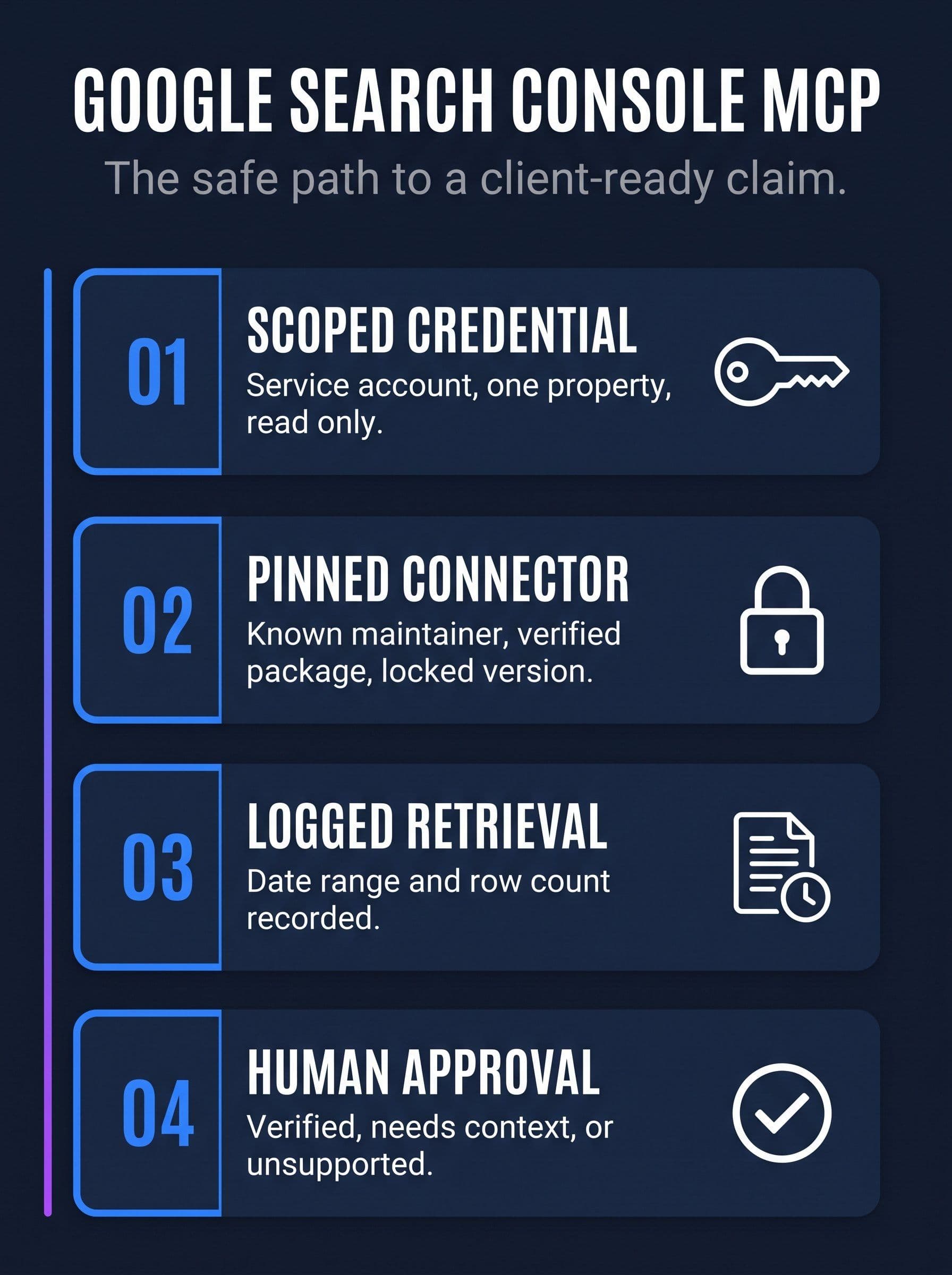
The safe path from a client Search Console property to a client-ready claim, with the two gates most setups skip.
When the agent is confidently wrong
Assume it will be, and build for that rather than hoping otherwise. The check is not complicated: for any number that will appear in front of a client, you need to be able to answer where it came from, over what date range, and how many rows the query actually returned.
Three habits catch most of it.
Ask for the query, not just the answer. A good agent workflow can show you the parameters it used. If it cannot, you are trusting a summary of an operation you cannot inspect.
Spot-check one figure per report by hand. Open Search Console, reproduce a single number. It takes two minutes and it catches systematic errors like a wrong property, a shifted date range, or a filter that silently persisted from an earlier question.
Separate what the data shows from what it means. "Clicks to these twelve pages fell 34% between June and August" is a retrievable fact. "The core update penalised our content" is an interpretation. Agents blur the two constantly, and the second kind is what turns into an awkward call when a client acts on it. The same discipline applies to any white label SEO report and to PPC reporting, where correlation gets promoted to causation faster than anywhere else.
What good looks like
A well-run Google Search Console MCP setup in an agency is boring in a specific way. It is narrow, it is logged, and it never gets the last word.
Read-only scopes, because reporting does not need to write. One property per credential, because the blast radius of a compromise should be one client and not all of them. A pinned version from a maintainer you can name. A record of what was queried, so a number in a report can be traced back to the call that produced it. And a human who reads the output and approves it before it goes out, with the source attached rather than remembered.
That last step is where most setups fall down, and it is not a technology problem. Speed is the entire reason you installed the connector, and a review gate feels like it gives the speed back. It does not, in practice. It moves the slow part from making the report to checking the report, and checking is much faster than making. What you lose is the possibility of shipping a confident sentence that nothing supports, which is the only kind of speed worth giving up.
The same logic runs through brand compliance and through any marketing reporting software decision: the constraint is not generating output, it is standing behind it. If you are working through the underlying search fundamentals as well, our free SEO audit checklist and the technical SEO audit checklist cover the manual baseline an agent should be reproducing rather than replacing.
Where MarqOps fits
MarqOps connects Search Console, GA4, and Google Ads and sits above them as an evidence layer rather than another dashboard. Analytics Ops lets you ask connected marketing data a plain-language question and keeps the source view attached to the answer, which is the same convenience an MCP connector gives you with the retrieval trail kept rather than discarded.
The part that matters for this topic is what happens next. Every material claim heading for a client report is traced to a source and held for human approval, marked verified, needs context, or unsupported. That is deliberately the workflow described above, built in rather than left as a discipline you have to maintain by hand at 6pm on a Friday.
For teams thinking further ahead about agent-accessible marketing systems, agent-native WebMCP covers where that is heading. And if you want to see the review model before connecting anything, the interactive sample report shows the claim review and evidence receipts with no live connections required.
Frequently asked questions
What is a Google Search Console MCP server?
It is a connector that exposes Search Console data to an AI assistant through the Model Context Protocol. The assistant calls the server's tools, the server calls the Search Console API, and you get an answer in conversation rather than in a spreadsheet export.
Is there an official Google MCP server for Search Console?
Google ships an official Analytics MCP server for GA4, open source and read-only. Search Console connectors are predominantly community built or vendor hosted, which is exactly why maintainer identity and version pinning matter more here than they do for the GA4 one.
Does an MCP server get around Search Console data limits?
No. The 16 month retention window, the row caps, the daily quota, and query anonymization all still apply. The connector changes how you ask, not what Search Console is willing to return.
OAuth or a service account for agency use?
Service account. OAuth binds access to one person's Google account and inherits everything that person can see. A service account is granted to specific properties with read permission, so it cannot reach a client it was never added to.
How risky is installing a community MCP server?
Risky enough that the NSA published guidance on it in May 2026, and that a counterfeit npm MCP package exfiltrated corporate data for over a week in September 2025 before anyone noticed. Pin versions, verify the package against its canonical repository, and grant the narrowest scope that does the job.
Why does my server connect but return no data?
Usually the property type prefix. A Domain property needs the sc-domain: prefix in your configuration and a URL prefix property needs the full URL with protocol. A mismatch authenticates fine and returns empty results, which is easy to mistake for a month with no traffic.
Can an AI agent make changes to my Search Console account?
Only if you grant write scope. The write operations available are sitemap submission and deletion. For analysis and reporting you do not need them, so decline them and remove an entire category of risk.
How do I stop an agent inventing Search Console numbers?
Require it to report the date range and row count for every retrieval, spot-check one figure per report against the interface by hand, and separate retrievable facts from interpretation before anything reaches a client.
Do I still need Looker Studio or a reporting platform?
An MCP connector is good at exploration and poor at repeatability. It answers ad hoc questions quickly and does not give you a consistent monthly artifact, version history, or an approval trail. Most agencies end up using both, for different jobs.
Is a hosted GSC MCP server safer than self-hosting?
It is a different trade rather than a strictly safer one. Hosting removes the local setup and the version management burden but puts your client credentials on someone else's infrastructure. Self-hosting keeps credentials local and makes the supply chain checks your responsibility.
The bottom line
A Google Search Console MCP server is a genuinely good piece of tooling. It removes a category of tedious work that never deserved the time it consumed, and for exploratory analysis it is faster than anything that came before it.
It also hands a credential to a process that decides for itself what to do next, using descriptions it cannot verify, against data with limits it will not mention unless you ask. None of that makes it a bad idea. It makes it a thing that needs a scope, a log, and a person at the end of it.
Install the connector. Give it read access to one property. Pin the version and know who wrote it. Then keep the last step for a human, because the value you sell a client is not the speed of the answer. It is that the answer holds up when someone checks.
Keep following the signal
Related field notes
Marketing
Marketing Automation for Agencies in 2026: What to Automate, What to Keep Human
11 min readMarketing
Brand Asset Management in 2026: How to Run It Without Adding Another Tool
14 min readMarketing Operations