Brand Asset Management in 2026: How to Run It Without Adding Another Tool
Brand asset management keeps logos, templates, and messaging approved and findable. Learn the five layers, how AI changes BAM, and how to choose software in 2026.
Table of Contents
- What Is Brand Asset Management?
- Why Brand Asset Management Matters More in 2026
- What Counts as a Brand Asset?
- The Five Layers of a Working BAM System
- How AI Changes Brand Asset Management
- BAM vs DAM vs Brand Management: Where the Lines Are
- How to Choose Brand Asset Management Software
- A 30-Day Rollout Plan
- Common Mistakes That Quietly Break a BAM Program
- How to Measure Whether It Is Working
- Frequently Asked Questions
Ask a marketing team where the current logo lives and you will usually get three answers: a shared drive, a Slack thread from last spring, and "ask Priya." That gap between having brand files and trusting them is what brand asset management exists to close. Lucidpress surveyed more than 450 companies in its State of Brand Consistency report and found that 60% deal with off-brand content, even though consistent presentation is linked to revenue growth of 10 to 20%.
This guide explains brand asset management in plain terms: what it is, which assets belong in it, the five layers that make it work, how AI changes the picture, and how to choose software without adding yet another tool to an already crowded stack. It is written for marketing directors, marketing ops managers, and agency leads who inherit brand chaos and need a system that holds up at scale. If you are earlier in the journey, start with our brand guidelines template and come back here once the rules are written down.
What Is Brand Asset Management?
Brand asset management is the process of organizing, storing, and controlling access to the files that represent a company's brand, then making the approved versions easy to find and hard to misuse. Cloudinary's definition covers the same ground: centralized storage with metadata, version control, approval workflows, permissions, distribution through brand portals, and locked templates for non-designers.
Notice what the definition leaves out. It is not a creative tool, and it is not the strategy document that explains why your brand looks the way it does. It is the operational layer between the two. The strategy says "our primary blue is #3080ff." Brand asset management makes sure the file a regional marketer downloads at 4:45 on a Friday actually uses it.
The problem it solves
Brand drift rarely comes from bad intent. It comes from friction. When the right file takes four minutes to find, people use the one in their downloads folder. When a template needs a designer to change a date, people rebuild it in a slide deck. Each small shortcut produces a slightly different logo, a slightly different blue, a slightly different tone. Multiply that by every channel, region, and agency partner, and you get the 60% off-brand figure above.
Why Brand Asset Management Matters More in 2026
Three pressures have made this a priority rather than a housekeeping task.
1. Content volume has outrun content findability
Teams now produce more assets than ever, and much of it disappears. A 2026 analysis from GSpann, citing Globant's Adobe Summit coverage, reports that 60% of the content created today goes entirely unused. Forrester figures cited by Cirrus Insight put the share of marketing content handed to sales teams that never gets used at 65 to 80%. Unused content is not just waste. It is evidence that the people who need an asset cannot find it, or do not trust it.
2. AI made production cheap and consistency expensive
When generating a new ad variant takes seconds, the bottleneck moves from making content to controlling it. Our guide to AI brand voice covers the writing side of this, and our piece on brand compliance covers the review side. Brand asset management sits underneath both: it is the approved source material that AI tools and human editors should be drawing from.
3. Search and AI answers reward a coherent brand
Search engines and AI assistants build an understanding of your brand from every page, image, and mention they can find. Inconsistent names, logos, and descriptions make that picture muddy. Our guides to entity SEO and AI visibility explain why a clear, consistent brand identity is now a ranking input, not just a design preference.
What Counts as a Brand Asset?
Most teams think of logos and stop. A complete inventory is broader, and the gaps are usually in the less obvious categories.
- Identity assets: logo suites (primary, secondary, icon, monochrome, reversed), color palettes with exact values, typography files and licenses.
- Visual assets: approved photography, illustration libraries, icon sets, video intros and outros, motion templates.
- Messaging assets: boilerplate, taglines, product descriptions, approved claims, tone-of-voice rules, legal disclaimers.
- Template assets: slide decks, social templates, email layouts, ad templates, one-pagers, report formats.
- Governance assets: the brand guidelines themselves, usage rules, partner co-branding rules, and approval checklists.
- Performance assets: the winning ads, headlines, and creative concepts your data says work, which are brand knowledge too.
That last category is the one most teams miss. A creative that consistently outperforms is an asset worth tagging, protecting, and reusing. If you track creative results, our guide to creative analytics shows how to find those winners, and AI content repurposing shows how to extend them across channels.
The Five Layers of a Working BAM System
Software features matter less than structure. Whatever tool you choose, a brand asset management system that works has five layers. If one is missing, the whole system degrades back into a shared drive with better branding.
Layer 1: A single source of truth
There must be exactly one place where the current, approved version of every asset lives. Not one place per department, and not one place plus "the folder Sam keeps." The test is simple: can a new hire find the correct logo in under a minute without asking anyone? If not, the source of truth is not working yet.
Layer 2: Metadata and search
Assets are only as findable as their labels. Good metadata covers asset type, product line, campaign, region, language, usage rights, and expiry date. Filenames like "final_v3_REAL.png" do not count. The practical rule is to require a small set of mandatory fields on upload and let AI suggest the rest, which we cover below.
Layer 3: Version control and expiry
Retiring an asset matters as much as publishing one. When a logo is updated, old versions should be archived and removed from circulation, not left alongside the new one. Time-limited assets such as licensed photography, seasonal campaigns, and legal claims need expiry dates that trigger a review. Filestage lists version control and access control among the core features every brand asset management tool should include.
Layer 4: Approvals and permissions
Not everyone should be able to publish to the brand library, and not everyone needs to see everything. A reasonable default is three roles: brand owners who approve and publish, contributors who submit for review, and consumers who search and download. Regional teams and agency partners get scoped access to only the collections they need. Our guide to brand compliance review goes deeper on how to design the review step so it does not become a bottleneck.
Layer 5: Templates and controlled creation
The highest-leverage layer is also the most overlooked. Instead of handing people raw assets and hoping for the best, give them locked templates where the logo, colors, and fonts are fixed and only approved fields can change. This is what lets non-designers produce on-brand work without a ticket. It is also the bridge to automation, which we cover in our guide to creative automation.
| Layer | What it answers | Failure looks like |
|---|---|---|
| Source of truth | Where is the approved file? | Three folders, three logos |
| Metadata and search | Can I find it fast? | People recreate assets instead of searching |
| Version and expiry | Is it still current and licensed? | Old logo on a conference banner |
| Approvals and permissions | Who can publish and use it? | Review becomes a two-week queue |
| Templates | Can non-designers stay on brand? | Every deck looks different |
How AI Changes Brand Asset Management
AI touches brand asset management in four distinct ways. Frontify's overview of AI in asset management describes the same four areas, and they map neatly onto the five layers above.
- Auto-tagging: computer vision and machine learning suggest tags and descriptions for uploaded files, cutting the manual metadata burden that kills most libraries.
- Natural-language search: instead of guessing filenames, people can search by intent, such as "lifestyle photo with two people, outdoors, spring campaign."
- Generation and adaptation: resizing for channels, producing copy variants, and creating regional versions from an approved master.
- Governance: flagging expired licenses, logo misuse, off-palette colors, and outdated assets automatically.
The catch: AI needs rules it can read
Generation without governance is just faster drift. For an AI tool to produce on-brand output, your brand rules have to exist in a form the tool can use: exact color values, font files, voice descriptors, banned phrases, logo clear-space rules, and examples of good and bad. A PDF that a human skims once a year does not qualify.
This is the idea behind Brand Intelligence DNA in MarqOps: brand rules are captured once and then applied to every piece of AI-generated copy, creative, and SEO content, so output starts on-brand instead of being corrected afterward. It is also why we think of brand assets as inputs to a system rather than files in a folder. For the broader picture of how agents fit into this, see our guide to AI agent governance for marketing teams.
BAM vs DAM vs Brand Management: Where the Lines Are
These terms get used interchangeably, which causes confusion when you are buying software or scoping a project. Here is a clean way to separate them.
Digital asset management (DAM) is the broad category: storing and organizing any digital file, including product photography, raw video, and internal documents. Brand asset management is the subset focused on the approved, externally facing assets that express the brand. Many DAM platforms include brand portals, and many brand portals started as lightweight DAMs, so the market overlaps heavily. Brand management is the discipline above both: strategy, governance, measurement, and stewardship of the brand over time.
If you want the strategic view, our guide to brand management covers governance and consistency across the organization, and brand tracking covers how to measure brand health once the foundations are in place. Brand asset management is the operational layer that makes both of those workable day to day.
How to Choose Brand Asset Management Software
The market includes established names such as Bynder, Brandfolder, Frontify, Canto, and Papirfly, most of them quote-based, plus lighter options with published pricing. Filestage's roundup of tools shows the range: some start from around $29 a month, while others are enterprise contracts with custom pricing. Rather than ranking vendors, here are the six criteria that separate a tool you will use from one you will abandon.
1. Findability
Run a real test. Give three non-designers a list of five assets and time them. If search requires exact filenames, adoption will stall within a quarter.
2. Version control and expiry
Check that retiring an asset removes it from search and shared links, not just from the main folder. Ask how expiry alerts work.
3. Approvals that match your real process
Look for configurable workflows with clear owners and deadlines. Rigid approvals that do not fit your team get bypassed.
4. Permissions by role, region, and partner
Agencies and regional teams need scoped access. Confirm you can give a freelancer one collection for one month without opening the whole library.
5. Templates and creation controls
The best systems let non-designers create from locked templates. If a tool only stores files, you are buying a better shared drive.
6. Integrations with where work happens
This is the criterion most buyers underweight. If assets live in one tool and content is made in five others, someone has to move files by hand, and that is where drift returns. This is the same logic behind a lean marketing tech stack: every extra tool is another place for brand rules to be misapplied. It is also the case for a unified approach. One platform that replaces seven or more disconnected tools means brand rules, creative production, SEO content, and analytics all draw from the same source.
A 30-Day Rollout Plan
You do not need a six-month project. A focused month gets a usable system in place.
Week 1: Audit and decide
Inventory where assets currently live. Count how many versions of the logo exist. Identify the ten assets people request most. Name one brand owner with authority to approve and retire files. This is also a good moment to revisit your brand guidelines, since outdated rules will be copied straight into the new system.
Week 2: Clean and structure
Archive everything outdated. Define collections (identity, templates, campaigns, partners) and a short list of mandatory metadata fields. Keep it small: five required fields people will fill in beat fifteen they will skip.
Week 3: Build templates and permissions
Convert your three most-used formats into locked templates, typically a slide deck, a social post, and an email. Set roles and scoped access for regional teams and agencies.
Week 4: Launch and measure
Announce with a one-page "where to find things" guide. Retire the old folders on a stated date. Capture baseline numbers for the metrics below so you can show progress in 90 days.
Common Mistakes That Quietly Break a BAM Program
- Migrating the mess. Uploading ten years of files unsorted recreates the old problem in a new interface. Archive aggressively first.
- No named owner. A library without an accountable owner decays within two quarters.
- Treating it as a design project. Marketing ops, legal, regional leads, and agencies all use it. Involve them early.
- Skipping expiry dates. Licensed imagery and time-bound claims create real legal exposure when they linger.
- Ignoring AI-generated output. If generated assets bypass the library, your approved set and your actual output diverge fast.
- Measuring nothing. Without baseline numbers, the program looks like a cost center at renewal time.
How to Measure Whether It Is Working
Pick a handful of metrics you can actually collect, and set a baseline before launch.
- Time to find an asset: sample-test with real requests, before and after.
- Off-brand incidents: count items caught in review or, worse, after publishing.
- Asset reuse rate: the share of downloads that come from the library versus recreated files.
- Approval cycle time: median days from submission to approved.
- Active adoption: the share of target users who searched the library in the last 30 days.
- Tool consolidation: how many places assets used to live versus now.
Tie these to business outcomes where you can. Faster production and fewer rebuilds show up in your marketing dashboard and in AI marketing ROI calculations, and a consistent presence in the market is part of what drives metrics like share of search. If you manage creative at scale, the principles in our guide to the content supply chain extend these metrics across the whole production line.
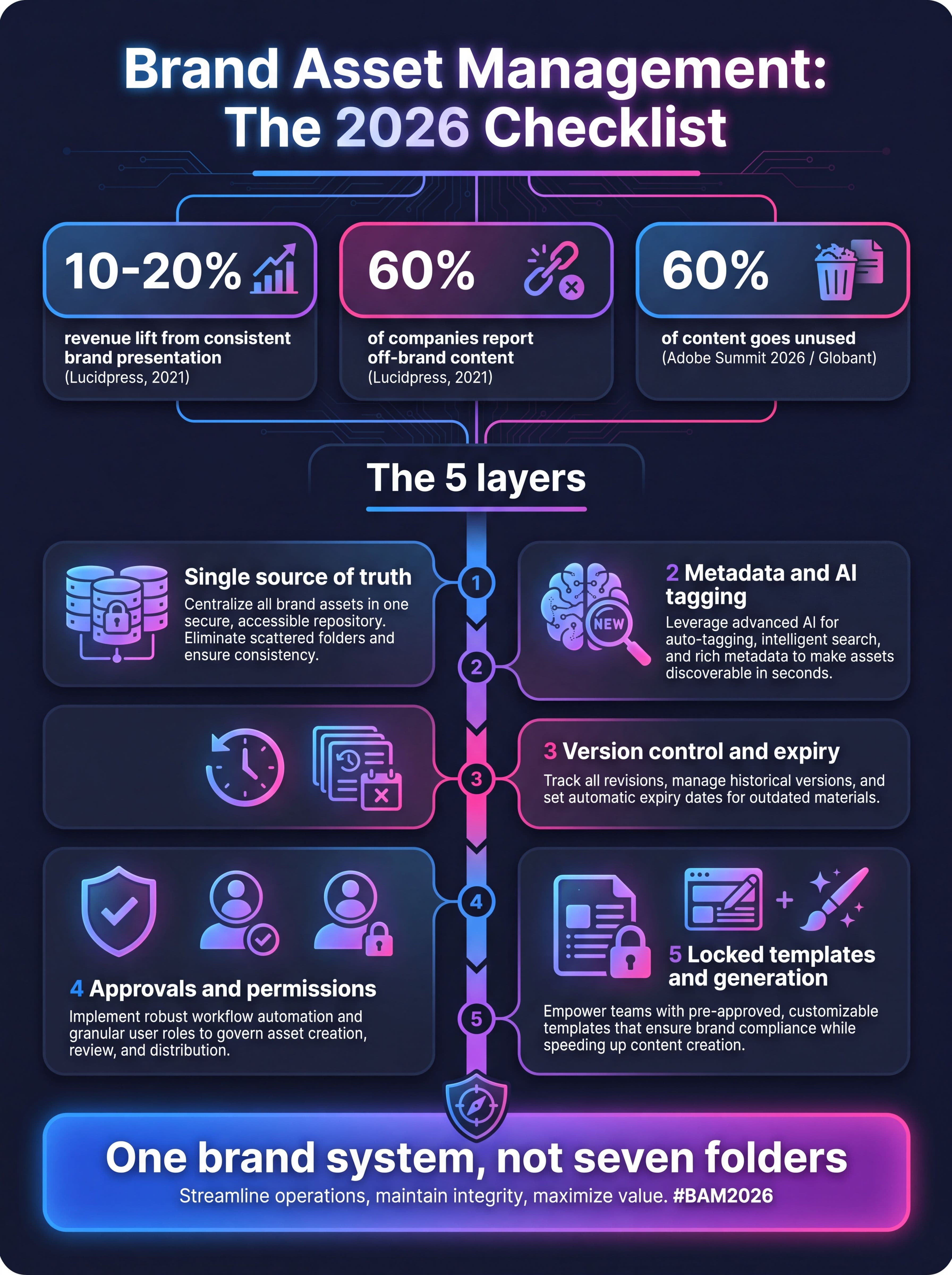
The five layers of a working brand asset management system, with the headline statistics from this guide.
Frequently Asked Questions
What is brand asset management?
Brand asset management is the process of organizing, storing, governing, and distributing the approved files that represent a brand, such as logos, colors, fonts, templates, photography, video, and messaging. Its goal is to make the approved version the easiest one to find and use.
What are brand assets?
Brand assets are the elements that identify and express your brand. They include identity assets like logos and color palettes, visual assets like photography and video, messaging assets like taglines and boilerplate, templates, and the guidelines that govern their use.
What is the difference between brand asset management and digital asset management?
Digital asset management is the broad category of storing and organizing any digital file. Brand asset management is the subset focused on approved, externally facing brand assets, with extra emphasis on version control, approvals, permissions, and templates. Many platforms combine both.
How much does brand asset management software cost?
Pricing varies widely. Some lightweight tools publish plans starting around $29 to $329 a month, while most enterprise platforms are quote-based and depend on users, storage, and modules. Always compare total cost, including the tools you could retire once assets and content creation are connected.
How does AI help with brand asset management?
AI helps in four main ways: auto-tagging uploaded files, enabling natural-language search, generating and adapting assets from approved masters, and monitoring the library for misuse, expired licenses, and outdated files. It works best when brand rules are stored in a machine-readable form.
Who should own brand asset management?
A single named brand owner, usually in marketing or marketing operations, should approve and retire assets. Legal, regional leads, and agencies contribute, but accountability needs one person, otherwise libraries decay within a couple of quarters.
Bringing It Together
Brand asset management is less about software and more about making the approved path the easy path. Get the five layers right, give AI rules it can read, and measure a few simple metrics. If your assets, content creation, SEO, and analytics all sit in different tools, consolidating them is often the fastest way to reduce drift, because there are fewer places for the brand to go wrong. MarqOps was built around that idea, with Brand Intelligence DNA feeding every output, 6x faster content production, and a unified dashboard so teams stop switching tabs.
Keep following the signal
Related field notes
Marketing Operations
Marketing Project Management Software in 2026: How to Choose Without Adding Tool #122
11 min readMarketing Analytics
Marketing Attribution Software in 2026: The Buyer's Guide for a Stack That Won't Stop Growing
11 min readMarketing Operations