Marketing Project Management Software in 2026: How to Choose Without Adding Tool #122
Marketing teams lose a quarter of the week to admin work. Here is what to check before buying marketing project management software in 2026, from approvals to AI credit costs.
Table of Contents
- Why Most Marketing Project Management Software Disappoints
- The Real Cost of Admin Work in Marketing Teams
- What Marketing Project Management Software Should Actually Do
- Popular Tools Compared: Pricing and Trade-Offs in 2026
- AI Features in Project Management Tools: Useful, But Metered
- The Blind Spot in Every Comparison: Disconnected Performance Data
- Standalone Tool or Unified Platform? How to Decide
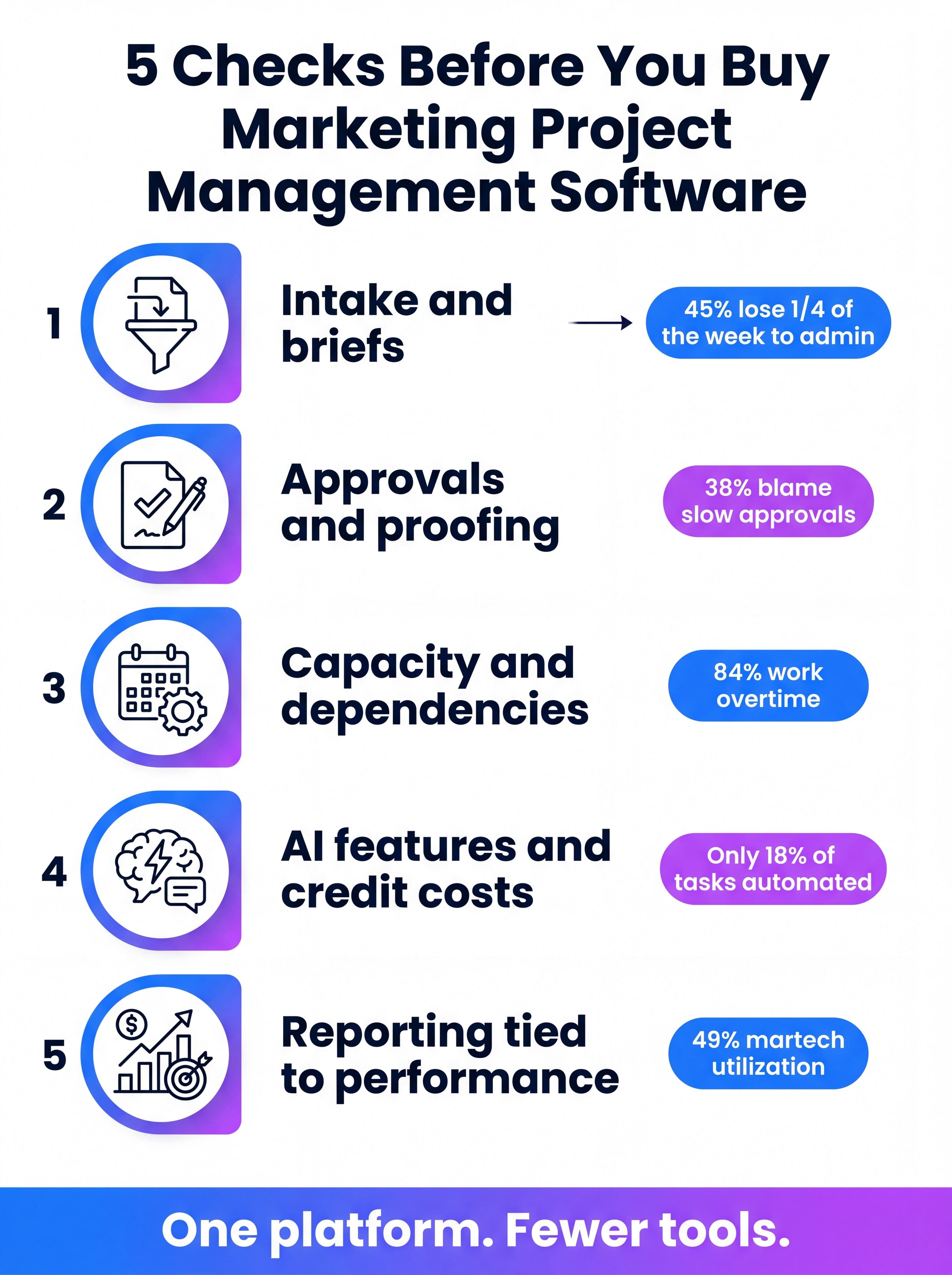
- A Five-Check Framework Before You Sign
- Frequently Asked Questions
Why Most Marketing Project Management Software Disappoints
Every marketing team eventually buys marketing project management software, and a surprising number regret it within a year. The tool is rarely the problem. The problem is that the team bought a generic task board, called it a campaign hub, and kept every other system exactly where it was.
The numbers explain the frustration. Optimizely's August 2026 survey found that 45% of UK marketers spend at least a quarter of their working week on low-value admin, and 14% spend more than half of it there. Adobe's January 2026 productivity study put a day count on it: roughly 91 business days a year lost to low-impact work like data entry, scheduling, and internal reporting, even as only 18% of marketing tasks are automated today.
This guide is for marketing directors, ops managers, and agency leads who are about to shortlist tools. It covers what to evaluate, what the popular platforms really cost, where AI features help and where they bill you extra, and how to decide whether you need another tool at all. If you are still mapping how work flows through your team, start with our marketing operations guide first.
The Real Cost of Admin Work in Marketing Teams
Project management software exists to remove coordination overhead. So it helps to be specific about where that overhead actually lives. Optimizely's respondents named four culprits, and none of them is "we lacked a Gantt chart."
- Slow approvals (38%): work sits in someone's inbox while a launch date slips.
- Poor or incomplete data (34%): teams plan campaigns without trustworthy performance numbers.
- Too many disconnected tools (33%): every extra system adds another login, another status field, and another place for work to go stale.
- Excessive meetings (33%): status gets reported verbally because no single system shows it.
The same survey found 60% of marketers launch campaigns without enough time or data to optimize them. That is the cost that never shows up on a software invoice: campaigns that go out half-finished because the process around them ate the schedule.
Adobe's study adds the human side. 84% of marketers say they work past their scheduled hours, and 32% have left a job specifically because of poor work management. Adobe also estimated that a unified workflow system could save about 38 days a year per person. Treat vendor-adjacent numbers with healthy skepticism, but the direction matches what most ops leaders already see.
There is a stack-level version of this problem too. Gartner's public martech summary puts average utilization at just 49%, which means teams pay for roughly twice the capability they actually use. We unpack that dynamic in our guide to the marketing tech stack, and it is the single most useful lens for this purchase: before you add a project management tool, ask what it will replace.
What Marketing Project Management Software Should Actually Do
Strip away the feature pages and marketing teams need five things from project software. Developers and general project managers can live without several of them, which is why a tool built for engineering sprints often feels wrong in a campaign context.
| Capability | What good looks like | Red flag |
|---|---|---|
| Structured intake | Request forms that capture channel, audience, deadline, and brief in one place, routed automatically. | Requests arrive by Slack and email, then get retyped into the tool. |
| Approvals and proofing | Markup on images, PDFs, and video with sequential reviewers and a clear audit trail. | Proofing locked behind the most expensive tier, or missing entirely. |
| Capacity and dependencies | A view of who is overloaded and which assets block a launch date. | Task lists with due dates but no workload view. |
| Cross-team visibility | One calendar showing campaigns across paid, content, email, and social. | Each channel keeps its own board and nobody sees the whole picture. |
| Reporting tied to results | Task status sits next to performance data, so you can see what shipped and what it earned. | Reports show tasks completed, never outcomes. |
A useful test: ask a vendor to show you how a single campaign moves from request to approval to live performance. If the demo stops at "task completed," you are looking at a task board, not marketing project management software. A marketing calendar is a good companion to any of these tools, but it should not be the only thing holding your cross-channel plan together.
Intake is the step most teams skip
Teams spend weeks comparing board layouts and almost no time on intake. Yet intake decides whether work arrives complete or incomplete. A good request form forces the requester to supply the audience, goal, channel, and deadline up front. That one change removes a surprising share of the back-and-forth that eats a marketer's week.
Approvals are where launch dates actually die
Given that 38% of marketers name approvals as their biggest time sink, treat proofing as a first-class requirement rather than an add-on. Check which plan includes it, how many reviewers you can add without paying a full seat, and whether legal or compliance reviewers can comment without learning a new system. If brand rules matter to your team, pair the tool with a clear brand compliance process so reviewers are checking against written standards, not personal taste.
Popular Tools Compared: Pricing and Trade-Offs in 2026
Prices change often and vary by region, contract, and seat count, so use this as a starting point and confirm on each vendor's pricing page. The figures below come from 2026 buyer's guides published by Workzone and Dupple.
| Tool | Typical per-seat price | Best for | Watch out for |
|---|---|---|---|
| ClickUp | Free to about $12/user/month | Teams that want many features per dollar | Can feel cluttered; AI add-on costs extra |
| monday.com | About 9 to 19 EUR/seat/month | Visual boards and leadership dashboards | Seat tiers and metered automation actions |
| Asana | About $10.99 to $24.99/user/month | Clear task ownership and dependencies | Marketing features sit in higher tiers |
| Wrike | About $10 to $25+/user/month | Proofing and sequential approvals | Video proofing needs the pricier Business tier |
| Airtable | About $20 to $45/seat/month | Content catalogs and asset libraries | No native proofing; approval flows are DIY |
| ProofHub | About $45 to $135/month flat | Agencies that want unlimited users | Thinner integrations and a dated interface |
Two patterns jump out. First, the starting price is rarely the price you pay: the features marketers care about most, like proofing and workload views, usually live one or two tiers up. Second, flat-rate tools like ProofHub flip the economics for agencies with lots of occasional reviewers, while per-seat tools punish you for inviting clients and stakeholders.
Budget for the whole bill, not the license
Add four lines to every quote: onboarding time, template and automation setup, the reviewer seats you will need, and AI credits. A tool that is $9 per seat on the pricing page can become a $25-per-seat tool once proofing and automation limits kick in. For a deeper look at how tool costs add up against results, see our breakdown of AI marketing ROI.
AI Features in Project Management Tools: Useful, But Metered
Every major vendor now ships an AI layer. monday.com has its Sidekick assistant and auto-update agents, Asana has Smart Status and AI Studio workflows, and ClickUp has ClickUp Brain with thread summaries and auto-generated subtasks. Dupple's May 2026 review puts ClickUp's Brain add-on at roughly $9 per user on top of the base plan, and notes that credit allowances differ sharply between tiers.
These features are genuinely handy for status summaries and meeting notes. They are less useful for the part of marketing work that matters most, which is making the creative, SEO, and ad output itself. A project tool can tell you a blog post is late. It cannot write the post, match your brand voice, or tell you whether the last ten posts earned any traffic.
That distinction matters because teams increasingly expect AI to remove admin, not just summarize it. Optimizely found 41% of marketers invested in AI assistants last year and another 38% plan to, yet the admin load has not dropped. If you are weighing where agents fit in your workflow, our guides to marketing workflow automation and AI agents for marketing cover what is realistic today.
Questions to ask every vendor about AI
- Which AI features are included in the plan I am quoting, and which need an add-on?
- How are credits counted, and what happens when we run out mid-month?
- Can the AI act on our performance data, or only on the tasks inside this tool?
- Who can see our content and briefs, and is it used to train models?
The Blind Spot in Every Comparison: Disconnected Performance Data
Almost every "best project management software for marketing" article scores tools on boards, templates, and integrations. Almost none ask the harder question: once the work ships, where do you see what it did?
In most stacks the answer is "in a different tool." Tasks live in the project platform, creative lives in a design tool, content lives in a CMS, ad data lives in Google Ads and Meta, and analytics lives in a dashboard nobody opens. Each handoff is a place where status goes stale and context gets lost, which is exactly the fragmentation behind that 33% of marketers who blame disconnected tools.
This is why marketing orchestration has become a bigger conversation than project management alone. The goal is not a prettier task list. It is a single flow from brief to asset to approval to live performance, so the people planning work can see how the last round performed. A marketing dashboard that sits on top of a separate project tool helps, but it still leaves two systems to maintain.
The same issue hits agencies hardest. When every client has its own boards, its own reports, and its own approval chain, ops managers become human glue. Our guides to client reporting and the AI marketing agency model show how teams are collapsing that overhead.
Standalone Tool or Unified Platform? How to Decide
There are two honest paths, and the right one depends on your stack rather than on any feature list.
Path one: add a dedicated project tool. This makes sense when your team is small, your channels are few, and your biggest pain is simply that nobody owns deadlines. A focused tool with strong intake and proofing will help right away, and the integration burden stays manageable.
Path two: consolidate. This is the better call when your team already runs a dozen or more marketing tools, when approvals cross creative, SEO, and paid, and when you cannot answer "what did last month's work earn?" without opening four tabs. Here, another standalone tool adds to the problem it is meant to solve.
That second path is the one MarqOps was built for. Instead of asking marketers to connect a project tool, a design tool, an SEO tool, an ad manager, and a reporting dashboard, MarqOps puts creative production, SEO content, Google Ads management, and analytics in one platform, with Brand Intelligence DNA keeping every output on brand from the start. Teams using it report producing content roughly 6x faster, and the unified dashboard means status and performance live side by side. It does not replace every task board on the market, but it can replace several of the tools that make task boards necessary.
If you want to see how a consolidated approach compares to a typical stack, our best AI marketing tools for 2026 roundup and the marketing automation tools guide are good next reads.
A Five-Check Framework Before You Sign
Run any shortlist through these five checks. They take an afternoon and will filter out most of the mismatches.
1. Map where work actually stalls
Track a handful of recent campaigns from request to launch and mark every delay. If most of the delay sits in approvals, buy for proofing. If it sits in unclear requests, buy for intake. If it sits in waiting for data, no project tool will fix it on its own.
2. Test intake and approvals with a real campaign
Do not trust a template gallery. Run one live campaign through the trial, including real reviewers from legal or brand. Count the clicks and the emails it still takes.
3. Price the total bill
Quote the plan that includes proofing, workload views, and AI credits, then multiply by the number of seats including reviewers. Compare that against flat-rate options if you work with many external stakeholders.
4. Ask the performance-data question
Ask each vendor how their tool connects to ad, SEO, and analytics data, and what it replaces. If the honest answer is "nothing," add it to your tool count before you buy.
5. Decide consolidation versus addition on purpose
Write down the decision and the reasoning. Teams that make this choice deliberately avoid the slow drift into 121-tool stacks. If consolidation wins, see how MarqOps works as a point of comparison.
Frequently Asked Questions
What is marketing project management software?
Marketing project management software is a tool for planning, assigning, and tracking campaign work. Unlike general project tools, it focuses on request intake, creative approvals and proofing, cross-channel calendars, and workload visibility for marketing teams.
How much does marketing project management software cost?
Most tools charge about $7 to $25 per user per month, with flat-rate options like ProofHub running roughly $45 to $135 per month. Proofing, workload views, AI credits, and reviewer seats often sit in higher tiers, so the real cost is usually higher than the entry price.
What is the best project management software for marketing teams?
It depends on your bottleneck. Wrike is strong on proofing, monday.com on visual dashboards, Asana on task ownership, and ClickUp on features per dollar. If your pain is fragmented tools rather than missing task features, a unified marketing platform may serve you better than another standalone tool.
Do marketing teams need different project software than other departments?
Often yes. Marketing work depends on creative reviews, brand and legal approvals, many parallel channels, and tight launch dates. Tools built for engineering sprints rarely handle proofing and cross-channel calendars well.
Can AI replace marketing project management software?
Not entirely. AI features can summarize status, draft subtasks, and automate updates, but teams still need a system of record for requests, approvals, and deadlines. The bigger gain comes when AI also produces the creative, SEO, and ad work inside the same platform.
Keep following the signal