Creative Operations in 2026: Workflows, Roles, and Metrics That Work
Creative operations is how marketing teams move work from request to approved asset. Learn the six-stage workflow, key roles, five metrics, and where AI helps in 2026.
Table of Contents
- What Is Creative Operations?
- The 2026 Numbers: Production Is Easy, Process Is Not
- The Creative Operations Workflow, Stage by Stage
- Roles and Decision Rights
- Five Creative Operations Metrics Worth Tracking
- Where AI Belongs in Creative Operations
- Building the Creative Operations Stack
- A 90-Day Plan to Stand Up Creative Operations
- Five Mistakes That Stall Creative Operations
- Frequently Asked Questions
Ask a marketing team why a campaign shipped late and you rarely hear "we could not make the assets." You hear that the brief changed twice, legal found a problem on day nine, nobody knew which logo file was current, and six people left comments in three different tools. Making creative is no longer the hard part. Moving it through the organization is. That movement is what creative operations manages.
This guide explains what creative operations is, what the 2026 survey data says about where teams get stuck, how to design the workflow and the roles around it, which five metrics to track, and where AI genuinely helps. If you are earlier in the journey, our overview of marketing operations gives the wider context, and our guide to creative automation covers the tooling side in depth.
What Is Creative Operations?
Creative operations is the discipline of running the full creative lifecycle as a managed process, from the first request to the final delivered asset and the performance data that comes back. Ziflow's 2026 guide describes it as the principles, methods, and practices that connect people, processes, and tools. In plain terms, creative operations is the business side of creative work: who can ask for what, how requests are prioritized, who approves, where files live, and how anyone knows whether the work paid off.
It is easy to confuse creative operations with neighboring functions, so it helps to draw the lines:
- Creative direction decides what the work should look and feel like. Operations decides how the work flows.
- Project management schedules individual projects. Operations designs the system those projects run through. A good marketing project management tool is one component of it, not the whole thing.
- Creative automation uses software to produce variants and adaptations at scale. The operating model decides when automation is appropriate and how its output is reviewed.
- Brand management sets the rules. Operations makes those rules easy to follow, a topic we cover in our posts on brand compliance and brand guidelines.
The 2026 Numbers: Production Is Easy, Process Is Not
Generative tools have removed most of the friction from making a first draft. Contra Labs' 2026 Creative Intelligence report, drawing on more than 150,000 working creatives, found AI adoption above 70% at junior, mid-level, and senior levels alike. The bottleneck has moved downstream, and the survey data shows where.
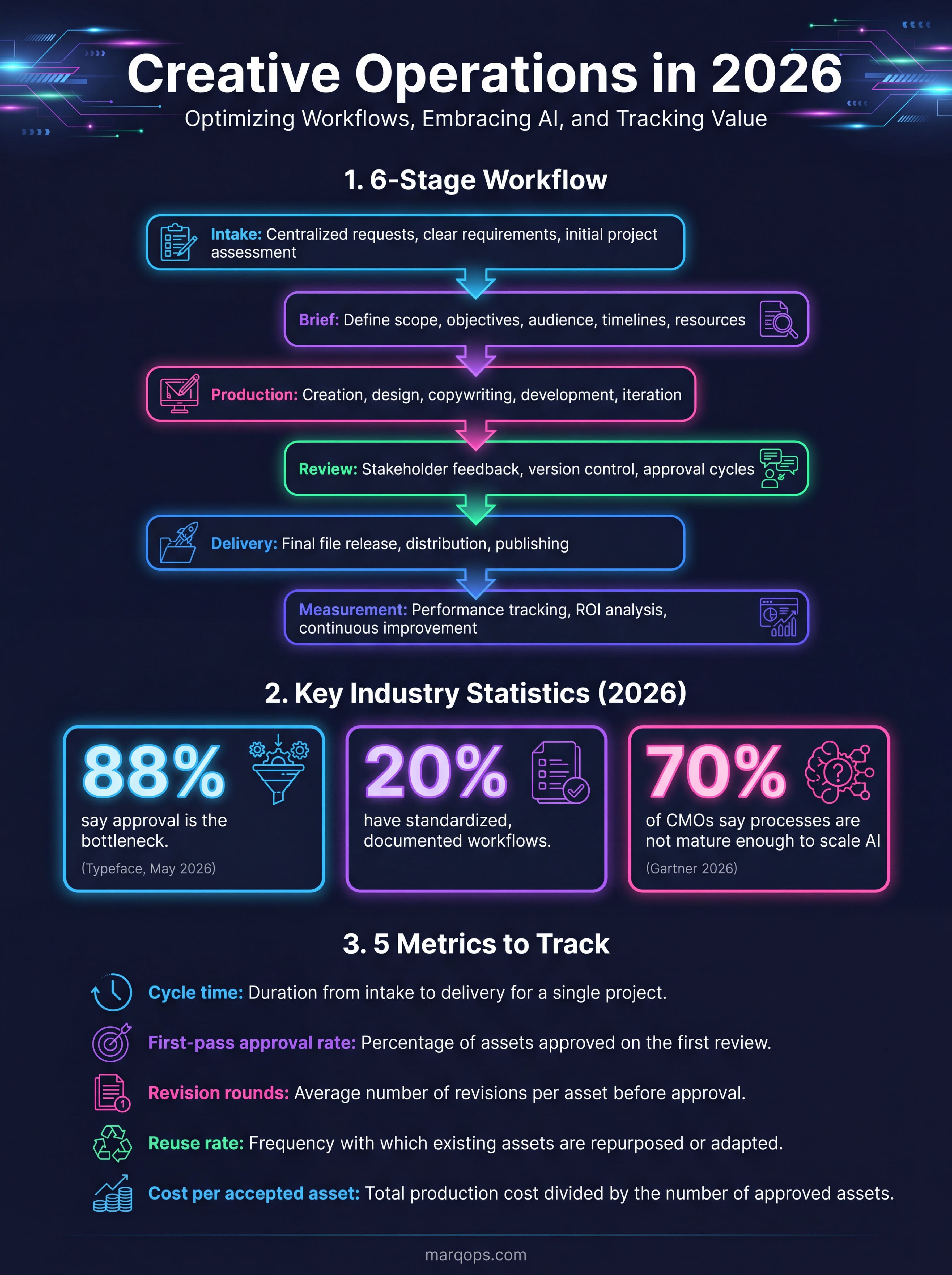
Typeface's "AI Speed Paradox" survey of more than 200 marketing leaders, published in May 2026 and summarized by Designerbox, found that 88% said their teams can make content quickly and that approval is where time disappears. Only 20% said their workflows were standardized and documented, while 18% said the workflow lived only in team members' heads. The share of leaders saying a single campaign needs 20 or more people rose from 10% to 44% in a year. Typeface sells content software, so treat the framing with care, but the pattern matches what most teams report.
| Finding | Figure | Source |
|---|---|---|
| Marketing leaders who say speed is fine and approval is the bottleneck | 88% | Typeface, May 2026 |
| Teams with standardized, documented workflows | 20% | Typeface, May 2026 |
| Creative teams spending over a quarter of their time on non-creative tasks | 57% | Monotype and Extensis, Sept 2025 (1,008 creatives) |
| Marketing and creative professionals who struggle to define performance KPIs | 42% | Cella by Randstad Digital, May 2025 |
| Teams that hold regular project retrospectives | 28% | Cella by Randstad Digital, May 2025 |
| CMOs who say processes are not mature enough to scale AI | 70% | Gartner 2026 CMO Spend Survey |
The Gartner figure deserves a closer look. In its 2026 CMO Spend Survey of 401 marketing leaders, fielded from January to March 2026, marketing budgets averaged 7.8% of company revenue and 15.3% of those budgets went to AI. Yet only 30% of CMOs described their AI readiness as mature, and the other 70% said their internal processes were not mature enough to implement and scale it. Money is flowing into tools faster than into the operating model that makes the tools useful.
Put the two surveys together and the message is consistent. Teams that buy faster generation without fixing intake, approval, and measurement end up with more drafts waiting in the same queue. We see the same dynamic in our look at the content supply chain.
The Creative Operations Workflow, Stage by Stage
Ziflow lays out six stages that most teams recognize: project intake, creative brief, project management, review and approval, revisions, and final delivery. Here is how to make each stage do real work rather than exist on a slide.
Stage 1: Intake
Every request enters through one form, not through chat messages and hallway asks. The form should capture the goal, audience, channel, deadline, required sizes and formats, approvers, and the budget code. A request missing any of these goes back to the requester, not into the queue. This one rule removes a large share of mid-project surprises.
Stage 2: Brief
The brief turns a request into instructions a designer, writer, or AI tool can act on. It states the single message, the proof points, the mandatory elements, and what success looks like. Pull voice and visual rules from a shared source of truth so briefs do not restate them differently each time. Our explainer on AI brand voice shows how to write rules a model can follow consistently.
Stage 3: Production
Production covers original work and adaptation. Sort requests into tiers so effort matches value. A reusable request is finished from an existing template. An adapted request modifies an approved master. A bespoke request starts from scratch. Designerbox suggests example turnaround targets of one working day for reusable work, three for adapted, and ten for bespoke, for a team of about eight. Treat those as a starting point to adapt, not an industry standard.
Stage 4: Review and approval
This is where most delay lives. Cap the number of review rounds, give each reviewer a defined lens (product accuracy, brand, legal, goal), and set a response deadline. One consolidated set of comments beats five parallel threads. For regulated categories, automate the checks that are rule-based, such as required disclaimers, and save human attention for judgment calls.
Stage 5: Delivery
Approved assets should land in a managed library with the right metadata, usage rights, and expiry dates, then flow to the channels that need them. Sound brand asset management keeps teams from rebuilding something that already exists.
Stage 6: Measurement
The loop closes only when performance data reaches the people who make creative decisions. Connect assets to results in your ad and analytics platforms so the next brief starts from evidence. Our post on creative analytics covers how to tie specific creative choices to outcomes.
Roles and Decision Rights
Most review delays trace back to unclear ownership. When five people can all say "I'm not sure about this," nothing gets approved. The fix is naming exactly one owner for each type of decision. A workable split, adapted from Designerbox's model, looks like this:
- Queue owner: checks that a request is complete, assigns its tier, orders the queue, and approves rush requests.
- Requester: confirms the work meets the goal stated on the form.
- Brand reviewer: checks logo, color, type, tone, and layout against the rules.
- Subject or product owner: checks claims, pricing, and factual accuracy.
- Creative lead: judges concept, composition, and finish on bespoke work.
- Creative operations manager: owns the intake form, queue rules, service levels, monthly metrics, and tool list. This person does not approve the creative itself.
In a small team one person can hold two roles, but each decision still needs one named owner. Add an escalation rule too: a rush request needs the queue owner's sign-off, and the requester names the work that moves down to make room. That single sentence ends most priority arguments.
The same logic applies as AI agents join the process. When an agent drafts, tags, or checks assets, someone must own its permissions and its mistakes. Our guide to AI agent governance walks through how to set those boundaries.
Five Creative Operations Metrics Worth Tracking
Cella by Randstad Digital found that 42% of marketing and creative professionals struggle to define performance KPIs, and only 28% hold regular retrospectives. You do not need a long scorecard. Five measures cover speed, quality, efficiency, and cost.
| Metric | How to calculate it | What it tells you |
|---|---|---|
| Cycle time | Delivery date minus the date of the complete request, in working days, reported as a median per tier | Whether you keep your service levels |
| First-pass approval rate | Assets approved in the first review divided by assets submitted | Whether briefs and intake are clear |
| Revision rounds | Total review rounds divided by approved assets | Where stakeholders disagree |
| Reuse rate | Requests finished from a saved template or workflow divided by all finished requests | How much repeat work you can systematize |
| Cost per accepted asset | Monthly people, tool, and outside costs divided by accepted assets | Your real unit cost |
Measure them monthly and review the trend, not a single month. If first-pass approval is low, fix the brief. If revision rounds are high, fix reviewer roles. If reuse is low, you are probably rebuilding work that a template could handle. The same discipline of choosing a few decision-ready numbers applies to reporting up, which we explore in our guide to client reporting and our breakdown of AI marketing ROI.
Where AI Belongs in Creative Operations
The instinct is to use AI to make more assets. The more durable value is in making existing assets findable, compliant, and connected to results. A 2026 analysis from Medialake, written by a vendor, argues that producing more content faster can worsen governance and visibility problems that already exist. Its three areas of measurable value are discovery, rights and compliance, and performance tracking. The argument fits the survey data above, though you should verify any vendor's numbers independently.
Good uses of AI
- Asset tagging and search. Automatic metadata makes the library usable and prevents duplicate work.
- Pre-review checks. Flag off-brand wording, missing disclaimers, and expired licenses before a human sees the file.
- Variant production. Resize, localize, and adapt approved masters. Our post on dynamic creative optimization shows how variants feed testing.
- Repurposing. Turn one approved asset into many formats, as described in our guide to AI content repurposing.
- Performance feedback. Connect each asset to ad and analytics results so briefs improve.
Where to be careful
Speed gains are real on routine tasks. A preregistered experiment with 453 professionals, published in Science in 2023, found AI assistance cut writing task time by 40% and raised quality by 18%. But those were writing tasks, and the gains came from using AI inside a defined task. Brand-defining concepts, sensitive claims, and final approval still need people. Cost, output quality, and privacy were the top barriers creatives named in the Contra Labs data, at 70.1%, 44.6%, and 43.5% respectively, which is a reminder to write usage policies before you scale usage.
Building the Creative Operations Stack
Most teams assemble creative operations from separate tools: a request form, a project board, a proofing tool, a digital asset library, a design suite, a generative tool, and an analytics dashboard. Each is useful alone. The cost shows up in the seams, where files get re-uploaded, comments get copied, and nobody can see a request's full history.
Evaluate any stack against five questions:
- Can a request be traced from intake to performance without switching tools?
- Do brand rules live in one place that both people and AI tools read?
- Is review a single threaded conversation with clear approvers?
- Can you pull the five metrics above without a manual spreadsheet?
- What is the total cost, including the integrations that keep it all together?
This is the gap an integrated platform aims to close. MarqOps brings creative production, SEO content, analytics, and ad operations into one workspace, and its Brand Intelligence DNA applies brand rules to output from the start, so reviewers spend less time correcting voice and visuals. Teams typically consolidate seven or more disconnected tools and see content output up to six times faster. You can see how the pieces connect on the How It Works page, and our guide to the marketing tech stack helps you audit what you already pay for.
If your workflows involve many handoffs, it is also worth reading about marketing workflow automation and marketing orchestration, which cover how to route work between teams and systems without manual chasing.
A 90-Day Plan to Stand Up Creative Operations
Days 1 to 30: Map and measure
Document how work really flows today, including the informal paths. Interview requesters and reviewers about where time is lost. Start logging cycle time and first-pass approval rate by hand if you must. The goal is a baseline, not a perfect system.
Days 31 to 60: Standardize
Launch the single intake form and the brief template. Define the three request tiers and their target turnaround. Name decision owners and publish the escalation rule. Retire at least one side channel for requests.
Days 61 to 90: Automate and review
Now add automation where the data shows repeat work: templates for high-reuse requests, automated brand and compliance checks, and asset tagging. Hold the first retrospective, compare your five metrics to the baseline, and decide what to change next. Sequence matters. Automating a broken process only produces broken work faster.
Five Mistakes That Stall Creative Operations
- Buying tools before fixing the process. Gartner's 70% figure is the warning. Tools amplify whatever process they sit on.
- Letting the form be optional. If urgent requests can bypass intake, every request becomes urgent.
- Too many approvers. Give each reviewer a lens and a deadline, and cut anyone without a defined role.
- Treating it as an admin cost. It protects the time of your most expensive people. Monotype and Extensis found 57% of creative teams spend more than a quarter of their time on non-creative tasks.
- Skipping measurement. Without a baseline you cannot show that anything improved, and the program loses funding at the next budget review.
Frequently Asked Questions
What is creative operations?
Creative operations manages how creative work moves from request to approved, delivered, and measured asset. It covers intake, briefs, production, review, asset management, and performance measurement, and it connects the people, processes, and tools involved.
What does a creative operations manager do?
This role owns the system rather than the creative output. Typical duties include maintaining the intake form, setting queue rules and service levels, reporting monthly metrics, managing the tool list, and removing bottlenecks. They usually do not approve the creative work itself.
What is the difference between creative operations and creative automation?
Creative automation is a set of tools that produce or adapt assets at scale. It is the broader management system that decides what gets made, who approves it, and how results are measured. Automation works best when it sits inside a defined process.
Which metrics matter most for creative operations?
Start with cycle time and first-pass approval rate, then add revision rounds, reuse rate, and cost per accepted asset. Together they cover speed, quality, efficiency, and unit cost. Review them monthly as trends rather than reacting to a single data point.
How can AI improve creative operations?
AI helps most with asset tagging and search, pre-review brand and compliance checks, variant production, repurposing, and linking assets to performance data. Use it to remove routine work and surface problems early, and keep people responsible for concepts, claims, and final approval.
Keep following the signal