Google Shopping Ads in 2026: Feeds, Bidding, and AI Search Visibility
Shopping clicks still cost around $0.66 against $2.96 for Search, but the lever has moved. Your product feed now decides visibility in the Shopping grid, inside AI Mode answers, and at agentic checkout. Here is what Google Shopping ads deliver in 2026, the five feed levers that move impressions without a bid change, and how to structure Performance Max against Standard Shopping.

For most of the last decade, Google Shopping ads were a bidding problem wearing a feed costume. You uploaded a product file, accepted whatever titles your ecommerce platform generated, and spent your energy on campaign structure and bids. That worked because the auction was the bottleneck.
In 2026 the bottleneck moved. The same product data that fuels your Shopping campaigns now also decides whether your products appear inside AI Mode answers, whether an AI agent can complete a purchase on a shopper's behalf, and whether Google's Shopping Graph considers your catalog specific enough to recommend at all. Nearly half of online shoppers engaged an AI assistant during their most recent purchase journey, according to a January 2026 NRF and Salesforce survey. Your feed is now the interface to all of it, and most catalogs are not ready.
Table of Contents
- What Google Shopping Ads Are in 2026
- The Economics: Benchmarks Worth Planning Against
- Your Feed Is No Longer Just an Ad Input
- Feed Quality: Five Levers, Ranked
- Performance Max vs Standard Shopping
- Bidding and Structure That Survive Automation
- Winning Visibility in AI Mode and Agentic Checkout
- The Disapprovals That Cost the Most
- Measuring Shopping Without Fooling Yourself
- A 60-Day Google Shopping Playbook
- Mistakes That Quietly Drain Shopping Budgets
- Frequently Asked Questions
- The Bottom Line
What Google Shopping Ads Are in 2026
Google Shopping ads, also called product listing ads, are the image-led results that show a product photo, price, merchant name, and often a rating or promotion. Unlike text ads, you do not bid on keywords. Google matches a shopper's query against your product data and decides which items to surface. That single difference explains almost everything about how the channel behaves.
Because there is no keyword layer, the product data is the targeting. If your title says "SKU 4471-BLK" instead of "Nike Air Zoom Pegasus 41 Men's Running Shoe Black Size 10," you have not written a bad title, you have chosen not to compete for a set of queries. Advertisers who come from Search often spend months tuning bids on a catalog that is structurally invisible for the terms they care about.
The 2026 version of the channel has three surfaces rather than one. There are paid Shopping results in the classic grid, free product listings that draw from the same Merchant Center data, and AI-native placements where Google composes an answer from the Shopping Graph and cites specific products. Same feed, three very different consumption patterns.
The Economics: Benchmarks Worth Planning Against
Shopping remains one of the best value-per-click positions in paid media, which is why it survives every round of budget scrutiny. The numbers below are cross-industry averages for 2026 and should be treated as orientation rather than targets, since category variance is enormous.
| Metric | 2026 average | What good looks like |
|---|---|---|
| Cost per click | About $0.66 | Under $0.50 in low-competition categories, $1.20 and up in electronics |
| Click-through rate | About 0.86% | Above 1.2% is strong |
| Conversion rate | About 1.91% | 3% to 5% for well-run retail accounts |
| Return on ad spend | Varies widely | Around 6x for top-quartile ecommerce brands |
| Search CPC for comparison | About $2.96 | Shopping is roughly a quarter of the cost per click |
Two implications follow. First, a Shopping click is cheap enough that impression volume, not bid aggression, is usually the growth constraint. Second, a 0.86% average CTR means the majority of your impressions are being ignored, and the fastest route to a better number runs through the image and the title rather than the bid. If you are benchmarking the channel against blended efficiency, our guide to customer acquisition cost covers how to read Shopping performance inside a full-funnel picture, and AI marketing ROI covers the attribution side.
Your Feed Is No Longer Just an Ad Input
The Shopping Graph is Google's live index of products, sellers, prices, availability, reviews, and attributes. It has existed for years as plumbing behind Shopping results. What changed in 2026 is that it became the retrieval layer for conversational commerce, which means feed quality now determines visibility in places you cannot bid on.
Google's I/O announcements in May 2026 made the direction explicit. Universal Cart, expanded AI Mode shopping capabilities, and a new Merchant Center attribute schema called Conversational Attributes all point the same way: richer structured data, consumed by a model rather than rendered in a grid. Google also began testing Direct Offers, which surfaces exclusive discounts inside AI Mode for high-intent shoppers based on verified promotions tied to Merchant Center promotion codes.
Agentic checkout arrived alongside it. The Universal Commerce Protocol launched in January 2026, and Google started rolling out agentic checkout with select US merchants, where an AI agent handles discount codes, loyalty credentials, subscriptions, and selling terms alongside Google Pay before a shopper confirms. If you want the broader context on where this is heading, our piece on agentic commerce unpacks the buying-side shift, and Google AI Mode covers the search experience itself.
The practical consequence is uncomfortable for teams organised around campaigns. A model deciding which three products to recommend in a conversational answer has no bid signal to work with. It has your attributes, your reviews, your price competitiveness, and your image quality. That is the entire input set.
Feed Quality: Five Levers, Ranked
If you do one thing with this article, do this section. Feed work is unglamorous and it consistently outperforms every other Shopping optimisation available to a mid-sized retailer.
1. Titles. Highest leverage by a wide margin. The pattern that holds up across categories is brand, then product type, then defining attribute, then size or colour, within the 150 character limit. Front-load the terms a shopper would actually type. Rewritten titles with better query alignment routinely produce 3x to 5x more impressions on identical bids and identical landing pages, which is a return no bid adjustment can match.
2. GTINs. Complete, valid, and matched to the manufacturer identifier. GTINs are how Google reconciles your listing against every other seller of the same item, which unlocks comparison surfaces and documented impression share increases. Missing GTINs on branded resale catalogs is one of the most common and most expensive gaps we see.
3. Images. Clean background, high resolution, product filling the frame, no promotional overlays. Image quality is a direct ranking and click signal in the grid, and it is a retrieval signal in AI recommendation surfaces where the model is assessing whether your listing looks like a credible primary result.
4. Attribute completeness. Fill every optional field you can justify: colour, size, material, gender, age group, pattern, item group ID, condition, shipping weight. Reporting from 2026 suggests stores with near-complete attribute coverage are seeing 3x to 4x higher visibility in AI product recommendations than stores with sparse data. Optional fields stopped being optional the moment a model started reading them.
5. Price and availability accuracy. Not an optimisation so much as a survival requirement, covered in the disapprovals section below. A feed that disagrees with your site is the single fastest route to a suspended account.
The operational catch is that feed work is continuous, not a project. Titles need testing, attributes drift as merchandising adds products, and rules need maintaining. This is exactly the kind of repetitive, high-frequency work that AI-assisted PPC management handles well, and where creative automation earns its keep on the image side.
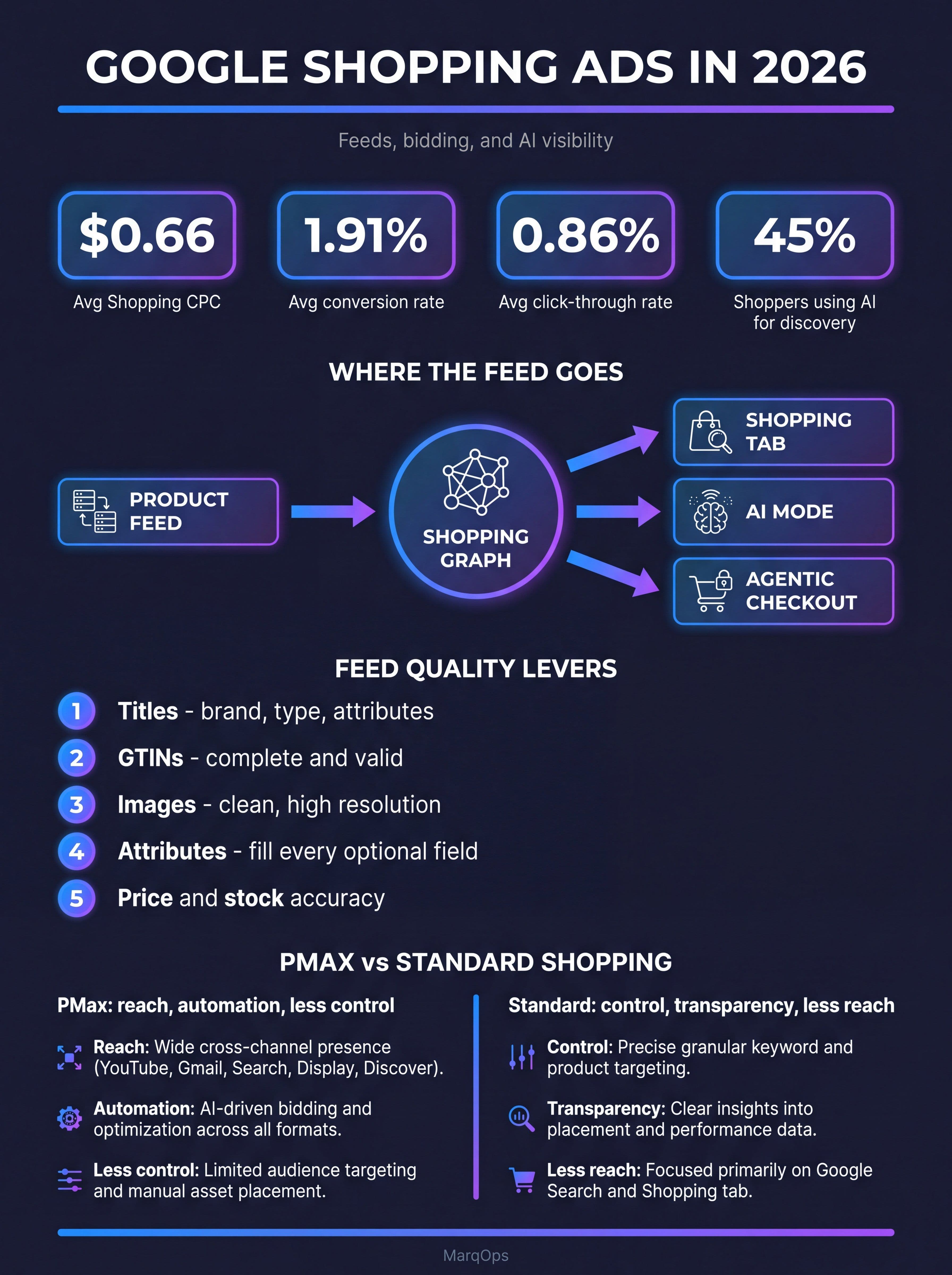
Google Shopping ads in 2026: the benchmarks, where the feed goes, and the levers that move impressions.
Performance Max vs Standard Shopping
This argument has calcified into tribalism, which is unhelpful, because the honest answer is that they solve different problems and most serious retail accounts now run both.
| Dimension | Performance Max | Standard Shopping |
|---|---|---|
| Reach | Search, Shopping, YouTube, Display, Discover, Maps, Gmail | Shopping surfaces and Search partners only |
| Control | Settings-level, including campaign brand exclusions | Structural, by campaign and product group |
| Transparency | Improved with channel reporting and the expanded where-ads-showed report | Full query and product-level visibility |
| ROAS | Typically 10% to 20% higher than Standard Shopping on comparable catalogs | More predictable, easier to diagnose |
| Best for | Scaling non-brand discovery and new customer acquisition | Brand protection, hero SKUs, margin-sensitive lines |
Transparency improved materially. Channel-level reporting shows where budget is actually going across Search, Display, YouTube, Discover, and Maps, and in February 2026 Google expanded the where-ads-showed report to display Search Partner Network placements directly. The old complaint that Performance Max is a black box is now roughly half true rather than entirely true.
Brand exclusions are the setting that decides whether your PMax numbers mean anything. Without them, PMax harvests your own branded demand, reports a spectacular ROAS, and tells you nothing about incremental acquisition. The standard structure among experienced retail teams: brand exclusions on in PMax from day one, a separate brand Search campaign with controlled bids, and Standard Shopping retained where structural certainty matters more than reach. Our Performance Max guide goes deeper on asset groups and signals, and Performance Max vs Search campaigns covers the cannibalisation question specifically.
Bidding and Structure That Survive Automation
Shopping bidding in 2026 is mostly a matter of giving automation a clean problem to solve. Target ROAS and Maximise Conversion Value do the arithmetic. Your job is segmentation and conversion data quality.
Segment by margin and velocity rather than by category. A single campaign containing a $12 accessory and a $900 hero product forces one ROAS target across two entirely different economics. Splitting them by expected value gives the algorithm room to bid correctly on each, and it makes the reporting legible when something breaks.
Feed the bidder better signal. Conversion values should reflect margin rather than revenue wherever you can calculate it, and offline conversion imports matter more than most retailers act on. Automation optimises toward whatever number you send it, so sending revenue on a catalog with 15% to 70% margin spread guarantees it will over-invest in your worst products. Our guide to smart bidding covers the signal side in detail, and first-party data covers the customer value inputs that make value-based bidding work.
Winning Visibility in AI Mode and Agentic Checkout
This is the part of the channel with no established playbook, which makes it the part worth investing in early. AI Mode composes an answer from the Shopping Graph based on a conversational query such as "a waterproof jacket for hiking in cold rain, under $200." There is no keyword to bid on and no position to buy. Selection is retrieval, and retrieval runs on your data.
What appears to matter, based on what Google has published and what merchants are reporting:
- Attribute density. Conversational queries carry constraints such as material, use case, size, and compatibility. If those attributes are absent from your feed, your product cannot satisfy the constraint and will not be retrieved.
- Descriptive titles and descriptions. Written for a reader rather than stuffed for a matching engine. Natural-language descriptions of use case and fit now do real work.
- Review corpus. Ratings and review text are visible inputs to recommendation, which makes review generation a paid-media lever rather than a purely organic one.
- Price competitiveness and stock accuracy. Both are surfaced directly and both filter you out when wrong.
- Promotion feeds. Verified promotions tied to Merchant Center promotion codes are the mechanism behind Direct Offers testing in AI Mode.
The adoption curve behind this is steeper than most retail teams have priced in. Roughly 45% of shoppers used AI for product discovery in early 2026, up from about 18% in 2024, and 66% of shoppers who buy more than once a week report regularly using AI assistants to guide purchase decisions. Comparison queries, sizing and fit questions, and compatibility checks dominate the use cases, and every one of those is answered from structured attributes. For the broader measurement question of whether your brand shows up in AI answers at all, see our guide to AI visibility.
The Disapprovals That Cost the Most
Nothing in Shopping destroys revenue faster than a Merchant Center suspension, and nearly all of them are preventable. The recurring causes in 2026:
- Price and availability mismatch. The feed says one thing, the landing page says another, Google crawls and disagrees. Sync frequency is the fix, particularly around promotions.
- Missing required attributes. GTIN, brand, condition, and image are the usual gaps, and they disapprove products silently at scale.
- Preorder versus backorder. Using preorder for a temporarily out-of-stock item is a specific and very common misuse that triggers disapprovals during peak season. Backorder is the correct value.
- Shipping and tax misstatement. Google expanded misrepresentation rules around delivery accuracy, refunds, and transparency, and regional shipping or VAT errors now trigger invalid region and inaccurate shipping disapprovals.
- Unresolved 404 crawl errors. Dead product URLs escalate quickly from warnings to full campaign suspension.
Treat feed health as a monitored system rather than an occasional inspection. A weekly review of disapproved items, a price and stock sync running at least daily, and an alert on account-level warnings will prevent the overwhelming majority of these. Google has signalled that 2026 brings deeper AI-powered listing verification and real-time crawl checks, which raises the cost of drift further.
Measuring Shopping Without Fooling Yourself
Shopping is unusually easy to measure badly, because the platform reports a number that looks like the truth. Three corrections are worth making.
Separate brand from non-brand. A Shopping account that captures branded demand will report strong ROAS regardless of what it contributes. Brand exclusions in PMax plus a dedicated brand campaign gives you two numbers that mean different things, which is the point.
Read new customer acquisition separately from total conversions. Retail accounts frequently discover that a large share of Shopping conversions are repeat buyers who would have returned anyway. New customer acquisition reporting exists in Google Ads and is worth configuring properly with a genuine customer list rather than a conversion tag proxy.
Watch impression share and lost impression share by product group. This is the number that tells you whether the constraint is budget, bid, or feed. Lost impression share to rank on products with healthy bids is almost always a feed problem, which sends you back to titles and attributes rather than to the budget conversation. A consolidated marketing dashboard that puts feed health, impression share, and margin-adjusted ROAS on one screen removes most of the guesswork here.
A 60-Day Google Shopping Playbook
Days 1 to 14: audit and fix. Pull every disapproved and pending item and clear them. Verify GTIN coverage as a percentage of catalog. Check price and availability sync frequency. Confirm brand exclusions are set in Performance Max. Establish your current impression share baseline by product group so you can prove what changes later.
Days 15 to 30: rewrite titles. Start with the top 20% of products by revenue potential, not by current spend, since current spend reflects the feed you are trying to fix. Apply the brand plus type plus attribute plus variant pattern. Run it as a genuine test with a held-out control group so you can measure the impression lift rather than assume it.
Days 31 to 45: fill attributes and restructure. Populate every optional attribute you can source, prioritising the ones that appear in conversational constraints such as material, use case, and compatibility. Split campaigns by margin tier. Move conversion values to margin-based where the data exists.
Days 46 to 60: extend into AI surfaces. Add promotion feeds. Turn on review collection if it is not already running. Improve product descriptions for readability rather than keyword density. Then re-measure impression share against your day-14 baseline and decide where the next increment of budget goes.
Mistakes That Quietly Drain Shopping Budgets
- Shipping the platform's default feed. Shopify and WooCommerce feeds are a starting point, not a strategy. The default title is your product name, and your product name was written for your website, not for a query.
- No brand exclusions in Performance Max. Guarantees inflated ROAS and unreliable acquisition reporting.
- Revenue-based conversion values on a wide-margin catalog. Trains automation to buy your least profitable sales.
- Ignoring disapprovals under a threshold. Fifty disapproved items sounds small until you check which fifty.
- One ROAS target for the whole catalog. Forces a compromise that is wrong for both ends of your price range.
- Treating feed work as a one-time project. Attribute coverage degrades every time merchandising adds products.
- Optimising only for the grid. The same feed now determines AI Mode visibility, and that surface is growing faster than the one you are watching.
Frequently Asked Questions
What are Google Shopping ads?
Google Shopping ads, also known as product listing ads, are visual ads showing a product image, price, merchant name, and often ratings or promotions. They are generated from product data you submit through Google Merchant Center rather than from keywords you choose. Google matches shopper queries against your product feed and decides which items to display, which makes your product data the effective targeting layer.
How much do Google Shopping ads cost in 2026?
Average Google Shopping cost per click sits around $0.66, compared with roughly $2.96 for Search ads. Competitive categories such as electronics run above $1.20. Because you pay per click, total cost depends on volume rather than a fixed fee, and there is no minimum spend. A useful planning approach is to set budget from your target cost per acquisition and expected conversion rate rather than from an arbitrary monthly number.
Are Google Shopping listings free?
Partly. Free product listings appear on the Shopping tab and other surfaces, drawing from the same Merchant Center feed as paid ads, so a well-built feed earns unpaid visibility alongside your campaigns. Paid Shopping ads are what get you into the higher-visibility placements on Search results. In practice the two are the same optimisation problem, since both are decided by feed quality.
How do I set up Google Shopping ads?
Create a Merchant Center account, verify and claim your website, and upload a product feed with the required attributes including ID, title, description, link, image link, availability, price, brand, and GTIN. Link Merchant Center to Google Ads, then create either a Performance Max campaign with a retail objective or a Standard Shopping campaign. Fix all disapprovals before increasing spend, since disapproved products simply do not serve.
Should I use Performance Max or Standard Shopping?
Most sophisticated retail advertisers now run both. Performance Max delivers more reach and typically 10% to 20% higher ROAS on comparable catalogs, while Standard Shopping gives structural control over which products serve where. The common structure is Performance Max with brand exclusions for non-brand discovery, a separate brand Search campaign, and Standard Shopping retained for hero products or margin-sensitive lines where control matters more than volume.
How do I improve Google Shopping ad performance?
Start with titles, since query alignment drives the largest impression and click-through gains and rewrites frequently produce 3x to 5x more impressions on identical bids. Then complete GTINs, upgrade images, and fill every optional attribute. Complete attributes, accurate GTINs, and keyword-aligned titles together can expand impression share 40% to 60% without any bid change, which is a larger effect than most bidding adjustments deliver.
Do Shopping ads appear in Google AI Mode?
Yes, and increasingly so. AI Mode composes shopping answers from the Shopping Graph, which is populated by Merchant Center data, and Google is testing Direct Offers that surface exclusive discounts to high-intent shoppers based on verified Merchant Center promotions. Visibility there is driven by attribute completeness, review data, price competitiveness, and stock accuracy rather than by bids, so feed quality is the lever.
Why are my products disapproved in Merchant Center?
The most common causes are price or availability mismatches between your feed and your website, missing required attributes such as GTIN or image link, using preorder when backorder is correct, inaccurate shipping or tax information for a region, and unresolved 404 errors on product URLs. Unresolved crawl errors escalate to account warnings and campaign suspension, so treat feed health as a monitored system with at least daily price and stock syncing.
The Bottom Line
Google Shopping ads used to reward the advertiser with the best campaign structure. In 2026 they reward the advertiser with the best product data, because the same feed now has to satisfy a grid, a conversational model, and an agent completing a checkout. Bidding is largely automated. Structure is a solved problem. Feed quality is the remaining differentiator, and it is the one most retailers still delegate to whatever their ecommerce platform exports by default.
The teams that will compound here are the ones treating Merchant Center as a product data operation rather than an ad account chore: titles written for queries, attributes filled because a model reads them, disapprovals monitored weekly, margin in the conversion values, and reporting that separates brand from acquisition. None of it is exotic. All of it is boring, continuous, and worth considerably more than another round of bid adjustments.
Keep following the signal