Google Ads Audit: The 2026 Checklist for Finding Wasted Spend
Audits of live Google Ads accounts consistently find 20% to 40% of budget going to traffic that was never going to convert, and the 2026 platform changes made the old audit template obsolete. This guide walks through a working audit in the order that matters: the consent and enhanced conversion changes that broke tracking this year, where waste actually concentrates, how to audit Performance Max now that channel and asset reporting exist, the AI Max readiness check every account needs before the February 2027 Dynamic Search Ads sunset, bidding and creative governance, a full checklist, and the weekly and monthly cadence that keeps findings from drifting back.

Most Google Ads audits still open with a spreadsheet of quality scores and a note about ad copy length. That template stopped being useful somewhere around the point where Google's own terms started authorizing its systems to format, select, and generate targets, ads, and destinations on your behalf. You are no longer auditing a set of manual choices. You are auditing the quality of the inputs you hand to an automated system, and the guardrails you left around it.
The stakes are not small. Audits of live advertiser accounts consistently find that 20% to 40% of spend goes to traffic that was never going to convert. On a $10,000 monthly budget that is $2,000 to $4,000 leaving every month. Accounts that have gone six months or more without a structured review sit at the ugly end of that range, and the 2026 data suggests the problem is getting worse rather than better as AI-driven match expansion reaches further than most advertisers bother to check.
This guide is a working Google Ads audit for how the platform actually behaves in 2026. It covers the tracking changes that quietly broke measurement this year, where waste concentrates now, how to audit Performance Max and AI Max without pretending they are Search campaigns, and how to turn a one-time audit into something your team runs every month without dreading it.
Table of contents
- What a Google Ads audit means in 2026
- Where the money actually leaks
- Step one: audit conversion tracking or the rest is fiction
- Step two: structure, budgets, and campaign overlap
- Step three: search terms, match types, and negatives
- Step four: auditing Performance Max and AI Max
- Step five: bidding strategy and target settings
- Step six: assets, auto-generated creative, and disclosure
- The Google Ads audit checklist
- From one-time audit to monthly cadence
- Frequently asked questions
- The bottom line
What a Google Ads audit means in 2026
A traditional PPC audit assumed the advertiser held the levers. You reviewed keyword selection, bid adjustments by device and geography, ad rotation settings, and copy. Every finding pointed to a manual change you could make on Monday morning.
Almost none of that survives contact with a 2026 account. Match types expand semantically. Smart Bidding sets the device and geographic modifiers you used to control. Asset generation writes headlines. AI Max, Google's expanded automation layer for Search, moved out of beta this year with stronger targeting and creative controls, and starting in September the older Dynamic Search Ads infrastructure begins upgrading into it automatically, with a full sunset planned for February 2027.
So the audit shifts. You are checking three things instead of one hundred:
- Signal quality. Is the conversion data the algorithm optimizes toward accurate, complete, and correctly valued? Everything downstream inherits this.
- Guardrails. Where automation is free to roam, did anyone set the fences? Brand exclusions, account-level negatives, URL expansion controls, asset generation permissions.
- Evidence. Can you show, from source data rather than from the platform's own attributed numbers, that the account is producing business results?
Where the money actually leaks
Waste in a modern Google Ads account is rarely one dramatic mistake. It is four or five ordinary conditions compounding quietly.
Irrelevant search traffic. Broad match plus AI-driven query expansion reaches further than most advertisers audit. This remains the single largest category, and it is also the most recoverable. Structured negative keyword work reduces wasted spend by roughly 25% in typical accounts.
Campaign cannibalization. Performance Max, Shopping, and Search campaigns bidding on the same query, with the reporting crediting whichever surface Google chose. This inflates apparent performance in one campaign while draining another.
Brand leakage into Performance Max. Without brand exclusions, PMax happily buys traffic that would have arrived for free, then reports a flattering ROAS on it.
Miscounted conversions. Duplicate conversion actions, form-fill events firing on page load, and unvalued lead events all push bidding toward the wrong outcome. This one is worse than pure waste because it actively teaches the algorithm bad habits.
Zombie campaigns. Paused-then-reactivated campaigns, geographic targets nobody has questioned since launch, and dayparting logic inherited from a previous agency.
Step one: audit conversion tracking or the rest is fiction
Every other section of this audit depends on this one being right. If conversion data is wrong, Smart Bidding is optimizing toward a fiction, your reported ROAS is a fiction, and any optimization you make on top of it compounds the error.
Two changes landed in 2026 that broke tracking in accounts where nobody was watching.
The consent gate closed
Google removed the Google Signals setting as a control over how GA4 shares data with Google Ads. As of 15 June 2026, the ad_storage Consent Mode parameter is the single gate. If your consent banner does not fire ad_storage correctly on acceptance, conversions, audiences, and Smart Bidding signals go dark. Consent Mode v2 is now fully enforced for GA4 data flowing into Google Ads and is a hard requirement in the EEA and UK.
What to check: load the site, accept the banner, and confirm in the tag debugger that ad_storage moves from denied to granted. Then confirm the same on a second page load, on mobile, and after a cookie clear. A misfiring default-denied signal degrades conversion modeling, audience building, and attribution simultaneously.
Enhanced conversions changed shape
Enhanced conversions send hashed first-party data such as email, phone, and address alongside conversion events, letting Google recover conversions lost to cookie restrictions, cross-device journeys, and delayed actions. Advertisers typically see a 5% to 15% increase in reported conversions after implementing them properly.
The way GA4 passes hashed user data back to Google Ads was updated in April 2026. Accounts using Google Tag Manager or gtag.js implementations may find the setup no longer passes data correctly without reconfiguration, and it fails silently. Check the diagnostics report in Google Ads for the match rate rather than assuming the toggle being on means it is working. This is exactly the kind of dependency that makes disciplined first-party data collection a performance lever rather than a compliance chore.
The rest of the tracking review
- Primary versus secondary actions. Only the conversions you actually want to buy should be marked primary. Micro-conversions belong in the secondary column for observation.
- Duplicate counting. A GA4-imported conversion and a native Google Ads tag firing on the same event will double-count. Pick one source per action.
- Conversion values. If every lead is worth the same number, value-based bidding cannot work. Assign values from closed-won data if you have it. Tie this back to your real customer acquisition cost rather than a placeholder from launch week.
- Attribution window and model. Confirm the lookback window matches your actual sales cycle. A 30-day window on a 90-day cycle systematically undercounts.
- Offline conversion imports. For lead-gen accounts, check that the import is still running. These break quietly when a CRM field changes name.
Step two: structure, budgets, and campaign overlap
Account structure matters less than it did in 2019 and more than the automation evangelists claim. What structure controls now is budget allocation and reporting clarity, not targeting precision.
Work through this in order:
- Map spend against outcome by campaign. Pull the last 90 days. Sort by spend descending. Any campaign in the top five by spend that is not in the top five by conversion value needs an explanation.
- Find the overlap. Run the search terms report across Search and Shopping, then compare against the PMax search themes report. Queries appearing in multiple campaigns are competing against themselves.
- Check budget-constrained campaigns. Any campaign flagged as limited by budget while a lower-performing campaign runs underspent is a straight reallocation.
- Review geographic targeting settings. Confirm the location option is set to presence rather than presence or interest unless there is a deliberate reason. This one setting quietly funds a lot of irrelevant international traffic.
- Audit the ad schedule. For lead-gen accounts with no after-hours coverage, check whether leads generated at 2am ever convert. Frequently they do not.
Resist the urge to restructure for its own sake. Rebuilding an account resets the learning history that Smart Bidding depends on, and the recovery period often costs more than the structural inefficiency did. Restructure when the reporting genuinely cannot answer a business question, not when the naming convention offends you.
Step three: search terms, match types, and negatives
This is where the recoverable money sits. Negative keyword work reduces wasted spend by around 25% in typical accounts, and it is the fastest section of the audit to turn into a result.
Pull the search terms report for the last 60 to 90 days, then sort by cost with zero conversions. Read the actual queries rather than scanning aggregates. Patterns emerge fast:
- Job seekers. "careers", "salary", "jobs", "hiring". Almost always pure waste.
- Research intent. "what is", "how does", "free", "template", "diy". Sometimes valuable at the top of funnel, usually not from a conversion-optimized campaign.
- Competitor names. Deliberate strategy or accidental spend, but it should be a decision either way.
- Wrong product or wrong market. The clearest signal that match expansion has drifted.
- Wrong geography. City and country names that do not match your service area.
Build the negatives at the right level. Account-level negative lists for the universal exclusions such as jobs and free. Campaign-level for intent mismatches. Ad-group level sparingly. Then set a recurring review, because match expansion means the list is never finished.
One structural note on match types: broad match with Smart Bidding and clean conversion data genuinely outperforms tightly controlled phrase and exact in many accounts now. The failure mode is not broad match itself, it is broad match with weak conversion signals and no negative discipline. If your tracking passed step one, broad match is a reasonable tool. If it did not, broad match is an expensive way to fund Google's learning.
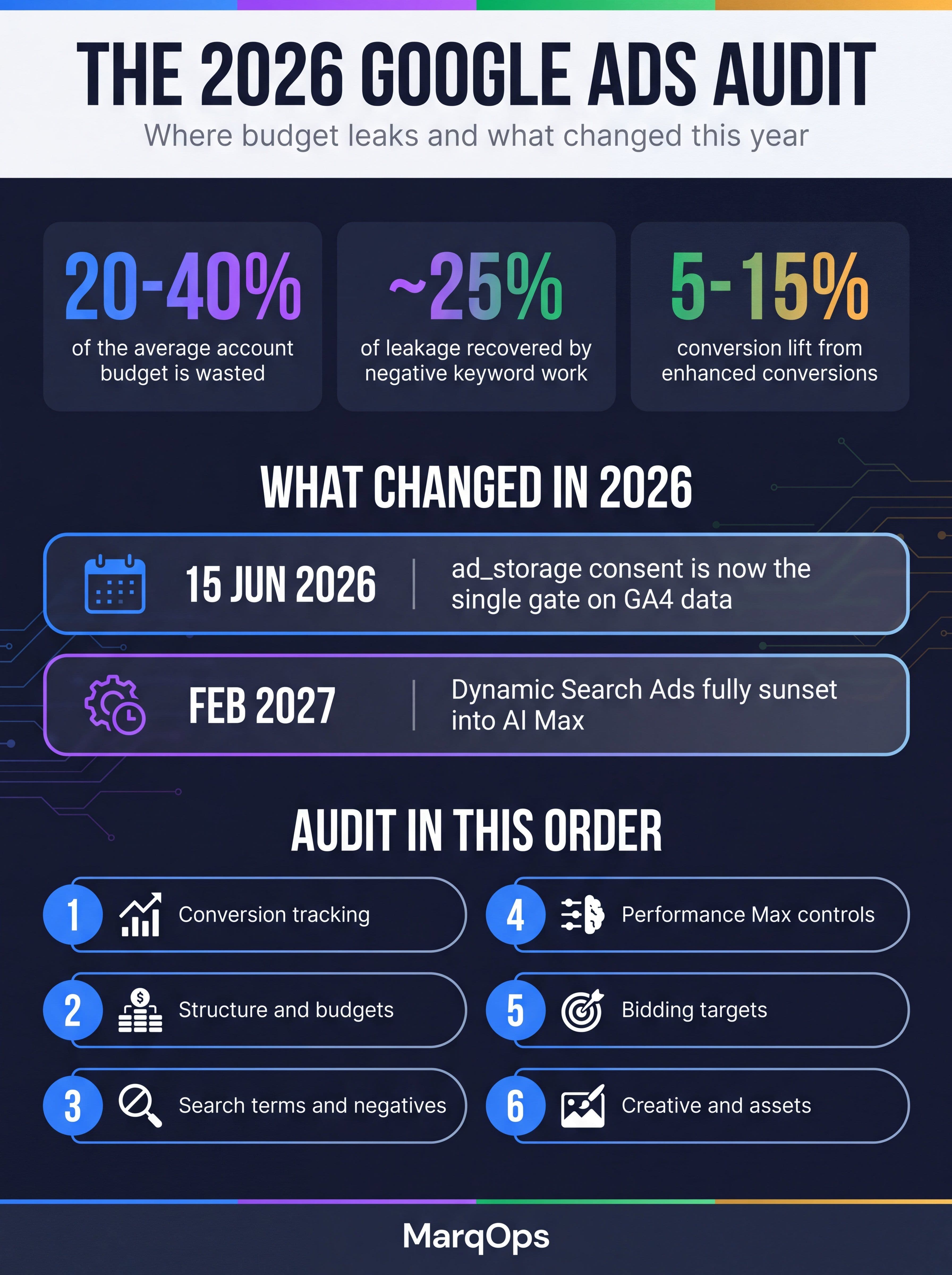
The 2026 Google Ads audit at a glance: where budget leaks, what changed this year, and the order to work in.
Step four: auditing Performance Max and AI Max
For two years the honest answer to "how do I audit Performance Max" was "you mostly cannot". That changed in 2026. Channel-level performance data, asset-level reporting, search themes reporting, and an expanded "where ads showed" report that surfaces Search Partner Network placements all shipped this year. Performance Max is now genuinely auditable, and there is no excuse for treating it as a black box.
The Performance Max checks
- Brand exclusions. Confirm your own brand exclusion is active. Then pull the search terms data filtered for brand queries and confirm brand impression volume stays under roughly 1% of total. If brand terms are still leaking through, the exclusion list is incomplete, usually missing misspellings and product names.
- Search themes. Search themes replaced the old category insights. Review which themes are driving spend and confirm they match commercial intent rather than research intent.
- Channel distribution. The channel performance report shows where budget is actually going across Search, Shopping, YouTube, Display, Discover, and Gmail. A PMax campaign quietly spending 60% on Display is a different campaign than the one you thought you were running.
- Asset group performance. Asset-level reporting tells you which creative is carrying the campaign. Low-performing asset groups usually mean thin creative rather than bad targeting.
- URL expansion. Check whether final URL expansion is on and whether it is sending traffic to pages you would not have chosen. Add exclusions for pages such as careers, support, and blog archives.
- Account-level negatives. Confirm the account-level negative keyword list applies to PMax.
If you are still deciding how much budget belongs in PMax versus standard Search, our comparison of Performance Max versus Search campaigns works through the trade-offs, and the Performance Max AI guide covers asset group construction in more depth.
The AI Max readiness check
AI Max is the expanded automation layer for Search campaigns, and it is no longer optional to have a position on it. Dynamic Search Ads begin automatically upgrading from September 2026, with a full sunset planned for February 2027. Any account still running DSA needs a migration plan inside this audit, not next quarter.
Check whether AI Max is enabled at the campaign level, whether the account has tested it against a control, and whether the creative and targeting controls have been configured rather than left at default. Our AI Max guide covers the settings that matter. The broader shift toward AI-managed PPC is the context for why this audit looks the way it does.
Step five: bidding strategy and target settings
Bid strategy audits go wrong in a predictable way: someone finds a campaign missing target CPA and adds one, without checking whether the conversion volume supports it.
| What to check | Healthy signal | What it means when it fails |
|---|---|---|
| Monthly conversion volume per campaign | 30 or more for target-based strategies | Below that, targets add volatility rather than control. Consolidate or use maximize conversions. |
| Target versus actual CPA or ROAS | Actual within roughly 20% of target | A large gap means the target is aspirational rather than operational and is suppressing delivery. |
| Frequency of target changes | No more than one change per two weeks, 10% to 15% per move | Frequent large edits keep campaigns permanently in learning. |
| Learning status | Not in learning for most of the period | Persistent learning status points to budget swings, target churn, or tracking instability. |
| Value assignment | Differentiated values per conversion action | Flat values make target ROAS mathematically equivalent to target CPA. |
The deeper mechanics of how these strategies read your signals are covered in our guide to Smart Bidding. The short version for audit purposes: bid strategy problems are almost always conversion data problems wearing a costume.
Step six: assets, auto-generated creative, and disclosure
Creative is the part of the account automation cannot fix for you, and 2026 added a governance dimension that did not exist before.
Google's terms now explicitly authorize automated systems to format, select, or generate ads and destinations on the advertiser's behalf. Automatically created assets are on by default in many campaign types. New AI-generated content label requirements also arrived this year. For regulated industries such as finance, healthcare, and legal, the correct audit finding is usually to turn automatic asset generation off entirely and document that decision.
For everyone else, check:
- Asset strength ratings. Anything below Good in a top-spending ad group is a real finding.
- Headline and description count. Responsive search ads need enough variety to test against. Thin asset sets throttle delivery.
- Auto-generated asset review. Read what the system actually wrote. Approve, edit, or remove. Silence is approval here.
- Sitelinks, callouts, and structured snippets. Missing extensions remain one of the most common findings in any PPC audit, and they cost nothing to fix.
- Landing page alignment. Does the page deliver what the ad promised? Page experience feeds directly into ad rank.
- Creative refresh cadence. Assets that have run unchanged for six months are usually decaying quietly. Creative analytics tells you which ones to retire before performance drops.
The Google Ads audit checklist
Condensed into something you can work through in a couple of hours on a mid-sized account. Run it in this order, because each section depends on the one above it.
| Area | Check | Priority |
|---|---|---|
| Tracking | ad_storage fires on consent; Consent Mode v2 verified live | Critical |
| Tracking | Enhanced conversions active with a healthy match rate | Critical |
| Tracking | No duplicate conversion actions; primary versus secondary set correctly | Critical |
| Tracking | Conversion values differentiated; attribution window matches sales cycle | High |
| Waste | 90-day search terms reviewed; account-level negative lists in place | Critical |
| Waste | Location option set to presence, not presence or interest | High |
| Performance Max | Brand exclusions active; brand impressions under about 1% of total | Critical |
| Performance Max | Channel distribution reviewed; URL expansion controlled | High |
| AI Max | DSA migration plan documented ahead of the February 2027 sunset | High |
| Bidding | Conversion volume supports the strategy; targets within 20% of actual | High |
| Creative | Auto-generated assets reviewed and approved or disabled | Medium |
| Creative | Full extension coverage; landing pages match ad promise | Medium |
| Measurement | Platform-reported results sanity-checked against an independent source | High |
That last row is the one most audits skip. Google Ads reports on its own performance, which makes it a useful operational tool and a poor final arbiter. Cross-check with incrementality testing where budget allows, and hold platform numbers alongside a broader multi-touch attribution view rather than treating either as truth.
From one-time audit to monthly cadence
A one-off audit produces a document. What actually protects the budget is a cadence, because every condition you fixed starts drifting back the day after you fix it. Match expansion finds new queries. Automated assets generate new copy. Conversion tags break during site releases.
The accounts that stay clean run something like this:
- Weekly, 20 minutes. Search terms scan for the last 7 days, spend pacing against budget, any campaign that entered learning, conversion volume anomalies against the prior four weeks.
- Monthly, 90 minutes. The full checklist above, brand exclusion verification, asset performance review, target versus actual by campaign.
- Quarterly, half a day. Structural questions. Channel mix, budget reallocation across campaigns, incrementality read, and a genuine look at whether the account's stated goal still matches the business goal.
The reason most teams do not hold this cadence is not laziness. It is that the weekly check produces findings that live in someone's head or a Slack thread, so by month three nobody can reconstruct what was changed or why. When a client asks whether the account improved, the answer becomes a screenshot of a platform dashboard rather than a traceable record.
This is the problem MarqOps was built around. Ad Ops surfaces campaign risk as traffic-light analysis with search-term review and recommended next actions, so the weekly scan produces a governed decision rather than a note to self. Analytics Ops lets you ask connected GA4 and Search Console data a plain-language question and keeps the source evidence attached to the answer. And verified reporting checks each material claim against source data before it reaches a client, holding anything unsupported for human approval rather than letting it ship.
Whatever tooling you use, the principle holds. Write the findings down, attach them to the source data, and make the record something a client or a CFO could inspect. Pair that with a clear set of marketing KPIs and a marketing dashboard that reports on outcomes rather than platform activity, and the audit stops being an annual event.
Frequently asked questions
How often should you audit a Google Ads account?
Run a short weekly check covering search terms, pacing, and conversion anomalies, a full monthly review against the checklist, and a structural quarterly review. Accounts that go six months or more without a review consistently sit at the high end of the 20% to 40% wasted spend range, so annual audits are far too infrequent for accounts running meaningful budget.
How much of a Google Ads budget is typically wasted?
Audits of live accounts commonly find 20% to 40% of budget going to traffic that will not convert, with irrelevant search terms, campaign cannibalization, and brand leakage into Performance Max as the main sources. Structured negative keyword work alone typically recovers around 25% of that leakage, which makes the search terms review the highest-return hour of any audit.
What should you check first in a PPC audit?
Conversion tracking, always. Smart Bidding optimizes toward whatever data you give it, so incorrect, duplicated, or incomplete conversions corrupt every downstream finding. Verify that ad_storage fires correctly on consent, that enhanced conversions are live with a healthy match rate, that no action is being counted twice, and that conversion values reflect real business value before reviewing anything else.
Can you audit a Performance Max campaign in 2026?
Yes, and far more thoroughly than in previous years. Performance Max now offers channel-level performance data, asset-level reporting, a search themes report, and an expanded "where ads showed" report that surfaces Search Partner Network placements. The core audit checks are brand exclusion coverage, channel spend distribution, URL expansion controls, and whether account-level negative keyword lists apply to the campaign.
What changed in Google Ads tracking in 2026?
Two things matter most. From 15 June 2026 the ad_storage Consent Mode parameter became the single gate on GA4 data reaching Google Ads, replacing the Google Signals control, so a misfiring consent banner now silently degrades conversions, audiences, and bidding signals. Separately, the April 2026 GA4 update changed how hashed user data passes through for enhanced conversions, meaning some Tag Manager and gtag.js setups need reconfiguration to keep working.
Do I need to do anything about AI Max during an audit?
If the account runs Dynamic Search Ads, yes. DSA campaigns begin automatically upgrading to AI Max from September 2026 with a full sunset planned for February 2027, so every audit this year should document a migration position. Even accounts without DSA should record whether AI Max has been tested against a control and whether its targeting and creative controls were configured rather than left at default.
The bottom line
The Google Ads audit did not get easier in 2026, but it did get more honest. Fewer levers to fiddle with means fewer places to hide. If the conversion data is clean, the guardrails are set, and the search terms are reviewed regularly, the account will mostly work. If any of those three are broken, no bid strategy or campaign type will compensate, and the platform will keep reporting confidently on results that do not survive contact with a finance team.
Start with tracking. Recover the search term waste. Set the brand exclusions. Then build the cadence that keeps all three from drifting, and write the findings somewhere they can be traced back to. That last part is what separates an account that improves from one that just gets audited.
Keep following the signal