Ad Fatigue in 2026: How to Diagnose It, Read Meta and Google Signals, and Refresh Creative
What ad fatigue really is, what the data says about how fast creative wears out, how Meta and Google signal it, a diagnosis table, a worked example and a creative supply formula.

Quick answer: Ad fatigue is the decline in an ad's results after its audience has seen it too many times. People stop noticing it, so click-through rate tends to fall and cost per result climbs. Confirm it against the ad's own baseline, rule out auction, page and tracking causes, then add a new concept. Keep the old ad if it still meets your CPA goal, and pause it if it misses unless you approve a short benchmark period.
Table of Contents
- What Is Ad Fatigue?
- Ad Fatigue or Something Else? A Diagnosis Table
- Worked Example: A Mixed Diagnosis
- How Meta and Google Signal Ad Fatigue
- What the Data Says About Creative Wear-Out
- How to Refresh a Fatigued Ad Without Pausing What Works
- Plan Creative Supply So Ad Fatigue Never Surprises You
- How to Test Refreshes Honestly
- Frequently Asked Questions
- Sources
A new ad launches, beats everything for two weeks, then gets steadily more expensive. Before you blame ad fatigue and order new creative, it is worth checking whether the creative is really the problem. This guide shows how to tell, what the platforms now report, and how to plan replacements. It pairs well with our guides to creative analytics and PPC reporting.
What Is Ad Fatigue?
Ad fatigue, often called creative fatigue, is what happens when an audience has seen a creative often enough that it stops responding. Meta's developer documentation describes the mechanism: fatigue rises as an audience sees the same creative repeatedly, which usually shows up as a falling click-through rate and a rising cost per action.
Meta's own analysts draw a useful line between two effects. Their analysis of repeated exposures separates creative fatigue, which comes from seeing the same creative and can be fixed with new creative, from broader audience saturation with the brand, which a refresh would not solve.
Two terms are worth keeping apart:
- Frequency is a delivery metric: impressions divided by reach over a window. It is an average, so it raises the risk of fatigue without proving it.
- Ad fatigue is a performance outcome: worse results from the same creative and audience over time, after other causes are ruled out.
Weak launch results alone do not establish fatigue. If the image or video is new to this audience, look at the concept, offer and delivery first. If it is reused, check where else the audience has already seen it, because a new ad ID is not a new creative to the viewer. Otherwise, fatigue means decline from a level the ad once achieved, which is why diagnosis starts with that ad's own baseline.
Ad Fatigue or Something Else? A Diagnosis Table
Rising costs are not always fatigue. Refreshing creative when the real problem is the auction or the checkout wastes production budget. Compare the same creative within a stable placement and audience mix, then read the pattern.
| What you see (same ad, same audience) | Likely cause | What to check first |
|---|---|---|
| CTR falling, CPM flat, frequency rising | Possible creative wear | Check sibling ads and placement mix. If only this ad declined, brief a replacement. |
| CPM rising, CTR steady | Auction pressure or seasonality | Compare with other ad sets and the same period last year before touching creative. |
| CTR steady, click-to-purchase rate falling | Landing page, offer or tracking | Check the page, pricing, stock and conversion events. |
| Reach flat, frequency climbing, results worse across several different creatives | Possible audience saturation | Compare matched windows and check for targeting or spend changes. If results still meet the goal, keep running. Otherwise test broader reach or lower spend. |
| Every ad worse on the same day | Platform, tracking or attribution change | Check event quality, outages and attribution settings. |
| CTR falling, CPA still under target | Early wear, still profitable | Keep it running and line up the next concept. |
The cleanest comparison is each creative against its own early period. One 2026 benchmark measured each of its 57 qualifying ads against that ad's first 100,000 impressions. Smaller accounts can use the first 7 or 14 days. Our own review rule is to act when a decline holds across two comparison windows with mature conversion data. Check conversion volume first: two low-volume windows still tell you little, so weigh the cost of waiting against your allowable CPA.
Worked Example: A Mixed Diagnosis
The brand below is fictional and every figure is a placeholder chosen to show the arithmetic. It assumes link CTR, purchases on a 7-day click attribution window, and two matched 7-day windows with equally mature purchase data.
"Northpine Coffee" runs a prospecting ad set on Meta with one hero video. Here is the ad against its own baseline:
| Metric | Baseline week | Latest week | Change |
|---|---|---|---|
| CPM | $11.20 | $11.60 | Up 3.6% |
| Link CTR | 1.40% | 1.05% | Down 25% |
| Cost per click (CPM / 1,000 / CTR) | $0.80 | $1.10 | Up 38% |
| Click-to-purchase rate | 3.33% | 2.69% | Down 19% |
| Cost per purchase (CPC / purchase rate) | $24.00 | $41.00 | 1.71 times baseline |
Step one: split the increase. At the old purchase rate, cost per purchase would have risen only with cost per click: $24 x ($11.60 / $11.20) x (1.40% / 1.05%) = $33.14. The table rounds the rates. The lower observed purchase rate takes it to $41. That tells Northpine which rates moved. It does not yet say why.
Step two: narrow the why. If frequency rose and the same video lost CTR within the same placements, creative wear is plausible. A lower purchase rate can come from the checkout, the offer, tracking gaps, or simply a different mix of people clicking. Northpine reconciles recorded purchases with store orders and checks the checkout before attributing the whole gap to the ad.
Step three: check the platform. CPA is 1.71 times its own baseline. Meta's status compares against past ads on its own terms, so Northpine records whatever the Delivery column shows. Once it adds challengers, the ad set has more than one creative and stops being eligible for the label, so its own checks take over.
Step four: size the gap. At $1,500 a week, $24 per purchase buys 62.5 purchases and $41 buys about 36.6. The gap against baseline is about 26 purchases a week. That is the gap, not a forecast of what a refresh will recover. With an allowable CPA of $35, the incumbent now misses goal, so the buyer approves a short benchmark period. At each twice-weekly check, if the original has spent more than $750 that week and its mature CPA is still above $35, the buyer pauses it. At the 14-day review the benchmark period ends: the buyer keeps the original if its mature CPA is $35 or less and pauses it if it is above $35. If Northpine needs a hard budget and a causal answer, it runs a separately budgeted control in a randomized test instead.
Step five: test the creative and investigate the purchase-rate drop. The team checks checkout, shipping costs and purchase tracking. In parallel it adds two new concepts to the same ad set while the original keeps running: a blind taste test, and a cost-per-cup comparison against a cafe latte. Offer and landing page stay fixed, so creative is the only planned change. Both briefs build on the original video's winning hook, captured in a creative brief.
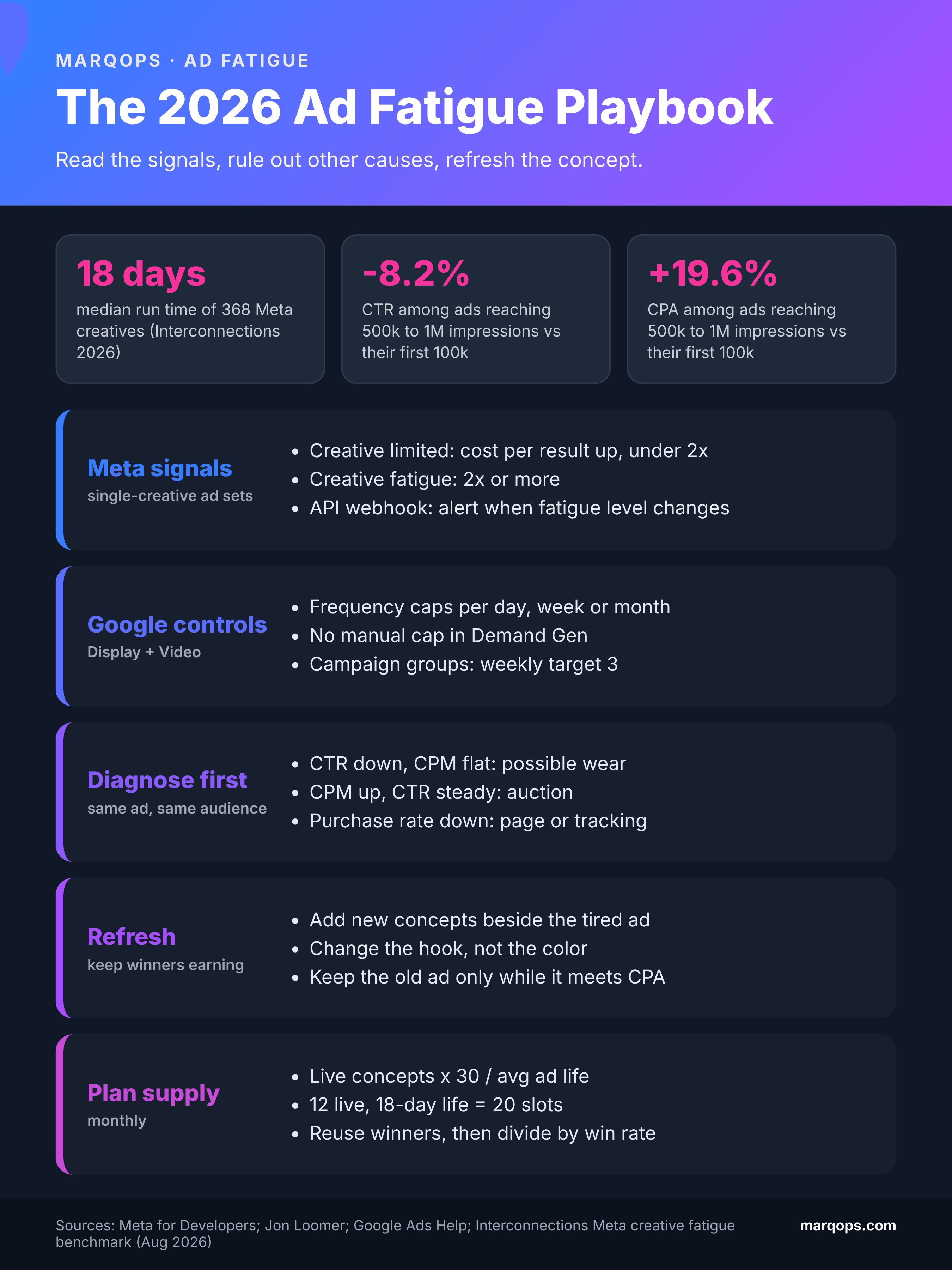
The ad fatigue playbook at a glance: read the signals, rule out other causes, then refresh the concept.
How Meta and Google Signal Ad Fatigue
Meta: delivery labels and a fatigue webhook
In Ads Manager, Meta can show a message in the Delivery column. As Jon Loomer explains the two labels, "Creative limited" means cost per result is higher than it has been in the past but less than double, and "Creative fatigue" means at least twice as high. Loomer calls these simplified definitions, and Meta applies them with its own comparison, so you cannot reproduce the label from your spreadsheet. Treat a label as a prompt to investigate.
Eligibility matters more than most guides admit. As Terrads quotes Meta's help page, the status is only available for ad sets with one creative, and not for Advantage+ catalog ads, dynamic creative or Advantage+ app campaigns. If your ad sets hold several creatives, a quiet Delivery column tells you nothing. The same page quotes Meta's advice that keeping the original ad active instead of pausing it may maximize results.
For teams that automate, the Marketing API has a creative_fatigue webhook on the ad account. Meta's reference describes a notification sent when an ad's fatigue level changes. Check the live schema before building alert logic on exact field values. Our recommended workflow: subscribe the ad account, send a test notification, route alerts to the ad owner, then review frequency, link CTR and CPA for the affected ad before acting.
Google: what you can set and what you can see
Google Ads has no fatigue label. It gives you exposure controls and reporting, and they differ by campaign type:
| Campaign type | What you can set | What you can see |
|---|---|---|
| Display | Settings, Additional settings, Frequency management: let Google optimize or set your own cap (Google guide) | Reach and frequency columns |
| Video (auction in-stream, bumper) | Campaign-level impression or view caps per day, week or month, in whole numbers. Path: Settings, Additional settings, Frequency capping | Frequency distribution by asset |
| Video reach with Target frequency | An average weekly or monthly goal, which Google says is not a cap; run at least 7 days | Delivery against the target |
| Video campaign groups | A shared weekly target from 2 to 7; Google recommends 3 and suggests at least 50% of group budget in optimizable campaigns | Deduplicated group reach |
| Demand Gen | No manual frequency cap | Campaign reach reporting |
The most useful Google report for fatigue is the frequency distribution column. Find it under Campaigns, then Assets, then Videos, then Columns, then Reach and frequency metrics. Read the individual video's row, since a campaign row can mix several videos. Averages hide tails. An average weekly frequency of 2.4 can still include a slice of viewers who saw the same video 10 or more times. That slice is a reason to investigate, not an automatic pause.
In Demand Gen, check asset reporting against each asset's own starting results. Add fresh concepts beside winners when there is room, and replace an asset only when its results have clearly declined, not because of its age. Keep YouTube frequency goals in the exposure controls above.
What the Data Says About Creative Wear-Out
Search for ad fatigue statistics and you will find dozens of confident thresholds. Few trace back to a dataset. The studies below do, but each measures something different, so read the unit and baseline before comparing them.
| Source | Unit and baseline | Key finding | Limits |
|---|---|---|---|
| Analytics at Meta | Modeled likelihood of conversion by repeated exposures to the same creative | Modeled: about 45% lower at 4 repeated exposures. Separately, a split test across roughly 26 thousand cases found adding new creative improved conversion rate more in more fatigued ad sets. | The 45% is a modeled association. The authors also report an average 8% conversion rate improvement for high-fatigue cases. |
| AdEspresso (reported 2018) | 500 Facebook campaigns, results versus frequency 1 | At frequency 4, CTR down 23.34% and CPC up 68.02% | Correlation across campaigns, older delivery system |
| NP Digital (2026) | 50 companies, cumulative CTR change versus week one | 7.3% lower by week 4, 24.4% by week 7, 27.1% by week 8 | No date range or variance published |
| Interconnections (2026) | Decay cohort of 57 ads across 13 brands that reached 150,000+ impressions, each versus its own first 100,000 | Among ads reaching 500k to 1M impressions, CTR 8.2% lower and CPA 19.6% higher; CPM stayed within 3.1 points of its start | One agency, about four months, no reach data |
The agency datasets show weaker results in later weeks, higher impression bands or higher-frequency campaigns. None of them can tell you when a particular viewer tired of an ad. Meta's split test offers the more useful finding: adding a new creative improved conversion rate more in ad sets with higher estimated fatigue. Treat any fixed week count or frequency number as a hypothesis for your account.
That finding reframes the problem. In the wider Interconnections sample of 368 creatives, the median ad ran 18 days and 10,665 impressions. The authors read this as most ads being switched off or starved of delivery before they could wear out. For many advertisers the bigger risk is a few winners carrying the account while new concepts never get enough spend to prove themselves.
How to Refresh a Fatigued Ad Without Pausing What Works
Once creative wear is confirmed, the order of fixes matters. Start with the options that keep a profitable ad earning while you test.
- Add new concepts beside the tired ad. Keep the incumbent live while it still meets your CPA goal, which matches Meta's advice to keep the original active. If it misses goal, pause it unless you approve a short benchmark period. Adding ads can still shift spend allocation, so watch ad set CPA and spend share for a week.
- Change the concept, not the color. New hooks, angles, formats and people in the first three seconds count as new creative. A new background on the same video usually does not, because viewers still recognize it instantly. Meta's analysts found that repetition works best spread across many different-looking ads.
- Use variety inside one ad. Multiple primary text and headline variations give delivery more combinations of the same concept. Distinct concepts belong in separate ads.
- Widen the audience if saturation is the cause. If reach has stalled, broader targeting or Advantage+ audience gives the creative new people to reach.
- Cap or target frequency where Google allows it. Use caps on Display and eligible Video formats. For YouTube awareness, prefer Target frequency or campaign groups.
- Retest retired winners later. A strong concept can be worth bringing back after a break with a new opening shot. Treat the comeback as a new test.
When you need a fair answer on which version sells more, move from side-by-side delivery to a controlled experiment, covered below.
Plan Creative Supply So Ad Fatigue Never Surprises You
Most teams treat ad fatigue as an emergency. It is more useful to treat it as a predictable supply problem. If you know roughly how long your ads stay useful, you can estimate how many replacements you need.
First, define ad life. A live slot is a position held by a proven concept. It opens when that concept retires, for example when its CPA stays above your allowable CPA once conversions have matured. Track losing challengers in your test pipeline, and still-running winners as unfinished lifetimes, rather than counting them as retirements. Your own average service life is the number to use. The 18-day median above is how long ads ran in one agency's accounts, so treat it as an illustration only.
With 3 prospecting ad sets, 4 live concepts each, and an 18-day average life: 3 x 4 = 12 live concepts, and 12 x 30 / 18 = 20 replacement slots a month. A slot can be a variation of a proven concept, so 20 slots does not mean 20 brand-new briefs. If ads in your account last 30 days, the same setup needs 12. To estimate production, subtract slots you can fill by reusing past winners, then divide the rest by your test win rate. At a 1 in 4 win rate, 12 open slots means about 48 challengers.
| Account profile | Live concepts | Average ad life | Replacement slots per month |
|---|---|---|---|
| Small DTC, one ad set | 4 | 30 days | 4 |
| Growth DTC, three ad sets | 12 | 18 days | 20 |
| Multi-brand agency client | 24 | 21 days | about 34 |
The real question is capacity: how many approved variations can your team have ready before the next review? This is where MarqOps helps. Brand Intelligence DNA stores your voice and visual rules so replacement variations start on-brand, and a unified dashboard puts ad performance next to the creative library, so the team briefing a replacement can see which hook won last time. Teams already running creative operations or creative automation can fold it into the same loop.
More volume still needs review. Keep a light brand compliance check on every new variation, especially for regulated claims.
How to Test Refreshes Honestly
Comparing a new ad with an old one inside the same ad set tells you which one delivery preferred. That comparison does not tell you which one caused more sales, because each ad reached a different slice of people.
When the decision matters, run a controlled test:
- Set the rules before launch. Write down the primary metric, usually cost per acquisition, the minimum change worth acting on, and the test length. Do not change them mid-test.
- Split audiences as well as ads. Use the platform's A/B test or experiment tools so each version reaches a separate, comparable group.
- Do not peek and extend. Stopping early because one side looks ahead, or extending until it does, inflates false positives.
- Measure lift where you can. For larger budgets, incrementality testing shows whether a refresh moved real outcomes rather than only platform-reported conversions.
Our guide to AI A/B testing covers sample size and stopping rules in more depth.
Frequently Asked Questions
What is ad fatigue?
Ad fatigue is the decline in an ad's performance after its audience has seen it too often. Click-through rate usually drops and cost per result rises. It is also called creative fatigue, and it differs from broader audience saturation with your brand.
What frequency causes ad fatigue?
There is no universal number. AdEspresso's 500-campaign analysis, reported in 2018, found CTR about 23% lower at frequency 4 than at frequency 1, but results vary by audience, format and offer. Compare each creative with its own early CTR and cost per result.
How long does it take for an ad to fatigue?
It depends on spend and audience size, and published figures measure different things. NP Digital reported cumulative CTR about 24% lower by week 7. In one agency benchmark the median ad ran 18 days, and the authors think most were stopped for reasons other than fatigue.
What do "Creative limited" and "Creative fatigue" mean in Meta Ads Manager?
Both appear in the Delivery column for eligible single-creative ad sets. Based on Meta's help text as quoted by Jon Loomer and Terrads, "Creative limited" means cost per result is higher than past ads but under double, and "Creative fatigue" means at least double. Ad sets with several creatives or dynamic creative do not get the label.
How do you fix ad fatigue without losing performance?
Add materially different concepts to the same ad set. Keep the tired ad if it still meets your CPA goal. If it misses goal, pause it unless you approve a short benchmark period with a spend threshold and review date. Test broader reach only if several different creatives miss the goal in that audience.
Ad fatigue is predictable, which makes it manageable. Read the platform signals, separate creative wear from page, auction and tracking problems, and plan supply so a fresh concept is ready before the old one runs out.
Sources
- Meta for Developers: Creative fatigue webhook
- Analytics at Meta: Creative fatigue and repeated exposures
- Jon Loomer: Creative Fatigue, what it is and how to prevent it
- Google Ads Help: Use frequency capping
- Google Ads Help: About Target frequency
- Google Ads Help: Optimize reach and frequency with video campaign groups
- Google Ads Help: About frequency distribution
- Terrads: Meta creative fatigue is not frequency (quotes Meta Business Help)
- AdEspresso: 500-campaign frequency analysis (article dated August 27, 2018)
- Interconnections: 2026 Meta creative fatigue benchmark
- NP Digital: Ad fatigue, how CTR decays week over week (2026)
Keep following the signal
Related field notes
Advertising
Responsive Search Ads in 2026: A 15-Headline Template, Pinning Guide and Test Plan
16 min readAdvertising
Google Ads Optimization in 2026: The Cadence, Checklist, and What to Let AI Handle
13 min readMarketing