Responsive Search Ads in 2026: A 15-Headline Template, Pinning Guide and Test Plan
A practical guide to responsive search ads in 2026: a 15-headline template with a worked example, what the data says about Ad Strength and pinning, and how to test copy properly.
Quick answer: Responsive search ads are the standard text ad in Google Search campaigns. You supply up to 15 headlines of 30 characters and up to 4 descriptions of 90 characters. Google tests combinations in real time and shows up to three headlines and two descriptions in the traditional ad positions, matched to each search.
Table of Contents
- What Are Responsive Search Ads?
- How Google Assembles an RSA
- Ad Strength vs. Real Performance
- The 15-Slot Headline Blueprint
- Worked Example: A B2B SaaS Ad Group
- Pinning: When It Helps and How to Do It Safely
- RSAs Under AI Max: What Changed in 2026
- How to Test RSA Copy Properly
- Seven RSA Mistakes That Waste Budget
- Writing RSAs at Scale Without Losing Your Voice
- Frequently Asked Questions
- Sources
Setting up an RSA takes five minutes. Writing one that earns its clicks takes more thought, because Google can show any of your headlines next to any other. Fifteen near-identical lines give the system nothing to test, and an "Excellent" badge says little about cost per acquisition.
This guide covers the mechanics, what the 2026 data says about Ad Strength and pinning, a reusable copy blueprint with a worked example, the AI Max settings that can override your pins, and a proper way to test copy. For the wider account, see our guides to PPC reporting and Performance Max vs Search campaigns.
What Are Responsive Search Ads?
A responsive search ad is one ad built from a pool of interchangeable parts. You write many headlines and descriptions, and Google's systems choose which to show, and in what order, for each search. These are the specs from Google's responsive search ads documentation:
| Element | Minimum | Maximum | Character limit |
|---|---|---|---|
| Headlines | 3 | 15 | 30 each |
| Descriptions | 2 | 4 | 90 each |
| Display path fields | 0 | 2 | 15 each |
| Traditional headline and description positions | 1 headline, 1 description | 3 headlines, 2 descriptions | n/a |
Google also allows "enhanced flexibility." A headline can open a description line, and up to two unused headlines can appear as links beneath the ad, pointing to your domain. Unused assets from another RSA in the same ad group can show this way too. That matters for testing, as you will see below.
How Google Assembles an RSA
Google describes RSAs as adapting your message to match each search: over time it learns which combinations of your headlines and descriptions are most relevant to different queries. Separately, your bid strategy sets the bid for each auction. The combination a person sees can change from one search to the next.
Three practical consequences follow:
- Any headline can appear next to any other. Every unpinned line must make sense alone and beside the rest. "Free shipping" followed by "Ships free today" wastes a slot.
- Variety beats volume. Fifteen headlines that say the same thing give the system one idea to test, not fifteen.
- Bidding follows your conversion data. When low-quality leads count toward a conversion goal, Smart Bidding can optimize bids toward more of them, so clean conversion tracking matters as much as the copy.
The combinations report shows which assembled versions served most often. Read it like a customer would, since a combination that serves heavily can still read awkwardly.
Ad Strength vs. Real Performance
Ad Strength rates each RSA from Incomplete to Excellent based on the number, uniqueness, and relevance of your assets. Google's Ad Strength help page is clear on two points. First, Ad Strength is a feedback tool and is not used to calculate Ad Rank, Quality Score, or auction wins. Second, advertisers who improve Ad Strength from "Poor" to "Excellent" see 15% more conversions on average, according to Google's own data.
Independent data looks at a different question: efficiency across different ads. Optmyzr's April 2026 study of roughly 20,000 accounts found that Excellent-rated ads did not have the lowest CPA in its sample:
| Ad Strength | CPA | Conversion rate |
|---|---|---|
| Average | $12.43 | 12.65% |
| Excellent | $28.68 | 4.97% |
Both findings can be true, because they answer different questions. Google reports an average for advertisers whose rating improved. Optmyzr compares groups of different ads across customer accounts, not the same ad before and after an edit. Neither proves that the badge causes results. What the data does show is that a top rating is no guarantee of efficient spend.
Google's guidance on ad count is worth following. Its documentation reports that adding a second RSA to an ad group lifts conversions by 6.6% at a similar cost per conversion, and a third adds another 3.7%. Google's best practice is at least two RSAs rated "Good" or "Excellent" per ad group, each with a unique final URL. Treat the lifts as averages, not a promise for your account.
The 15-Slot Headline Blueprint
The fastest route to real variety is to give each headline a job before you write it. This allocation works for most lead generation and ecommerce ad groups. Treat it as a starting template, not a rule.
| Job | Slots | What it does | Pin? |
|---|---|---|---|
| Keyword match | 3 | Mirrors the query so the ad looks relevant at a glance | Optional: pin 2 or 3 to position 1 if the opening message must be controlled |
| Core benefit | 3 | The outcome the buyer gets, said three different ways | No |
| Proof | 2 | Ratings, customer counts, awards you can substantiate | No |
| Offer | 2 | Free trial, pricing, discount, guarantee | No |
| Objection handler | 2 | "No card required", "Cancel anytime", "Setup in a day" | No |
| Call to action | 2 | A clear next step that starts with a verb | No |
| Brand | 1 | Your name plus a positioning line | No |
Two observations from the same Optmyzr dataset are worth testing in your own account. Ads in Optmyzr's 0 to 20 character headline bucket averaged a $9.35 CPA, against $18.27 for the 21 to 30 character bucket. Sentence case headlines averaged $7.46, against $27.47 for title case. Treat the casing result with care: these are all-account observations, and only 31 accounts used every casing style, a subset Optmyzr calls too small for a firm conclusion.
For descriptions, write four that each stand alone: one benefit-led, one proof-led, one offer-led, and one that answers the most common objection. Make sure at least two include a clear next step, because any two can be paired. The same study found descriptions of 61 to 70 characters had the strongest CTR at 12.33%, while the longest, 81 to 90 characters, carried a $20.11 CPA. Mix lengths rather than filling every field.
Worked Example: A B2B SaaS Ad Group
Here is the blueprint applied to an ad group for "marketing project management software." Acme Plan is a made-up product, and every number and claim below is a placeholder for your own verified proof. Each headline is written in sentence case and checked against the limit.
| Asset | Job | Chars | Pin | Proof needed on page |
|---|---|---|---|---|
| Marketing project software | Keyword | 26 | H1 (optional) | None |
| Project tool for marketers | Keyword | 26 | H1 (optional) | None |
| Plan campaigns in one place | Keyword | 27 | H1 (optional) | None |
| See every deadline at once | Benefit | 26 | None | Timeline screenshot |
| Stop chasing status updates | Benefit | 27 | None | Approvals feature |
| Approve briefs in one click | Benefit | 27 | None | Product demo |
| Rated 4.8 by 2,000 teams | Proof | 24 | None | Review platform link |
| Used by 500+ agencies | Proof | 21 | None | Customer count, dated |
| Free 14-day trial | Offer | 17 | None | Trial terms |
| Plans from $29 per user | Offer | 23 | None | Pricing page |
| No credit card required | Objection | 23 | None | Signup form |
| Imports from Asana | Objection | 18 | None | Import docs |
| Start your free trial today | CTA | 27 | None | Trial terms |
| Book a 15-minute demo | CTA | 21 | None | Demo booking page |
| Acme Plan: built for marketing | Brand | 30 | None | None |
Descriptions for the same ad group, with lengths:
- "Plan, brief, and approve every campaign in one workspace. Start a free trial today." (83)
- "Rated 4.8 by 2,000 teams." (25, proof-led)
- "Free for 14 days, then plans from $29 per user. No card needed." (63)
- "See how to import from Asana. Schedule a demo." (46)
A served combination might read:
Headlines: Marketing project software | Stop chasing status updates | See every deadline at once
Description 1: Rated 4.8 by 2,000 teams.
Description 2: See how to import from Asana. Schedule a demo.
Every line adds something new: relevance, two benefits, proof once, and a next step.
Reading the numbers like a paid search lead: say Ad A leads with speed and Ad B leads with price. Over a month at $3,000 spend each, A buys 1,200 clicks and 30 qualified demos, a $100 cost per demo. B buys 900 clicks but 40 qualified demos, a $75 cost per demo. A bought more clicks. B generated 10 more qualified demos at a lower cost each. This is a lesson in which metric to read, not proof that the price message caused the gap. Only a controlled test can show that (see below).
Pinning: When It Helps and How to Do It Safely
Pinning locks a headline or description to a fixed position. It gives you control, and it limits the combinations Google can test. Google's documentation notes that pinning lowers Ad Strength and that pinning near-identical assets to one slot blocks testing.
The 2026 Optmyzr data favors a middle path, with an important caveat. Across the full dataset, partial pinning delivered the best CPA ($13.68), CTR (11.88%), and ROAS (365.15%), while fully pinned ads had the worst CPA ($32.57) and CTR (8.49%). But in the 268 accounts that used all three approaches, partial and no pinning had similar CPAs of about $26, and fully pinned ads had a $61.11 CPA while delivering the best ROAS. The honest reading: avoid pinning everything by default, and pin only where a message must be controlled.
How to make a required disclosure always show
For regulated wording, start with Google's text disclaimer asset rather than a pin. Per Google, an approved disclaimer is guaranteed to appear in the description area, overrides any description pinned to position 1, and is compatible with AI Max, including Final URL expansion.
- Create the campaign and RSA first, and keep any ads that legally require the wording paused.
- Go to Campaigns, then Assets, select the plus button, and choose Text Disclaimer. Enter up to 90 characters and select the campaign.
- Enable those ads only after the disclaimer is approved. If it is disapproved, the ad can still serve without it.
- Keep wording short. Google notes rare truncation, for example with larger accessibility font sizes.
Fallback with ordinary pins: edit the RSA, select the pin icon beside the asset, choose Headline 1 or Description 1, and save. Note that an approved text disclaimer replaces anything pinned to Description 1. Check that every alternative pinned to that slot, at ad and campaign level, carries the same wording. If you rely on the pin, turn off Final URL expansion and remove URL inclusions.
RSAs Under AI Max: What Changed in 2026
AI Max for Search adds three features on top of your keywords: search term matching, text customization, and Final URL expansion. Text customization, formerly called automatically created assets, writes extra headlines and descriptions from your landing pages, existing ads, and keywords, and serves them beside yours. Google's text customization help page explains how to preview generated assets before you opt in.
- The migration timeline. According to Google's April 2026 announcement, updated in June, Search campaigns using automatically created assets or the campaign-level broad match setting were scheduled to upgrade to AI Max during September 2026. Google moved the Dynamic Search Ads sunset and upgrade to February 2027. Google says AI Max campaigns using the full feature suite see an average of 7% more conversions or conversion value at a similar CPA or ROAS than search term matching alone, based on its internal data for non-retail advertisers.
- Pins are not guaranteed. The AI Max FAQ says that with text customization and Final URL expansion both enabled, or with URL inclusions provided, AI Max will not respect RSA pinning. In practice, Google can omit pinned copy when it sends the click to a different landing page, so you cannot rely on a pin in those setups.
| Text customization | Final URL expansion | URL inclusions | Can AI Max override an ordinary pin? |
|---|---|---|---|
| Off | Off | None | No |
| On | Off | None | No |
| On | On | Any | Yes |
| Any | Any | Provided | Yes |
Expected starting settings, per Google's August 2026 migration notice and setup guide:
- New Search campaign: text customization on, Final URL expansion on. Pins can be overridden.
- Migrated from automatically created assets (September 1 to 30, 2026): text customization on, Final URL expansion off. Pins hold unless URL inclusions are set.
- Migrated from campaign-level broad match (same window): text customization off, Final URL expansion off. Pins hold here too, as long as no ad group uses URL inclusions.
- Dynamic Search Ads: scheduled to migrate February 1 to 28, 2027.
Pre-launch check: go to Campaigns, then Settings, select the campaign, and open the AI Max section. Confirm whether text customization and Final URL expansion are on, then check each ad group for URL inclusions. Do this for new builds and for any campaign Google migrated during its September 2026 upgrade window.
If text customization is on, set text guidelines first. Google lets you add term exclusions and plain-language messaging restrictions such as "never mention price." The PPC tool Adalysis reports that, in its experience, advertisers often delete about 25% of AI-generated ad group-level assets such as callouts and sitelinks for being inaccurate or vague. To audit what Google wrote, filter the asset report for "Google AI" in the "Added by" column, as Google's text customization reporting guide describes. Google's AI Max setup guide covers the full configuration.
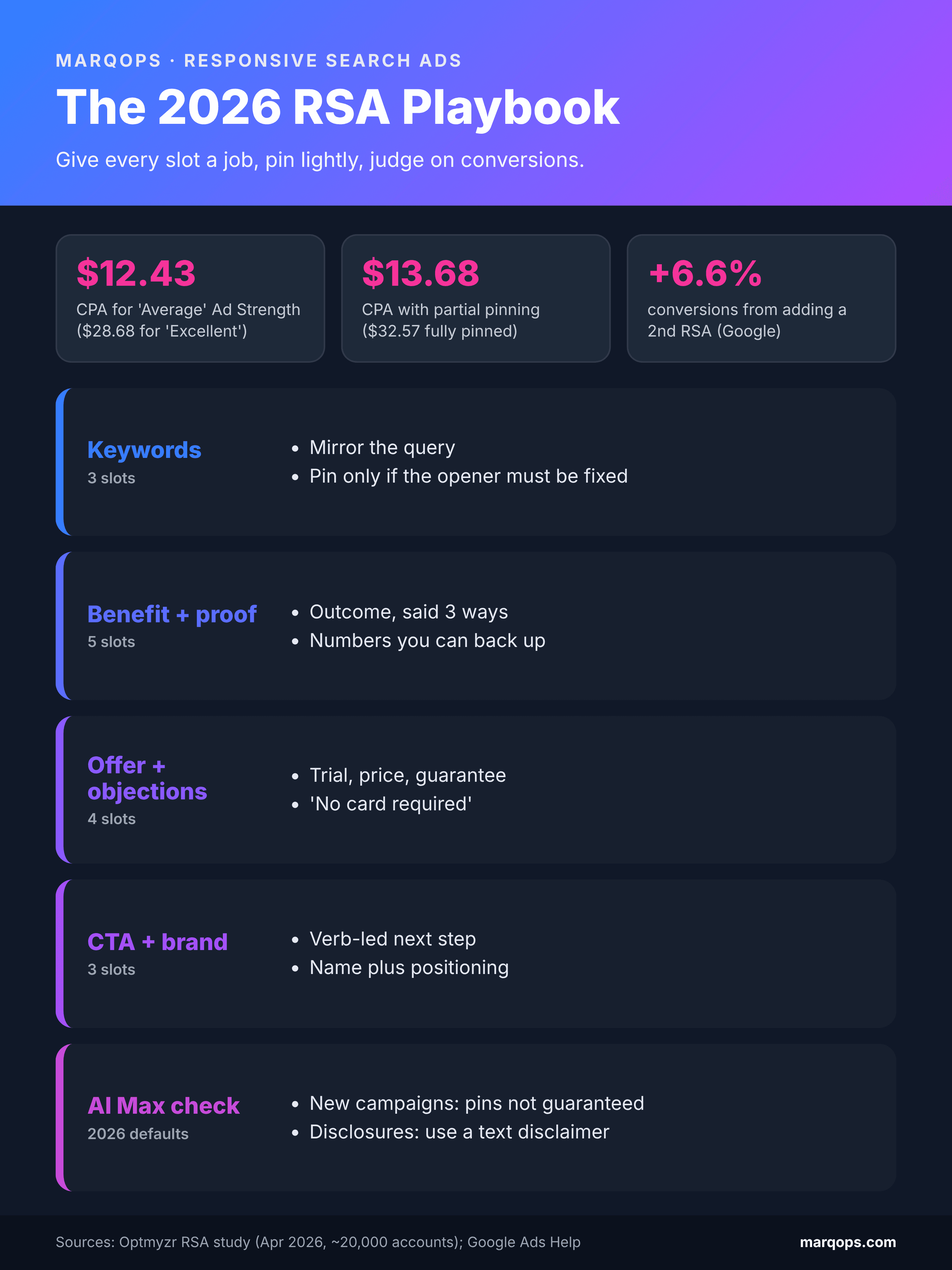
The responsive search ads playbook at a glance: give every slot a job, pin lightly, and judge on conversions.
How to Test RSA Copy Properly
Keep routine monitoring and copy decisions separate. Monitoring tells you where to look. A controlled test tells you what worked.
Routine monitoring (weekly)
Google retired the old Performance label for RSA assets. Per the ad-level asset report guide, you now get full statistics (impressions, clicks, cost, conversions, and conversion value) for dates from June 5, 2025. Go to Campaigns, then Ads, and select "View asset details" under the ad. These metrics are not summable: if one impression shows three assets, each asset records an impression. Use them to find candidates for replacement, not to crown a winning headline.
Copy decisions (an ad variation experiment)
Comparing two RSAs in one ad group is not a controlled test. They can serve on different searches, and unused assets from one can appear as links under the other. For a real answer, use Google's ad variations, which assigns the original or the variation by cookie to reduce the chance that someone sees both. A worked test for the Acme example:
- Hypothesis: replacing "Book a 15-minute demo" with "Choose a 15-minute demo time" reduces cost per CRM-qualified demo by at least 10%.
- Setup: in Campaigns, then Experiments, create an ad variation that finds and replaces only that headline, with a 50/50 split. Keep the booking page, offer, other assets, budget, and bidding unchanged.
- Define a win before launch: confirm a conversion action that counts only CRM-qualified demos, then use spend divided by that count in each arm. In Acme's case the campaign counts only imported CRM-qualified demos as conversions, so cost per conversion in the experiment report is the decision metric. Choose the confidence level (for example 95%) before launch rather than accepting the default. If your campaign counts several goals and the report cannot isolate the one that matters, plan a separate analysis before launch or do not name a winner.
- Duration: set the readout date from your expected qualified-demo volume and qualification lag. We treat two weeks as a planning minimum, not proof the test can detect a 10% difference.
- Decision: judge against the threshold, not against zero. If the 95% interval shows 12% to 24% lower cost per demo, it passes. If it shows 2% to 24% lower, it has not proven the 10% saving: at the planned readout, keep the control and record the result as inconclusive. If more evidence is worth buying, plan a fresh test rather than extending this one.
Change one message at a time when you need to learn which edit helped. New copy can change performance, but according to Google's Smart Bidding learning documentation, editing creatives does not remove historical data or trigger a learning status. Our guides to Smart Bidding, AI A/B testing, and Quality Score go deeper on each piece.
Seven RSA Mistakes That Waste Budget
- Fifteen versions of one headline. Swapping word order is not variety. Give each slot a distinct job.
- Editing winners to raise the badge. A converting "Average" ad does not need to become "Excellent."
- Pinning everything by habit. It removes most of the testing the format offers. Pin what must be controlled.
- Headlines that only work in order. "Looking for a CRM?" followed by "We have the answer" breaks when shown alone.
- Calling a winner from two ads in one ad group. Use an ad variation experiment instead.
- Unreviewed AI assets. Text customization can reuse outdated landing page claims. Check the "Google AI" assets weekly and keep your negative keywords current so expanded matching stays relevant.
- Off-brand copy at scale. When dozens of ad groups each need 15 headlines, tone and claims drift. Write to documented brand voice rules and run a brand compliance check before upload.
Writing RSAs at Scale Without Losing Your Voice
The blueprint is easy for one ad group. At 80 ad groups across six products, each needing 15 distinct headlines and 4 descriptions that stay on brand, under the limits, and accurate, most teams fall back on near-duplicates.
This is the workflow MarqOps was built for. Its Brand Intelligence DNA stores your voice rules, approved claims, and banned terms once. Here is what one pass looks like:
- Input: product page URL, the job "objection handler," and the approved claim "imports from Asana."
- Draft: "Imports from Asana in minutes" (29 characters), within the limit.
- Human step: the reviewer rejects "in minutes" because the approved claim gives no migration time, and approves "Imports from Asana" (18 characters).
That review step is the point: the tool drafts at volume, and a person stays accountable for every claim. MarqOps keeps ads, SEO, creative, and analytics in one dashboard, so the team reviewing copy is looking at the same results as the team running the account. For more on choosing tools, see our AI copywriting tool guide and AI PPC management guide.
Frequently Asked Questions
How many headlines and descriptions can a responsive search ad have?
Up to 15 headlines of 30 characters and up to 4 descriptions of 90 characters. You need at least 3 headlines and 2 descriptions. Google shows up to 3 headlines and 2 descriptions in the traditional positions, and may use unused headlines as links below the ad.
How many responsive search ads should I have per ad group?
Two or three. Google reports a 6.6% conversion lift from adding a second RSA and a further 3.7% from a third, at a similar cost per conversion. Make each one a distinct angle rather than a copy with small edits.
Does Ad Strength affect Quality Score or Ad Rank?
No. Google says Ad Strength is not used to calculate Ad Rank, Quality Score, or auction wins. It is a feedback tool for asset variety while you draft. Judge live ads on conversions and CPA instead.
Should I pin headlines in responsive search ads?
Pin a headline when its position matters, such as a keyword-led or brand opener, and avoid pinning every position by default. For mandatory disclosures, create the campaign and RSA, keep affected ads paused, add a campaign text disclaimer under Assets, and enable those ads only after it is approved.
What is the difference between responsive search ads and dynamic search ads?
With responsive search ads, you write the headlines and choose keywords. Dynamic Search Ads generate headlines and pick queries from your website content. Google is moving that role into AI Max, with the Dynamic Search Ads sunset and upgrade scheduled to begin in February 2027.
Responsive search ads reward the discipline good copywriting always has: a clear job for every line, proof you can back up, and tests that measure what matters. Set the structure once, keep Google's AI inside your guidelines, and judge every change by qualified conversions.
Sources
- Google Ads Help: About responsive search ads
- Google Ads Help: About Ad Strength for responsive search ads
- Optmyzr: What actually drives RSA performance (April 2026, about 20,000 accounts)
- Google Ads Help: About text customization in Search campaigns
- Google: We're upgrading Dynamic Search Ads to AI Max (April 2026, updated June 2026)
- Google Ads Help: Frequently asked questions about AI Max for Search campaigns
- Google Ads Help: View reporting for text customization
- Google Ads Help: About the ad-level asset report for responsive search ads
- Google Ads Help: Set up an ad variation
- Google Ads Help: About Smart Bidding learning
- Adalysis: How to create effective AI Max text guidelines (April 2026)
- WordStream: 2026 Google Ads benchmarks
Keep following the signal