Negative Keywords in Google Ads: The 2026 Rules and Review Workflow
Negative keywords never match close variants, and that single rule explains most exclusions that quietly do nothing. The three match types, the edge cases that break them, the 2026 Performance Max and AI Max changes, and a 20 minute weekly search term review.
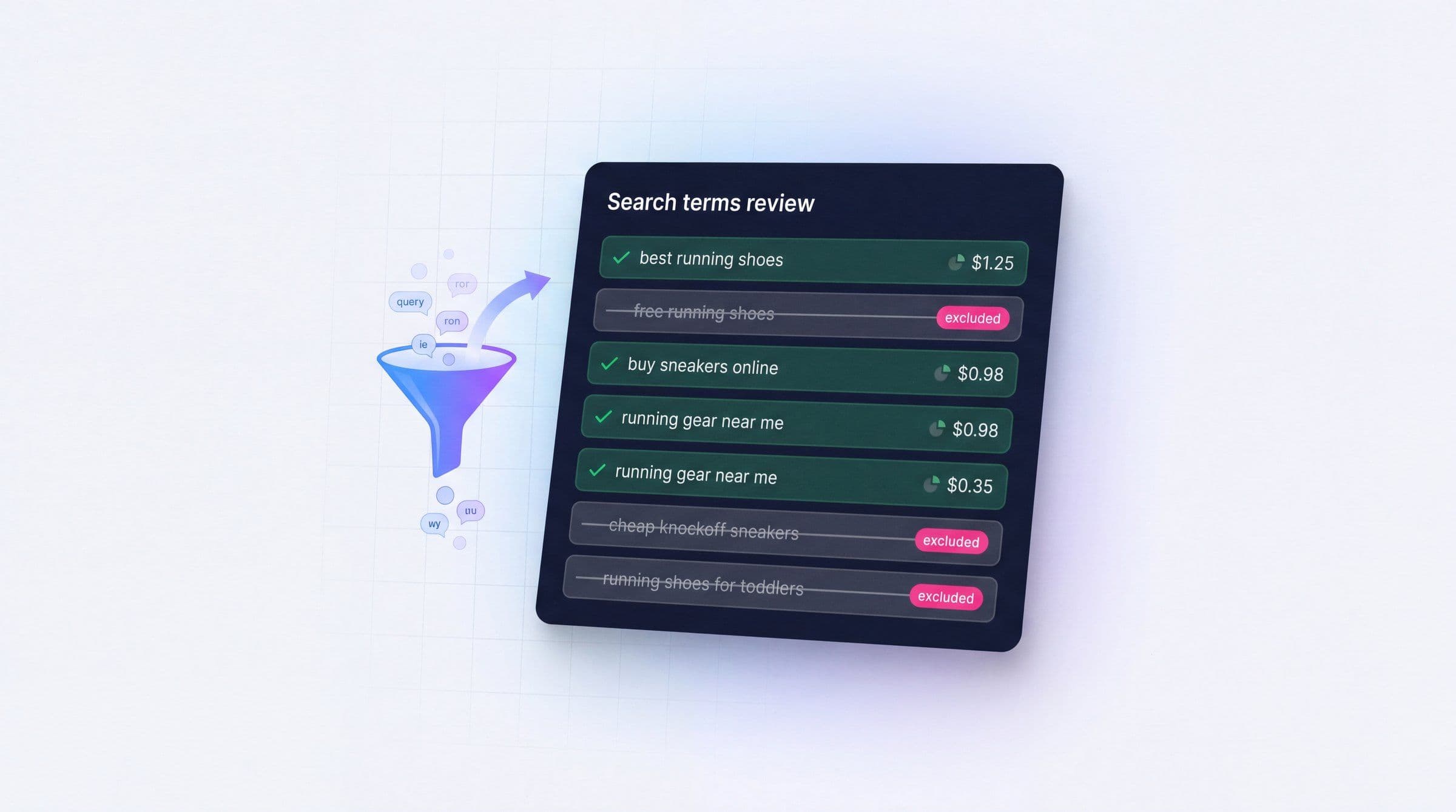
Negative keywords are the least glamorous control in Google Ads and the one that most reliably pays for itself. They do not need creative approval, they do not need a budget increase, and they work on the part of the account nobody wants to look at: the searches you paid for and did not want.
They are also widely misunderstood. Most guides stop at "add words you do not want to show for," which is true and useless. The rules that decide whether an exclusion actually fires are narrow, occasionally counterintuitive, and documented in places people rarely read. Then 2026 added a second problem: campaign types that expand queries far beyond what you typed, and a search terms report that hides a large share of the evidence.
This is the working version. What the match types really do, where exclusions apply in automated campaigns, the limits that bite at scale, and a review workflow you can run in twenty minutes a week.
Contents
- What negative keywords actually do
- The three negative match types
- The rules that quietly break exclusions
- Where negatives apply in 2026
- Limits worth knowing before you scale
- The search terms you cannot see
- A weekly search term review that takes 20 minutes
- What to exclude before you launch
- Mistakes that cost more than they save
- Where MarqOps fits
- Frequently asked questions
- The bottom line
What negative keywords actually do
A negative keyword tells Google a search should not trigger your ad. It is an exclusion, not a bid adjustment. There is no partial version, no "show less often here." A search that matches a negative is blocked, and the block is evaluated before any of Google's expansion or relevance logic runs.
That ordering matters more in 2026 than it did five years ago. When your campaign types were keyword driven, exclusions were a tidy fence around a small paddock. Now automated matching decides a large share of what you serve on, and negatives are one of the few places you still get a hard veto rather than a suggestion.
The classic example in Google's own documentation is an optometrist selling eyeglasses who needs to exclude "wine glasses" and "drinking glasses." The useful version in a real account is less obvious. It is the B2B software advertiser paying for "free," the local installer paying for "jobs" and "salary," and the ecommerce brand paying for a competitor's model number because a broad match keyword thought it was close enough.
The payoff is measurable but not magic. Seer Interactive analyzed millions of data points across 30 paid search accounts and found companies wasting roughly 15% of budget on irrelevant keywords. Other industry estimates put non-converting spend at 25% to 30%, and some vendor analyses claim higher still, though those numbers usually fold in click fraud and poor targeting alongside genuine query mismatch. The spread itself is the finding: waste is a function of how recently somebody read the search terms report, not of the industry you are in.
The three negative match types
Negative match types share names with positive match types and behave differently. This is the single largest source of exclusions that do not work.
The universal rule first: negative keywords do not match close variants. Positive keywords expand to plurals, misspellings, stemmings and synonyms. Negatives do not expand at all, with two exceptions Google handles for you: casing and misspellings. Exclude "flowers" and an ad can still serve on "red flower," because the singular is a different negative keyword as far as the system is concerned.
Here is how the three types behave, using Google's own worked example of the negative keyword running shoes.
| Search query | Negative broad | Negative phrase | Negative exact |
|---|---|---|---|
| blue tennis shoes | Ad can show | Ad can show | Ad can show |
| running shoe | Ad can show | Ad can show | Ad can show |
| blue running shoes | Blocked | Blocked | Ad can show |
| shoes running | Blocked | Ad can show | Ad can show |
| running shoes | Blocked | Blocked | Blocked |
Read the "running shoe" row twice. Every match type lets it through, because the singular is a different term. That row is the whole close variant lesson in one line.
Negative broad match is the default and the widest. It blocks a search containing all of your negative terms in any order, which is why "shoes running" is blocked but "blue tennis shoes" is not. Use it for concepts you never want, like "free," "jobs," "diy," "torrent."
Negative phrase match blocks searches containing your terms in the same order, with extra words allowed around them. It is the right default for multi-word exclusions where order carries the meaning: excluding the phrase "car insurance" should not also block "insurance car repair."
Negative exact match blocks only the precise query with nothing added. It is the surgical option, and it is the one to reach for when a term is usually fine and occasionally wrong. Excluding a single competitor comparison query without also killing every long tail that contains those words is exactly this job.
The rules that quietly break exclusions
These are documented, rarely known, and each one produces exclusions that look correct in the interface and do nothing in the auction.
The 16 word limit. If a search query runs longer than 16 words and your negative keyword falls after the 16th word, your ad can still show. Google's own example is a hotel query where "discount" appears as the 17th word. Long conversational queries have become more common as people type the way they talk to an assistant, so this fires more often than it used to.
Symbols change identity. Ampersands and accent marks create genuinely different negative keywords. "socks & shoes" is not the same exclusion as "socks and shoes," and "sidewalk cafe" is not the same as "sidewalk café." If your category uses either, add both forms.
The minus sign silently truncates. Adding a minus operator in front of a word makes that word ignored for matching. The negative keyword "dark -chocolate" is treated as just "dark," which is a far wider exclusion than you intended. People paste these in from search operator habits and block half their traffic.
Periods and pluses are dropped. "Fifth Ave." and "Fifth Ave" are the same negative. Pluses are usually ignored too, except at the end of a word where they can be preserved, as in C++.
Invalid characters throw errors. Commas, exclamation marks, at signs, percent signs, brackets, semicolons and pipes are rejected outright. Bulk uploads that fail partway usually fail here.
Display and Video work differently. On Display, a set of negative keywords is excluded as a topic rather than a literal string, so "women's pants" can block a page about women's jeans without the exact phrase appearing. Google also notes that for Display and Video, a maximum of 1,000 negative keywords is considered at the account level. Exclusion strategies that scale on Search do not transfer.
Where negatives apply in 2026
The biggest practical change in the last two years is that exclusions now have to be planned across campaign types that generate their own queries.
Search campaigns behave as always: ad group level, campaign level, shared lists, and account level all apply.
Performance Max went from a black box to a controllable surface in stages. Google began rolling out self-serve campaign level negatives in December 2024, and in March 2025 raised the per campaign limit from 100 to 10,000, matching Search. Shared negative keyword lists became applicable to PMax during 2025 as well. The important caveat: PMax negatives apply to Search and Shopping inventory only. They do not exclude Display, YouTube, Gmail or Discover placements, which need placement exclusions and content suitability settings instead. If you are still running PMax without exclusions, our Performance Max guide and the comparison of Performance Max versus Search campaigns cover where the two campaign types cannibalize each other.
Account level negative keywords apply automatically across all eligible Search and Shopping inventory in relevant campaign types, including PMax. This is the right home for brand safety terms and categorically irrelevant concepts, and the wrong home for anything campaign specific.
AI Max for Search raises the stakes. It expands query matching well past your keyword list using the landing page and asset context, which means the ratio of queries you did not choose to queries you did choose goes up. Negatives are still evaluated before expansion, so a query containing an excluded term is blocked regardless of how semantically relevant the model considers it. The practical advice from teams running it: build the exclusion list before you enable expansion, not after. Our AI Max guide covers the wider setup.
Brand terms are a special case. Google now recommends brand exclusions rather than negative keywords for controlling appearance on your own brand searches, because brand exclusions automatically cover misspellings, variants and subsidiary brands, which negatives do not. For blocking competitor brands, negative keywords remain the tool, and you have to add each variant yourself.
Limits worth knowing before you scale
Exclusion strategies fail at scale for boring structural reasons. These are the ceilings that matter.
| Level | Limit | Applies to |
|---|---|---|
| Campaign level negatives | 10,000 per campaign for Search and Performance Max | Search and Shopping inventory |
| Shared negative keyword lists | 20 lists per account, 5,000 keywords per list | Applied to selected campaigns |
| Account level negatives | Single global list, applied automatically | All eligible Search and Shopping inventory |
| Display and Video | 1,000 negatives considered at account level | Display and Video placements |
Two implications. First, shared lists are the only structure that scales across a portfolio, so decide your list taxonomy early. Most agencies land on three or four lists per client: universal junk, competitor brands, informational or research intent, and category-irrelevant products. Second, the Display and Video ceiling is low enough that those campaigns need placement and topic exclusions doing the heavy lifting instead.
One operational note for managed accounts: manager accounts and child accounts each get their own list allowance, which is usually the escape hatch when a large account runs out of room.
The search terms you cannot see
Here is the part that makes exclusion work genuinely incomplete rather than merely tedious.
Since Google raised the privacy threshold on the search terms report in 2020, queries that do not clear a minimum activity level across all of Google Search are withheld. Google has consistently defended the change as privacy driven rather than commercial. Independent analyses have repeatedly found that around 40% of search term clicks and spend are hidden from advertisers, and on broad match keywords the hidden share climbs considerably higher.
Practically, three things follow. You cannot build a complete negative list from the report alone. Match type discipline on the positive side does work the report cannot, because a tighter keyword set limits what can be matched in the first place. And any claim you make to a client about eliminating wasted spend should be scoped to visible spend, because that is the only spend you have evidence for. This is exactly the kind of sentence that needs a source attached before it reaches a client deck, which is the argument we made at length in our piece on white label reporting.
A weekly search term review that takes 20 minutes
Most accounts do not need a bigger negative keyword list. They need a shorter loop. Here is a review that fits in a weekly slot and produces a defensible record.
1. Pull the search terms report for the last 7 to 14 days. Include campaign, ad group, search term, match type, cost, clicks and conversions. Fourteen days smooths weekly seasonality without letting problems age.
2. Sort by cost, not by impressions. Impressions are free. You are hunting spend. Read the top 50 rows by cost with zero conversions first, every time.
3. Classify each row into one of four buckets. Irrelevant, which becomes a negative. Relevant but underperforming, which is a bid or landing page problem rather than an exclusion. Relevant and converting, which may deserve its own keyword and ad group. And ambiguous, which you leave alone and revisit next week rather than guessing.
4. Choose the level deliberately. Account level for anything categorically wrong. Shared list for anything true across clients in a vertical. Campaign or ad group level for anything specific to one offer. Getting this wrong is how a negative added for one client's edge case ends up suppressing another's best converting query.
5. Write the reason. One short line per negative: what you saw, what it cost, why it is excluded. This is the step everyone skips and the only thing that makes the list auditable a year later.
6. Check for conflicts before you save. Google Ads flags negatives that block your own active keywords, and those conflicts are the most expensive kind of exclusion error because they are silent. Review the flagged list every time.
7. Record the before and after. Note the spend attached to the terms you excluded. That is your evidence for the next report, and it is a number you can trace to a source rather than an estimate you defend from memory.
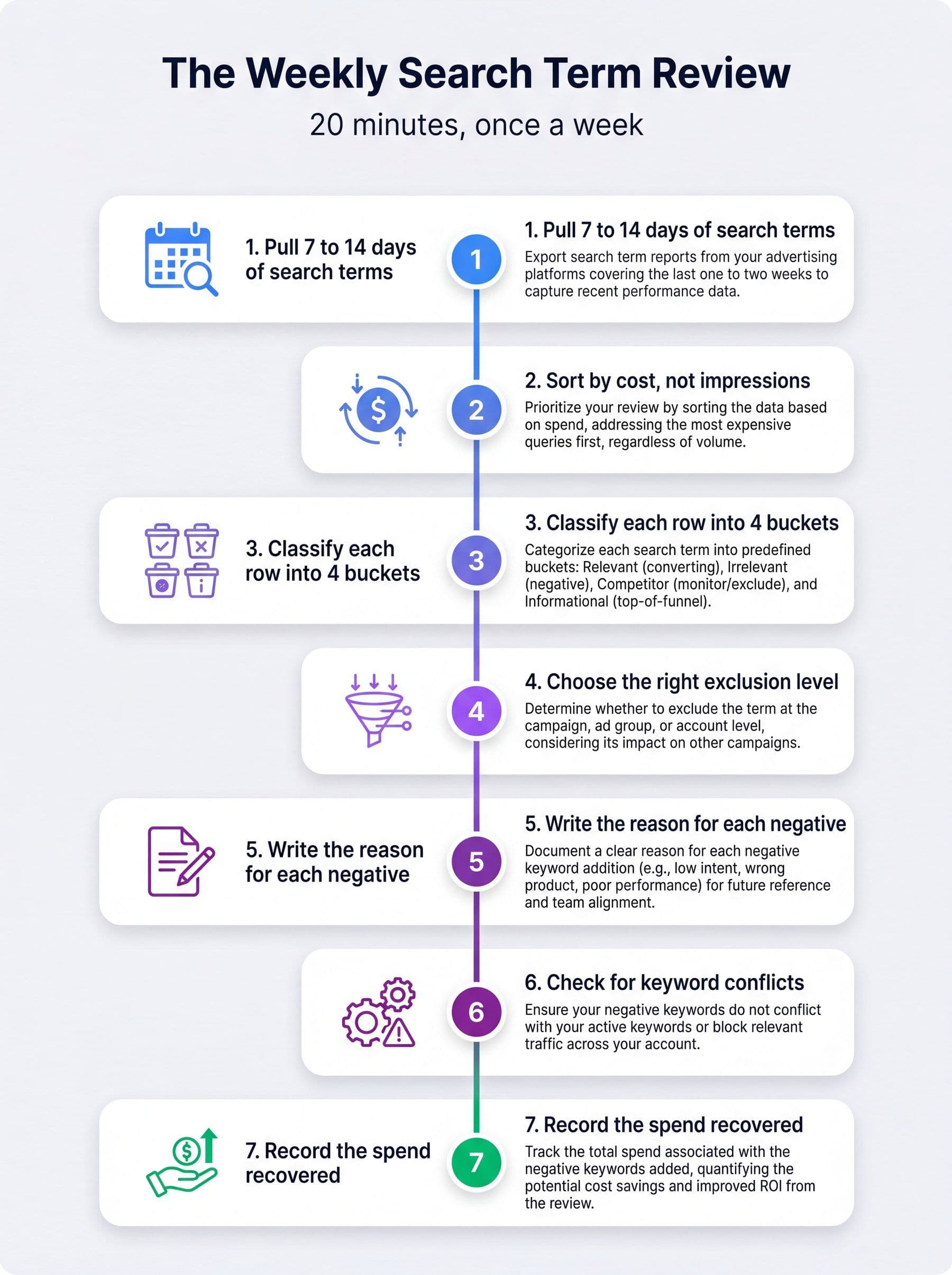
The weekly search term review, from report pull to a recorded, sourceable result.
Run this on a schedule and the exclusion list stops being a project. Industry estimates put the savings from disciplined negative keyword work at roughly 10% to 25% of wasted spend, which on most accounts is a larger number than any bid strategy change you could make in the same twenty minutes. If you want the fuller version of this loop across the whole account, our Google Ads audit walkthrough covers the monthly pass, and the Google Ads anomaly detection guide covers catching the spikes between reviews.
What to exclude before you launch
Downloadable lists of 500 negative keywords are popular and mostly harmful, because they exclude terms that are wrong for someone else's business. Categories travel. Specific words do not. Build from these buckets instead.
| Bucket | Typical terms | Who should not use it |
|---|---|---|
| Price seeking | free, cheap, discount, coupon, bargain | Freemium products, discount retailers, coupon-led ecommerce |
| Employment | jobs, salary, career, hiring, internship, resume | Recruiters and staffing firms |
| Education and research | what is, how to, definition, tutorial, course, pdf | Anyone running a deliberate top of funnel campaign |
| DIY and repair | diy, homemade, fix, repair, used, secondhand | Parts sellers, repair services, refurbished marketplaces |
| Wrong audience | wholesale, bulk, distributor, for kids, for students | B2B sellers, education products |
| Competitor brands | Named competitors and their product lines | Anyone running a deliberate conquesting campaign |
| Adjacent categories | Products that share a word with yours and nothing else | Nobody, this bucket is always account specific |
Note the third column. Every one of these buckets is wrong for somebody, which is why importing a generic list without reading it is how accounts lose good traffic. Excluding "how to" in an account whose best converting path starts with a how-to query is a self-inflicted wound.
The one universal recommendation: exclude your own brand from non-brand campaigns using brand exclusions, and keep competitor conquesting in a separate campaign so its economics stay visible. If you have not separated those yet, our notes on keyword clustering are a reasonable starting structure, and smart bidding behaves very differently once brand and non-brand traffic are not mixed in the same conversion pool.
Mistakes that cost more than they save
Over-exclusion. Google's own documentation warns that too many negative keywords will reach fewer customers, and in automated campaigns the cost is compounding: exclusions shrink the data the bidding model learns from. An account with 4,000 negatives and declining volume usually has an exclusion problem, not a demand problem.
Negatives that conflict with active keywords. The most common cause of a keyword with impressions that suddenly has none. Check the conflicts report before you blame the auction.
One list for every client. Convenient and quietly expensive. Vertical-specific lists are fine. A single global list across unrelated businesses is how a home services negative ends up in a SaaS account.
Adding negatives without conversion context. A term with 40 clicks and no conversions might be genuinely bad or might be a tracking gap. Verify the conversion signal is trustworthy before acting on the absence of conversions. Our Google Ads conversion tracking audit covers the checks worth running first.
Treating the list as permanent. Language changes, product lines change, and a negative added in 2023 for a product you discontinued may now be blocking your newest category. Review the full list once a quarter and delete as readily as you add.
Excluding at the wrong level. Ad group negatives are for sculpting between ad groups. Campaign negatives are for campaign-specific intent. Account negatives are for things that are never right anywhere. Most accounts put everything at campaign level and lose the distinction entirely.
Where MarqOps fits
Negative keyword work fails in practice for a reason that is not technical. The review is easy to skip, and when it does happen, the result lives in one person's memory instead of in a record anyone can check.
MarqOps positions itself as the evidence layer for marketing operations, and Ad Ops is the module aimed squarely at this loop. It runs traffic-light analysis on campaign risk, surfaces search-term signals worth reviewing, and turns them into a recommended next action rather than a dashboard you have to interpret. The point is not that the software adds the negatives for you. It is that the signal reaches you on a schedule and the decision leaves a trace.
That matters most at the reporting end. "We cut wasted spend this month" is the kind of claim that gets written into a client update without a source behind it. MarqOps checks material claims against connected data and holds them for human approval, sorting them into verified, needs context, or unsupported before they reach a client. A statement like "we excluded 43 terms representing $2,140 in non-converting spend across the last 30 days" survives that check. "We optimized the account" does not.
It connects to Google Ads, GA4, Search Console, WordPress and DataForSEO, and sits above whatever dashboard you already run rather than replacing it. If you want to see the shape of the output before signing up for anything, the interactive sample report is free, and Ad Ops is where the search-term side lives.
Frequently asked questions
What is a negative keyword example?
An optometrist selling eyeglasses adds "wine glasses" and "drinking glasses" as negatives so their ads do not show for those searches. In a B2B account, "free," "jobs" and "salary" are the three most commonly added negatives, because they attract clicks from people with no purchase intent.
Do negative keywords match plurals and misspellings?
Misspellings yes, plurals no. Google states that negative keywords automatically account for casing and misspellings, but they do not match close variants, so singular and plural forms, synonyms and different word stems each have to be added as separate negative keywords.
What are the negative keyword match types?
Broad, phrase and exact. Negative broad blocks a search containing all your terms in any order and is the default. Negative phrase blocks searches containing your terms in the same order, with extra words allowed. Negative exact blocks only the precise query with no additional words.
Can you add negative keywords to Performance Max?
Yes. Self-serve campaign level negatives rolled out from December 2024, and the per-campaign limit rose from 100 to 10,000 in March 2025. They apply to Search and Shopping inventory only, so they do not exclude Display, YouTube, Gmail or Discover placements. Account level negatives also apply to Performance Max automatically.
How many negative keywords can you add?
Up to 10,000 per campaign for Search and Performance Max. Shared negative keyword lists allow up to 20 lists per account with 5,000 keywords each. Display and Video campaigns consider a maximum of 1,000 negative keywords at the account level, which is much lower and needs placement exclusions instead.
How often should you review search terms?
Weekly for accounts spending meaningfully, with a full list review each quarter. Weekly catches new query patterns before they accumulate spend, and a quarterly pass removes stale negatives that no longer reflect the product line. Automated campaign types make the weekly cadence more important, not less.
Should you use negative keywords or brand exclusions for your own brand?
Brand exclusions. Google recommends them over negative keywords for controlling appearance on brand searches, because they automatically cover common misspellings, variants and subsidiary brands. Negative keywords remain the tool for excluding competitor brands, where you have to add each variant yourself.
Can too many negative keywords hurt performance?
Yes. Google's documentation warns that using too many negative keywords means reaching fewer customers, and in automated campaigns over-exclusion also shrinks the data that bidding models learn from. Conflicts with your own active keywords are the most expensive version, because they suppress traffic silently.
The bottom line
Negative keywords are cheap to add, easy to get subtly wrong, and one of the few remaining places in Google Ads where you get a hard yes or no rather than a hint to an algorithm. The rules that matter are small: no close variant matching, three match types that behave differently from their positive namesakes, a handful of symbol and word-count edge cases, and a set of limits that decide how your lists have to be structured.
The workflow matters more than the list. A twenty minute weekly review with a written reason per exclusion beats a 500 term import every time, partly because it catches new query patterns and mostly because it produces something you can show someone. In an account where roughly 40% of search terms are invisible and a growing share of queries are chosen by a model rather than by you, the record of what you decided and why is the closest thing to proof you are going to get.
Keep following the signal